Cleaning the Filter Screen
It’s recommended to cleaning the lter screen once every two weeks, if the indoor air quality is poor,
cleaning frequency shall be raised. Since the lter becomes clogged with dust, the conditioning eect
will be reduced. Specic cleaning steps are as follows:
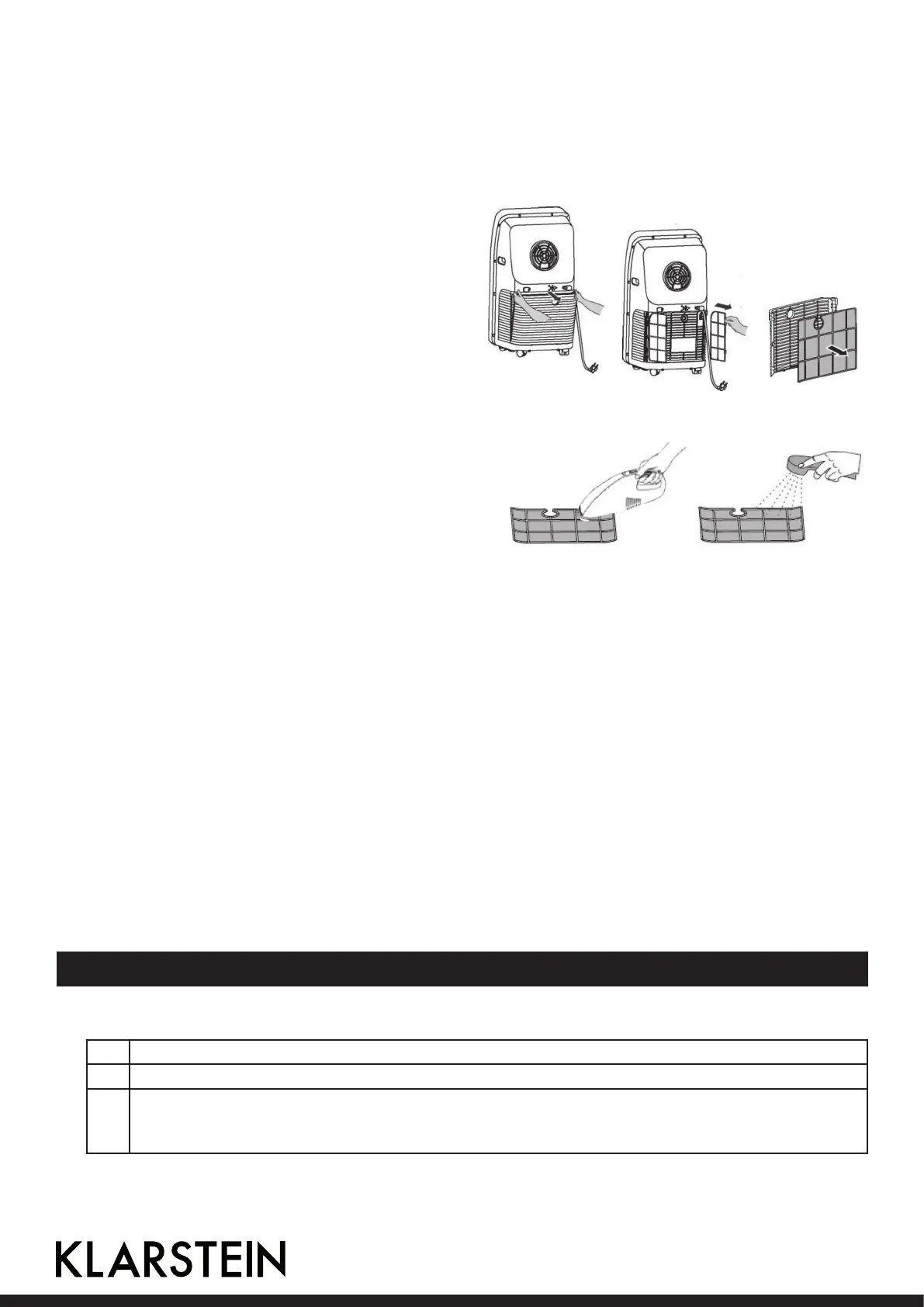
• Remove the intake grille and then lter screen
in the direction shown in the following picture
below. Put the lter screen into neutral de-
tergent water or warm water (about 40°C) to
clean, and then place in shade for drying.
• Reinstall the cleaned lter screen; Restart the
machine, and it can run normally.
NOTE:
If the lter screen is not too dirty, just use a va-
cuum cleaner to suck the dust. If the lter screen
is not too dirty, clean it with water or warm water.
Do not use high temperature water (optimum tem-
perature is around 40°C) or harsh detergents (such
as alcohol, petrol, benzene, etc.) to clean the lter
screen. In order to avoid lter screen deformation
keep the keep lter screen away from heat, and put
in dry air for drying naturally. Do not operate the
machine whose lter has not been installed.
Seasonal Maintenance
If the machine will be not in use for a long time, its maintenance follows the steps below:
• Pull out the plug in drainage fallout to drain o water.
• Keep the conditioner working 2 hours in the air distribution mode until its inside becomes dry.
• Turn it o and pull it plug out.
• Clean its lter screen and reinstall back.
• Remove its exhaust pipe and accessories, and keep them safely.
• Remove the batteries in remote controller.
• Put the conditioner into a plastic bag and place it in a cool and dry place.
Hints on seasonal Re-Use
• Conrm whether water plug and lter screen are installed.
• Check whether power cord is intact. If there is breakage, do not use the machine.
• Reinstall the remote controller batteries.
• Reinstall other parts following installation instructions.
Troubleshooting and Error Messages
Error Messages
E1 Coil temperature sensor failure.
E2 Indoor temperature sensor failure.
E4 Anti-freeze protection: when the coil temperature is below 0°C, the whole machine will stop.
When the coil temperature rose to 8°C or more, the protection will leave, and it will restore
to its original work.
16



 To Next Page