39
EN
Use
Temperature indicatior
• In cooling mode, when
or button is pressed, the setting temperature is
displayed and be adjusted.
• In auto and cooling mode, temp. indicator display is setting temperature.
• In drying and fanning mode, temp. indicator display is room temperature.
Function buttons
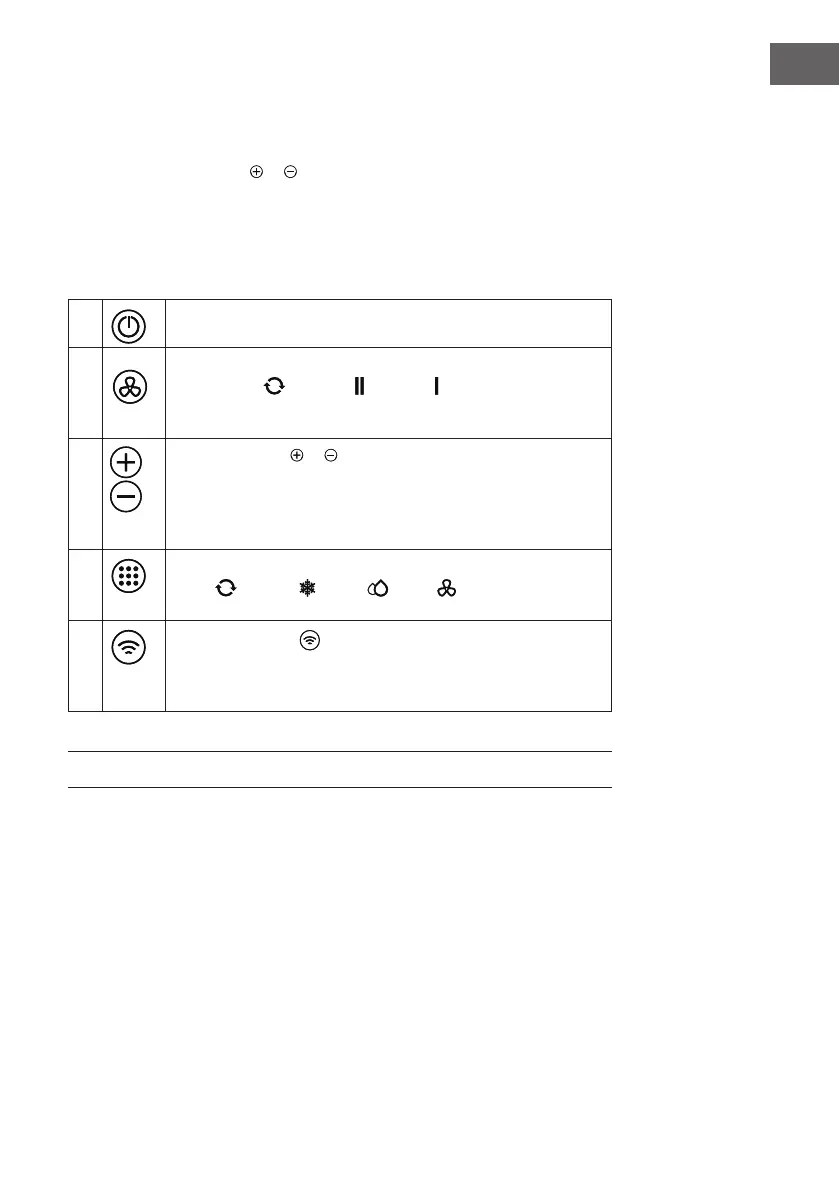
1 Press this button to make the unit run or stop.
2
Press this button, you can select the fan speed between the
modes AUTO
--> HIGH --> LOW . The fan speed
indicator light illuminates under the different fan speed.
Note: In fanning mode, auto fan speed is non-effective.
3
a. Each time then or button is pressed the setting
emperature will increase or decrease by 1°C(1°F).
The temperature setting range is16 °C(60 °F)–32 °C(90 °F).
b. By pressing both buttons at the same time(≥3s) the display will
toggle between Celsius and Fahrenheit.
4
Press this button, you can select the running mode as follows:
AUTO
-->COOL -->DRY -->FAN
The mode indicator light illuminates under the different mode.
5
Press and hold the button for 5 seconds. The WLAN turns on
for matching .
After the wi connection is successful, the indicator lights up and
the previous display status is restored.
Note: Please use the remote controller to set the sleep/timer function.





 To Next Page