48
EN
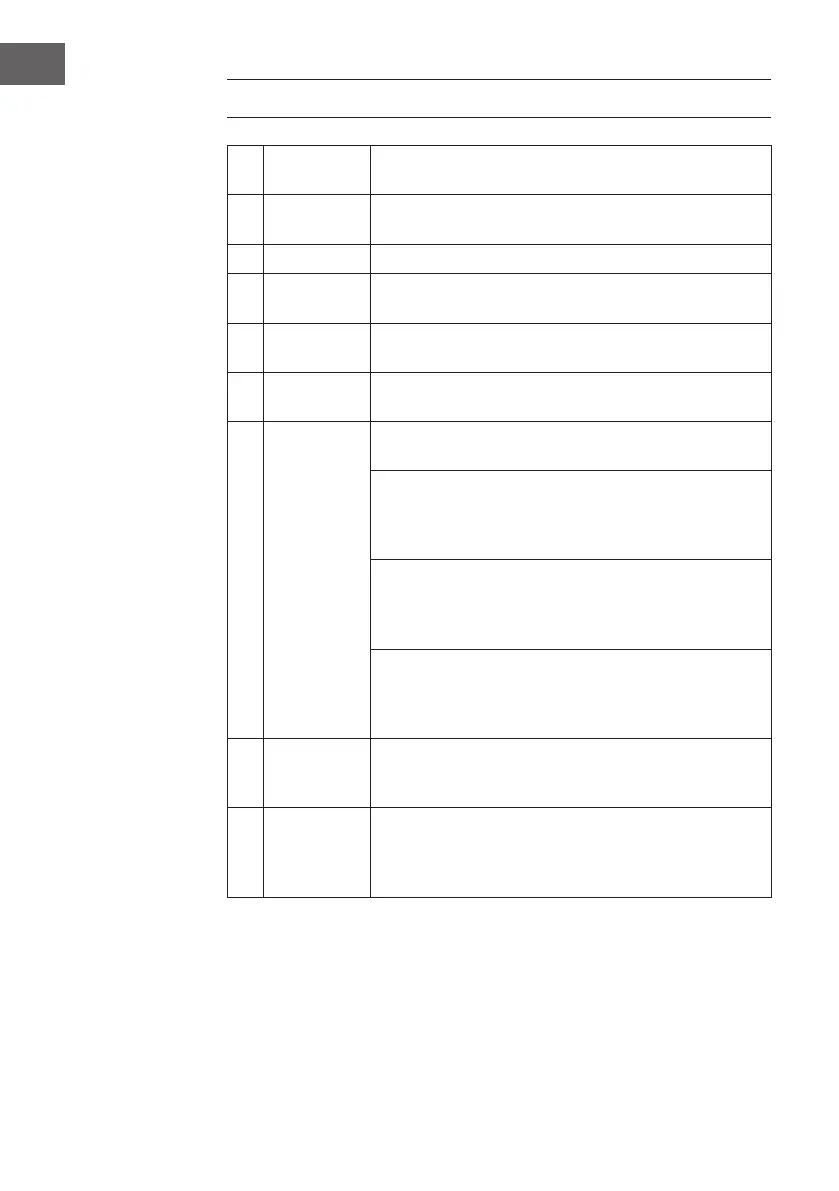
QUICK OPERATION GUIDE
1 Switch on the
device
Press the power button and open the door.
2 Fill with
detergent
Fillthelargecompartmentbeforeeachushingprogramme.
Fill the small compartment only for prewash programmes.
3 Check rinse aid
Display C indicates whether there is still enough rinse aid in the chamber.
4 Check rinsing
salt
Top up the rinsing salt as soon as the indicator light on the display lights
up.
5 Filling the
dishwasher
Remove food residues from the dishes and soak pans with burnt-in food
residues beforehand. Follow the instructions for loading the dishwasher.
6 Select program
Close the door and press the program button until the desired program
lights up.
7 Starting the
dishwasher
Turnonthetap and pressthe Start/Pausebutton.Theprogram starts
after 10 seconds.
Change program:
You can change the programme as long as the detergent has not dis-
solved.Ifithas,youmustrellit.PresstheStart/Pausebuttonfor3sec-
onds to cancel the current program. Select a new program and start it.
Add crockery:
PresstheStart/Pausebuttontopausetheprogram.Openthedoor.Add
thecrockery.ClosethedoorandpressStart/Pause.After10seconds
the program continues.
If the device was switched off during the program:
If the program was switched off in the middle, select the program again
after switching on so that the dishwasher can continue at the point where
it was switched off.
8 Switch off the
appliance
Oncetheprogramisnished,thebuzzersoundsfor8seconds.Pressthe
Power button to turn the unit off. If you do not turn off the unit, it will go
into standby mode and automatically turn off after 30 minutes.
9 Turn off the
water tap,
unload the
baskets
Wait 15 minutes before removing the dishes, as the dishes are very hot
and sensitive after drying and could easily break. It also dries faster. You
can remove the dishes after 15 minutes.





 To Next Page