33
EN
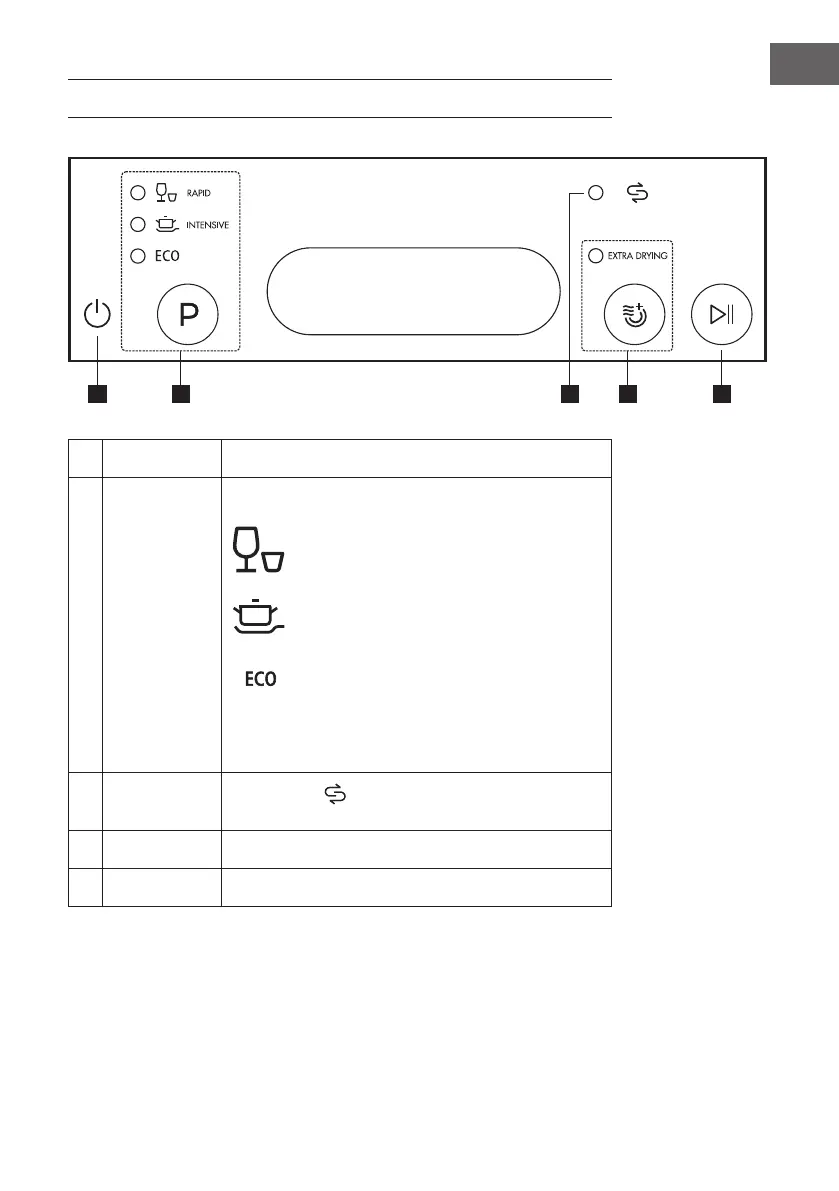
CONTROL PANEL AND BUTTONS
1 Power
Turns the device on and off.
2 Program
Press repeatedly to select one of the following programs:
Rapid
A shorter wash for lightly soiled loads that do
not need drying.
Intensive
For extremely dirty cooking tools and cutlery
using, it will be drying after washing.
Eco
This is the standard program for cleaning
normally soiled dishes. It is the most efcient
program in terms of energy and water
consumption.
3 Salt
warning light
If the indicator
is lit, it means the dishwasher is low on
dishwasher salt and needs to be relled.
4 Extra Drying
Press this button to select the “Extra Drying“ function.
5 Start/Pause
Press this button to start or stop the dishwasher.





 To Next Page