42
EN
Drain water from the water tank
• In standby mode, press and hold the Program and Extra Drying buttons
simultaneously for 3 seconds to drain the water tank.
CLEANING AND CARE
Note: Never use the dishwasher without lters!
Make sure the lter is properly assembled. The performance may be affected and
dishes and utensils could become damaged.
Cleaning the lter system
The lter system removes dirt and food residues, allowing the clean water to be re-
circulated for cleaning. In order for the device to perform at its best you should clean the
lters once a week. We recommend removing coarse dirt and food residues after each
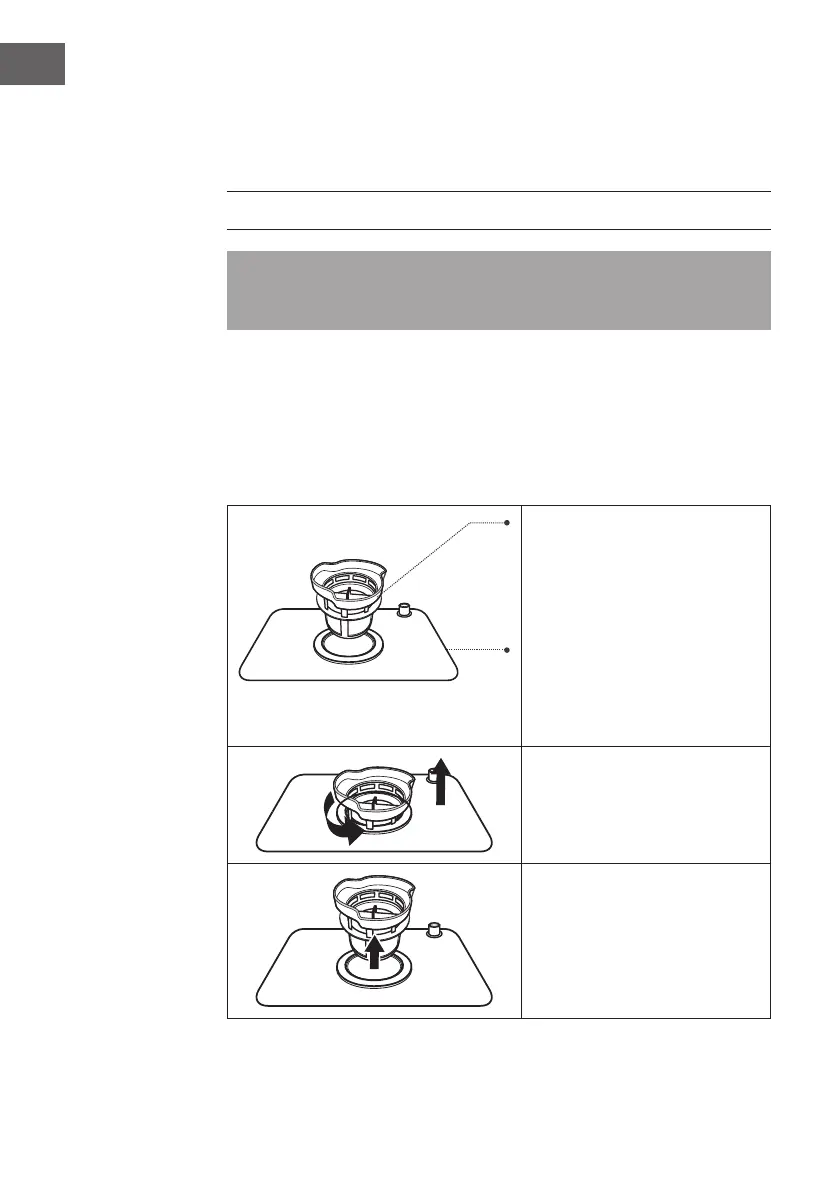
wash, by rinsing the lter and cup under running water. To remove the lter assembly,
pull the cup handle in the upward direction.
Fine lter:
Filters out dirt and residues and
prevents them from getting back
onto the dishes during the washing
process.
Main lter:
Leftovers and dirt particles are
crushed by a special nozzle on the
spray arm and discharged through
the drain.
Step 1:
Unscrew the complete lter set
counterclockwise.
Step 2:
Lift ne lter (B) up from main lter
(A). When you have cleaned the
lters, replace them in reverse order.




 To Next Page