44
EN
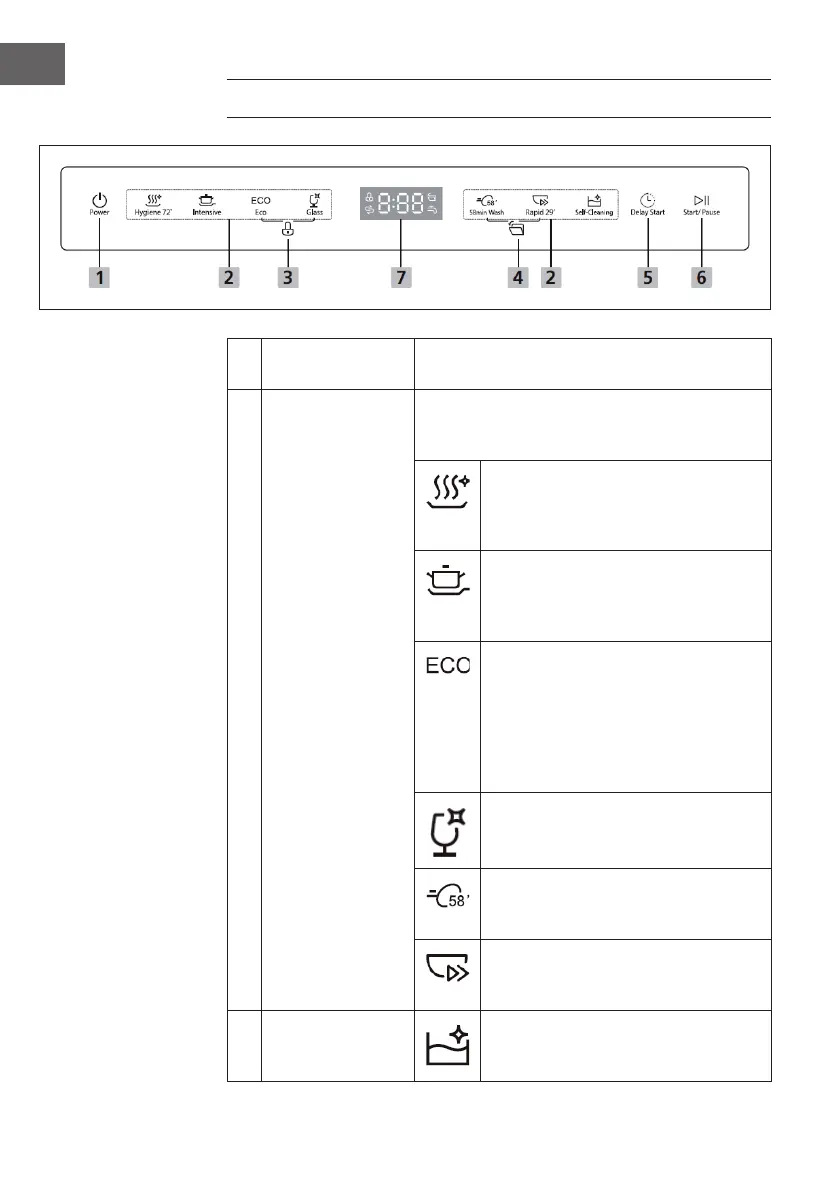
CONTROL PANEL AND BUTTON FUNCTIONS
1 On/o
Press the POWER button to switch on the
dishwasher. The screen lights up.
2 Programme
Press these buttons to select the desired
programme. The symbol of the selected
programme lights up.
Hygiene 72°
Can be used to disinfect dishes and
glasses. Keeps the water temperature at
70 °C.
Intensive
For very dirty dishes and ordinarily soiled
pots, pans, dishes, etc. with dried-on food
residues.
ECO
This is the default programme. The
default programme is suitable for
cleaning dishes with a normal degree
of soiling. It is the most ecient
programme in terms of electricity and
water consumption.
Glass
For lightly soiled dishes and glass.
58-minute cleaning
For normally soiled dishes that need to
be cleaned quickly.
Quick cleaning 29 minutes
A short rinse cycle for lightly soiled dishes
that do not need to be dried.
Self-cleaning
A short rinse cycle for lightly soiled dishes
that do not need to be dried.




 To Next Page