42
EN
COMMISSIONING AND OPERATION
Turning on/off
Press the ON/OFF button. The appliance switches on and runs in automatic mode.
Automatic mode
In automatic mode, the appliance can cool, ventilate or heat, depending on the ambient
temperature and the setpoint adjustment. The appliance has the following default
settings:
1. If the ambient temperature is > 23 °C, the appliance is automatically set to
cooling mode. The default setting is 24 °C. The “Automatic mode” and “Cooling
mode” indicator lamps light up.
2. If the ambient temperature is < 24 °C but > 20 °C, the appliance runs in fan
mode. The “Automatic mode” and “Fan mode” indicator lamps light up.
3. If the ambient temperature is < 20 °C, the appliance runs in heating mode. The
“Automatic mode” and “Heating mode” indicator lamps light up.
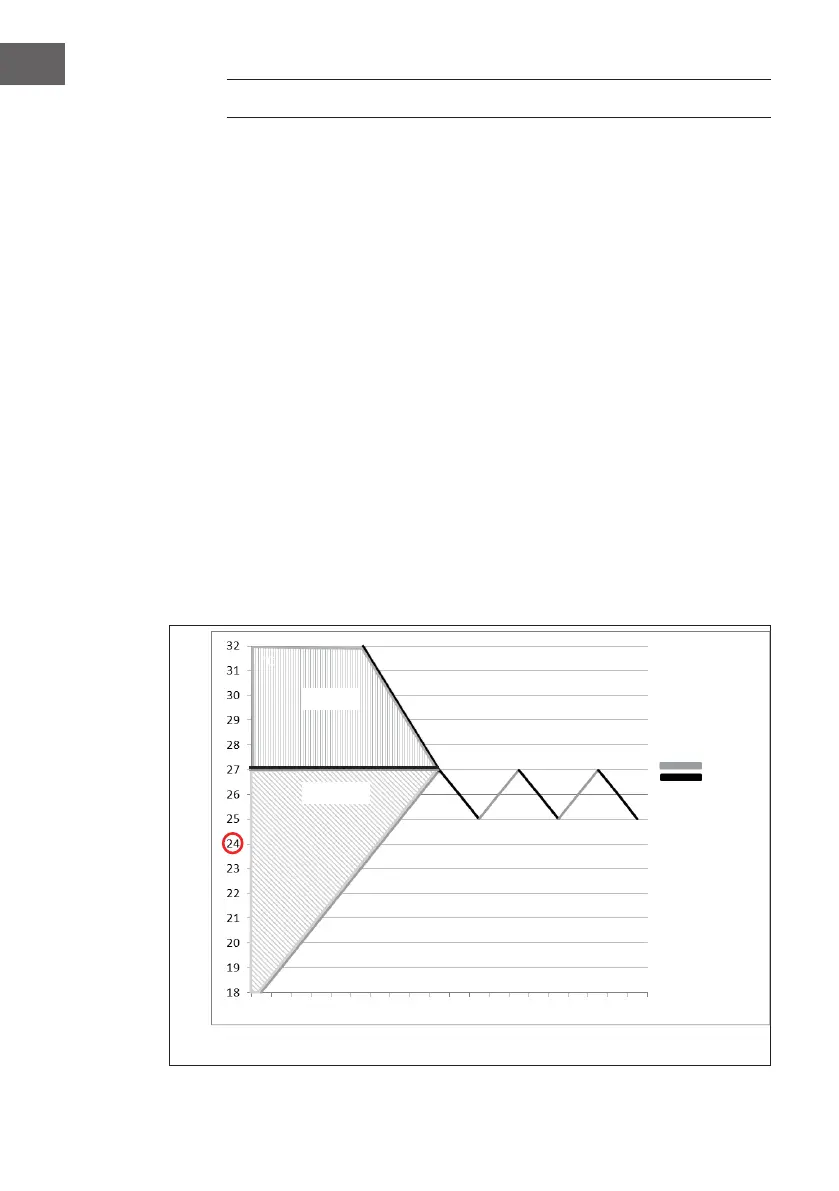
Setting the setpoint in automatic cooling mode 18-32 °C
If you set the setpoint at 24 °C, the appliance will start cooling at 27 °C (setpoint +
3°C). The appliance then cools down to 25 °C (setpoint + 1 °C) and then switches
back to fan mode.
°C
Time
ventilation
cooling
ventilation
cooling





 To Next Page