35
EN
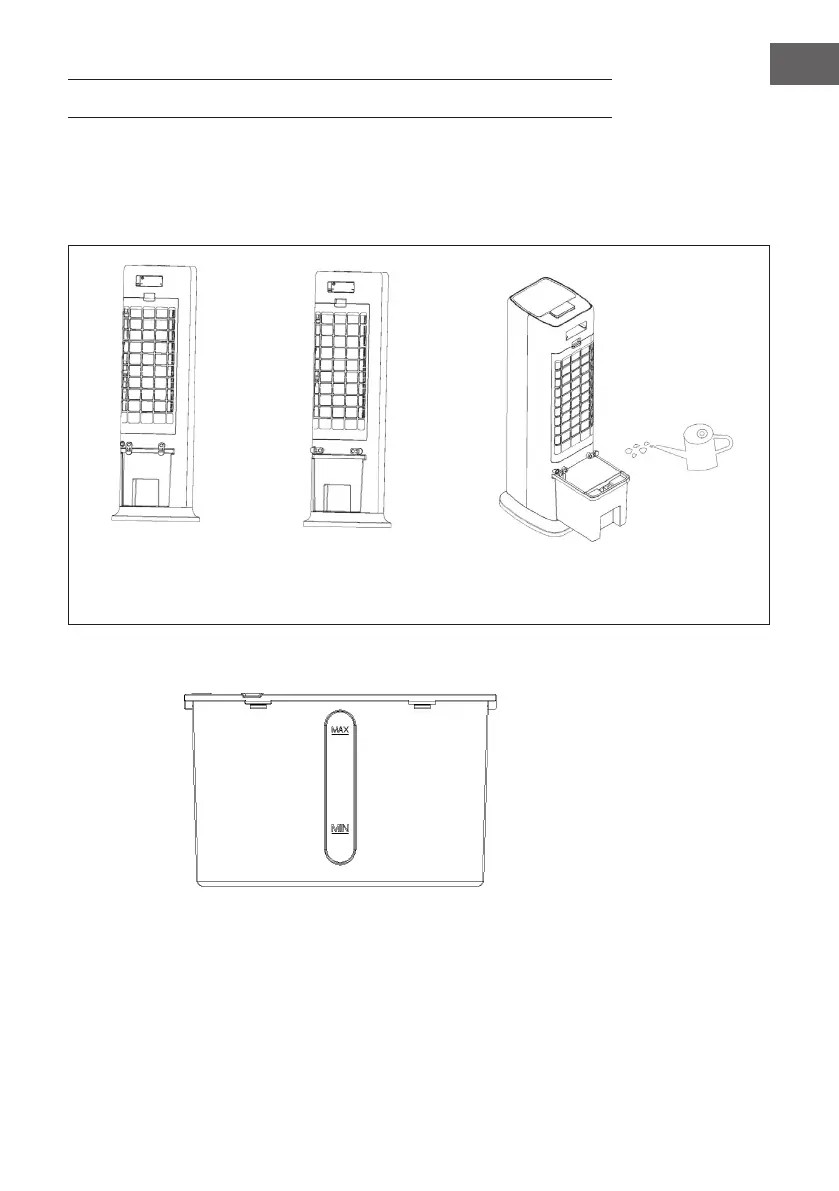
FILLING THE WATER TANK
Fill water into the water tank when using the cooling and humidifying function. Before
lling, rotate the winding frame 90° respectively. Pull out the water tank halfway. Pour
the water slowly into the water tank. After lling, push the water tank back into the
appliance. Rotate the winding frame to the original position.
Water tank lock knob
is locked
Water tank lock knob
is unlocked
Water tank is drawn out
for water lling
When lling water into the water tank, pay attention to the water level indicator:
1. When lling manually, make sure that the water level is above the minimum
indicator and below the maximum indicator.
2. Only use clean drinking water.
3. When the appliance is used for the rst time, there may be a slight smell and the
water in the water tank may be slightly discoloured. This is normal and harmless and
has no effect on your health.
4. When inserting the ice box, make sure that the maximum indicator is not exceeded.





 To Next Page