41
EN
3
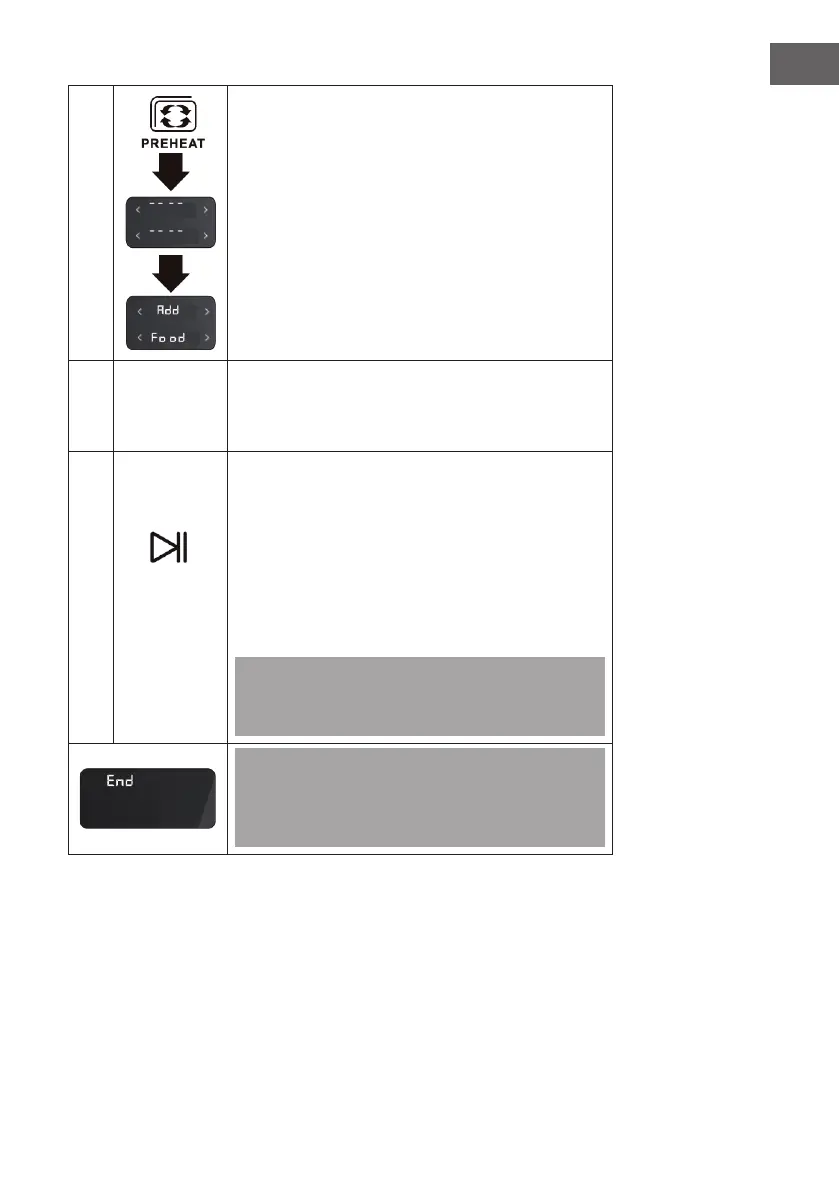
Touch the PREHEAT icon (3) to preheat the appliance.
As soon as the cooking chamber of the device reaches
a temperature of 150 °C, 'Add Food' is displayed on
the screen. (After preheating, place the food in the
appliance and close the door, the cooking process will
start automatically)
4
Position
accessories
Slide the accessories with the food into the desired slot
in the appliance and close the door. There are four slide-
in units. Position the accessories in the appropriate slot
according to the 'Position accessories' table above.
5
If you skip the preheating function in step 3, touch
the START/PAUSE icon (2) to start cooking. The set
time is counted down on the screen. The rst selected
programme lights up for a long time. The second
selected programme is only displayed on the screen
when the rst programme has nished. As soon as the
cooking process is nished, the device beeps 5 times
and 'END' is displayed on the screen. All menu icons
light up.
Note: If you want to use the rotisserie, touch the
ROTISSERIE symbol (8) after touching the START /
PAUSE symbol (2).
Start/
Pause
Note: The screen will display 'END' until the MENU
button (11) is pressed. After the cooking process is
nished, the fan continues to run for 4 minutes to
cool down the appliance.


 To Next Page