40
EN
DUAL COOKING
1
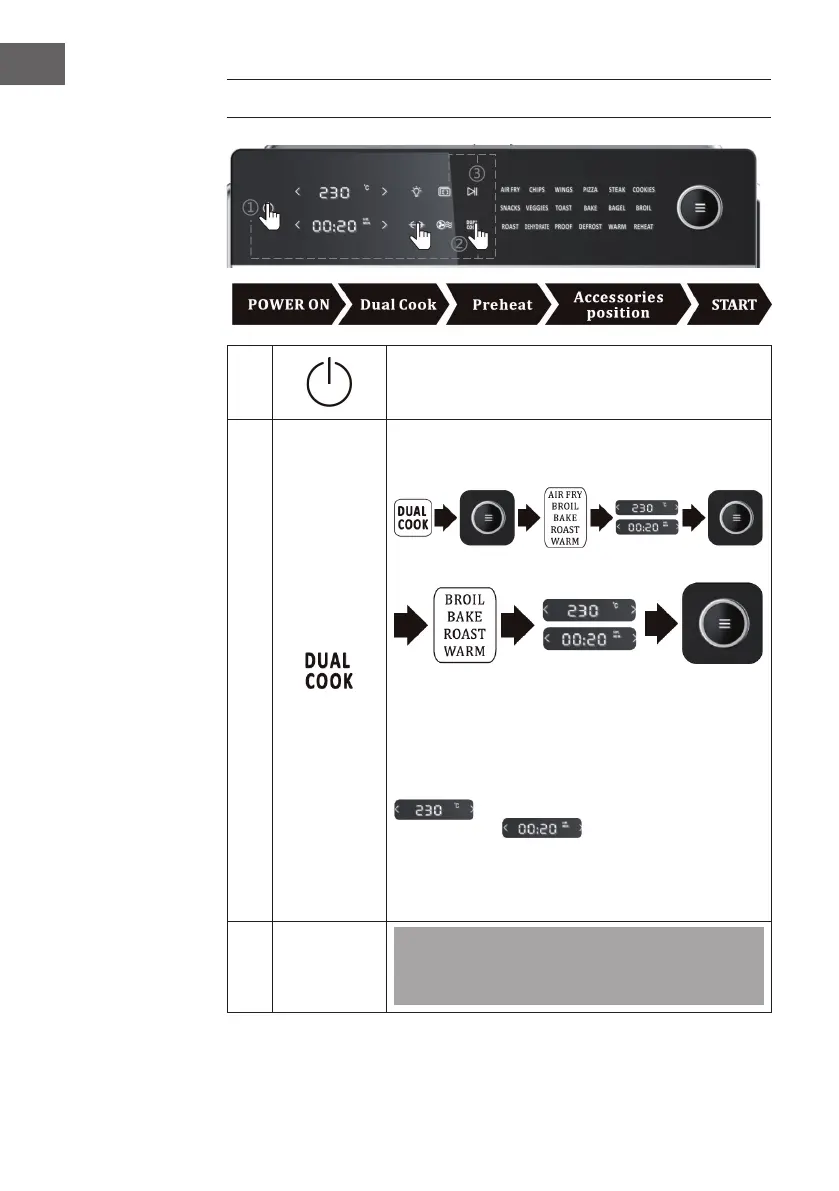
Insert the mains plug into the socket and touch the ON/
OFF button (6) to switch on the device. The screen lights
up and the HOT AIR symbol (9) ashes on the screen.
2
Example:
Step 1:
Step 2:
Touch the DUAL COOK symbol (10). The ve
programmes AIR FRY / BAKE/ BROIL / ROAST / WARM
light up for a long time. Turn the MENU knob (11) and
select the rst programme, for example AIR FRY. 'AIR
FRY' ashes on the screen (the other 4 programmes
remain lit). Then touch the temperature display
and set the desired temperature. Touch
the time display
to set the desired time.
Finally, press the MENU button (11) to conrm the
rst programme set. The remaining four programmes
continue to light up on the screen. Repeat the above
steps to set the second programme.
Note: Touch the START/PAUSE icon (2) and then the
DUAL COOK icon (10) to return to the main menu and
cancel the dual cooking function.


 To Next Page