45
EN
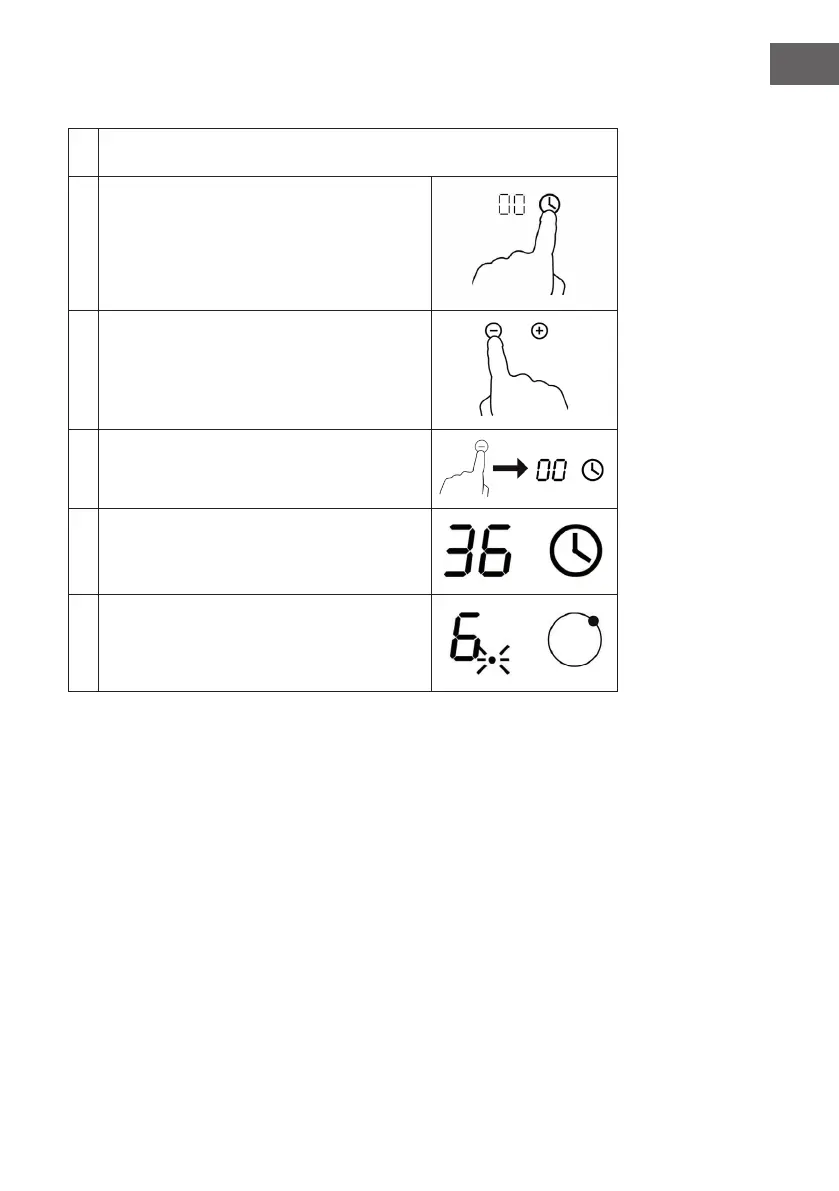
Using the timer
1
Make sure that the appliance is switched on. You can use the timer even if
you have not yet selected a hob.
2
Tap the key for the timer. The egg timer display
ashes and "00" appears.
3
Set the time by pressing "-" or "+". A single
keystroke decreases or increases the value by
one minute. Press and hold the keys to change
the value by 10 minutes.
4
Pressing the "-" key on the control panel
cancels the timer function. 00" appears in the
display.
5
When the time has been set, the countdown
starts immediately. The display shows the
remaining time. The timer display ashes for
5 seconds.
6
It beeps for 30 seconds and the timer display
shows "--" when the set time has been reached.




 To Next Page