Klein + Hummel
O 810 / O 870 Operating Manual Page 16 of 96 Version 01
Right
Center
Right Surround
LFE
Left Back
Right Back
Left
Left Surround
Sum Output
Right
Center
Right Surround
Left Back
Right Back
Left
Left Surround
7.1 High Definition
Bass Manager
Internal Subwoofer Signal or
Driver Cable (DC nn) when Remote
Electronics Kit (REK 2) is used
Optional additional subwoofersΣ
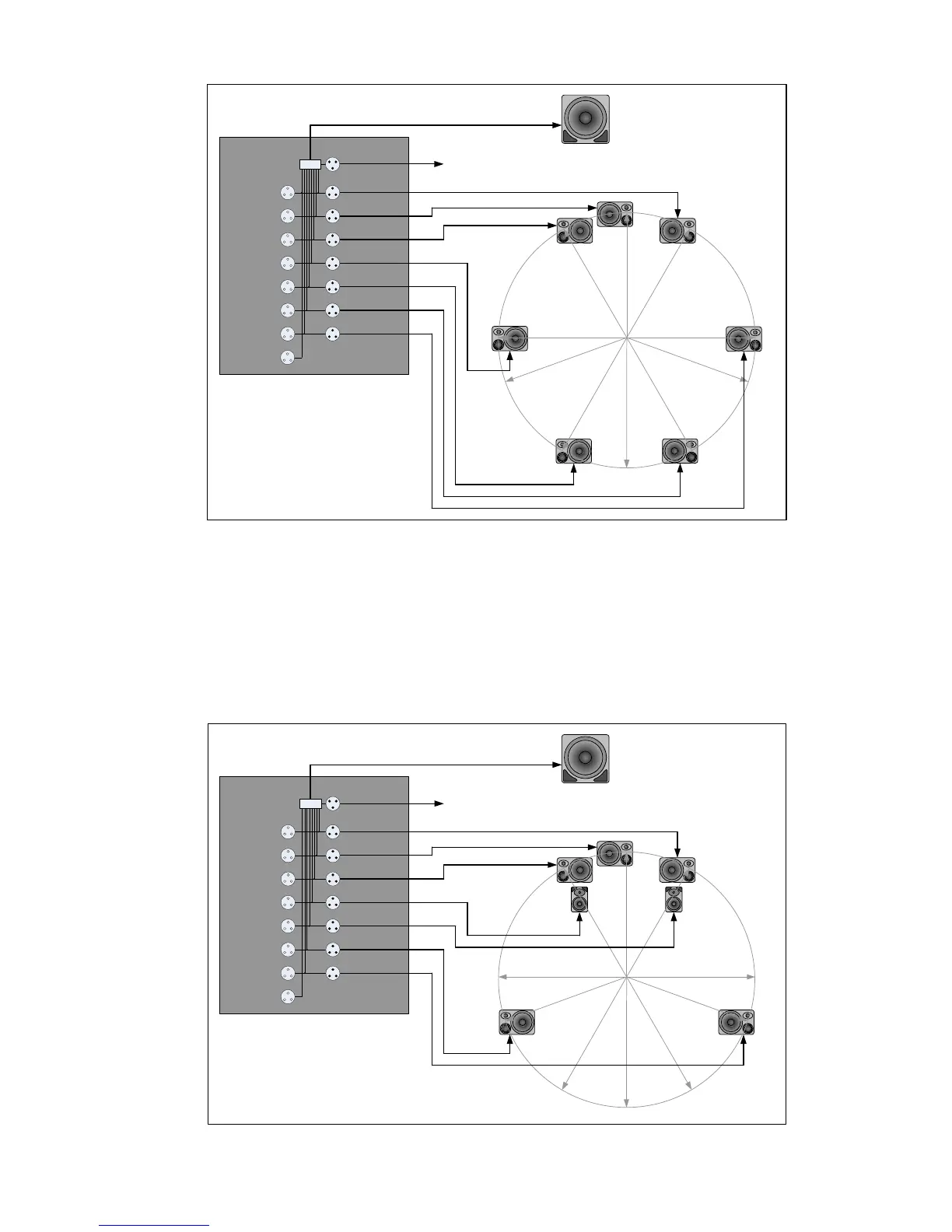
Analog connections to the 7.1 High Definition Bass Manager™
Analog connections to the 7.1 High Definition Bass Manager™Analog connections to the 7.1 High Definition Bass Manager™
Analog connections to the 7.1 High Definition Bass Manager™
From the above wiring diagram it is easy to see that the 7.1 High Definition Bass Manager™ can also be used for
1.0, 2.0, 3/1.0, 5.0, 5.1, 6.0, 6.1, and 7.1 (theatrical) signals.
A less obvious but very useful configuration is also possible. A 5.1 signal can be connected as shown in the
diagram below. In addition, the two unused back channels can be connected to a separate 2.0 signal and the
subwoofer used to give bass extension to a second pair of loudspeakers. Note that the additional pair of
loudspeakers should be placed the same distance as the 5.1 system’s main loudspeakers so that the phase
setting on the subwoofer remains valid for both systems. Different listening distances will require different phase
settings.
Right
Center
Right Surround
LFE
Right Back
Left Surround
Left
Left Back
Sum Output
Σ
Right
Center
Right Surround
Right Back
Left Surround
Left
Left Back
7.1 High Definition
Bass Manager
Internal Subwoofer Signal or
Driver Cable (DC nn) when Remote
Electronics Kit (REK 2) is used
Optional additional subwoofers
Simultaneous connection of 5.1 and 2.0 signals to the 7.1 High Definition Bass Manager™
Simultaneous connection of 5.1 and 2.0 signals to the 7.1 High Definition Bass Manager™Simultaneous connection of 5.1 and 2.0 signals to the 7.1 High Definition Bass Manager™
Simultaneous connection of 5.1 and 2.0 signals to the 7.1 High Definition Bass Manager™



 To Next Page