Klein + Hummel
O 810 / O 870 Operating Manual Page 20 of 96 Version 01
• In studio applications, the response of each loudspeaker at the listening position should be flat.
• In movie applications, the response of each loudspeaker should be one of the X-curve shapes, depending on
the size of the room (see ANSI/SMPTE 202M).
• In home applications, the response of each loudspeaker should be set for subjective audio quality. This is not
necessarily a flat response, but generally, with time, a gently downward sloping response with increasing
frequency is often preferred.
Next, all the loudspeakers in the system should have the same level at the listening position. This is often
measured using a pink noise signal and a sound level meter set to “C-weighted” and “slow”, although it is
possible to do this by careful listening.
Calibrating Subwoofer In
Calibrating Subwoofer InCalibrating Subwoofer In
Calibrating Subwoofer In-
--
-room Response
room Responseroom Response
room Response
For each subwoofer the following settings are recommended as a good starting point for further adjustment:
Acoustical Controls
Acoustical ControlsAcoustical Controls
Acoustical Controls
In a corner -8 dB -4 dB **
****
**
Next to or flush mounted in a solid wall -4 dB -2 dB **
****
**
Next to or flush mounted in a soft wall -2 dB 0 dB **
****
**
Free standing in an untreated room -2 dB 0 dB **
****
**
Free standing in a well-treated room 0 dB 0 dB **
****
**
*
**
* The level setting depends on the level settings of the main loudspeakers. The value show assumes that the
main loudspeakers are set to “0 dB” and “100 dB SPL at 1 m”, or equivalent in loudspeakers with differently
labeled controls.
**
****
** The use of the parametric equalizer very much depends on the acoustical conditions of the room so no
standard recommendation can be made here.
Calibrating Phase
Calibrating PhaseCalibrating Phase
Calibrating Phase
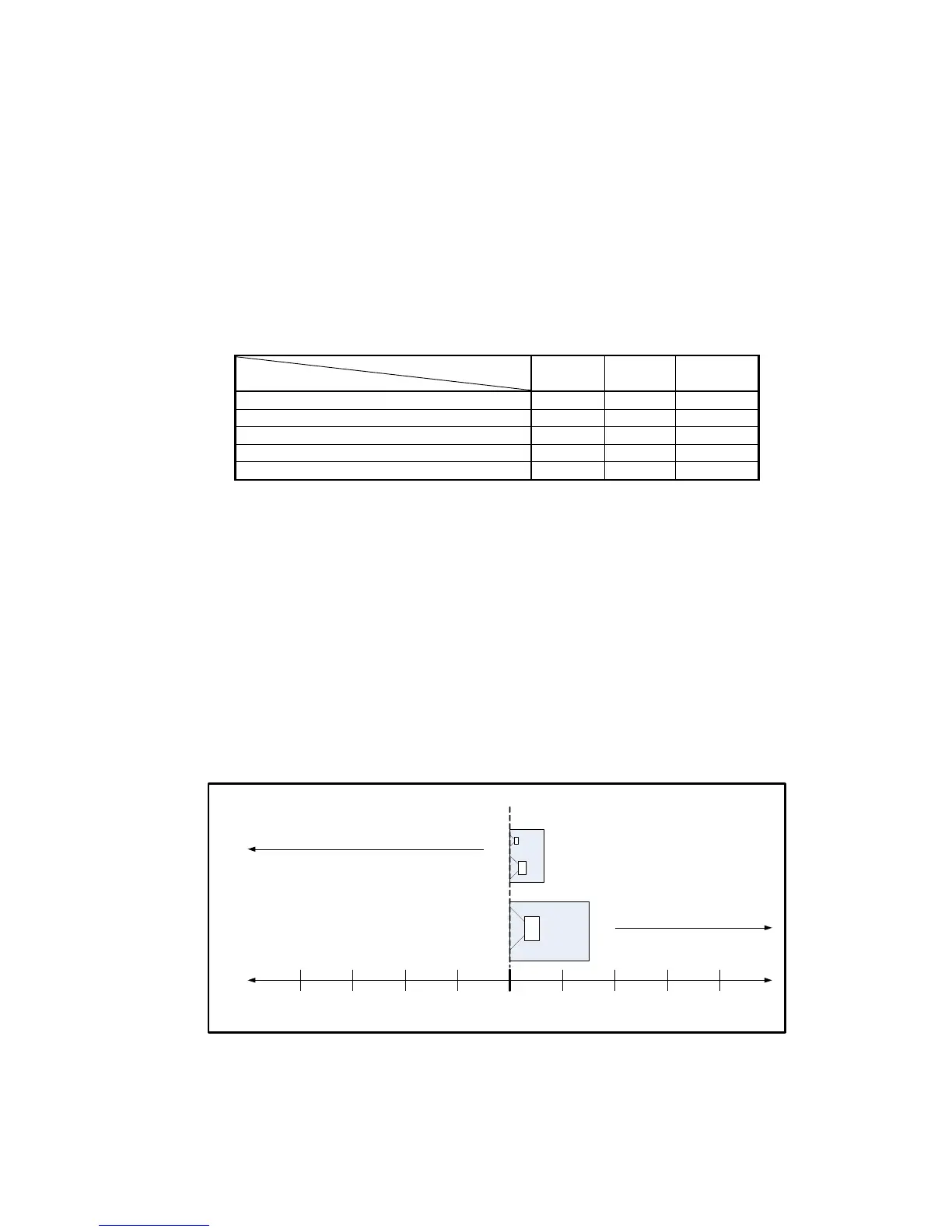
One way to calibrate the phase control is by simple physical measurements in the room. For example, if the
loudspeakers are positioned 1.5 m closer to the listening position than the subwoofer, the loudspeakers should
be delayed by 4.36 ms which is approximately the same as -135° at 80 Hz. Delaying a single subwoofer signal is
more practical than delaying all the main loudspeakers so us a -225° setting (achievable using the -180° and -
45° settings). It is recommended to keep the listening distance difference between the subwoofer’s and the main
loudspeakers’ within 2 m (6’) of each other.
0.5 m 1.0 m 1.5 m0.5 m1.0 m1.5 m 2.0 m0 m
-315° -270° -225°-45°-90°-135° -180°0°
Loudspeaker closer
than subwoofer
Subwoofer closer
than loudspeaker
2.0 m
-180°
Distance
Phase
Calibrating the Phase Control
Calibrating the Phase ControlCalibrating the Phase Control
Calibrating the Phase Control
Another way easy way to calibrate the phase control is to use the built in signal generator. Connect a loudspeaker
to the left output of the subwoofer, and turn on the signal generator. An 80 Hz tone will be heard from the
subwoofer and the loudspeaker connected to the left output. Now systematically use the two phase controls to
give values of 0°, 45°, 90°, 135° 180°, 225°, 270°, and 315°. Find setting that gives the lowest
lowestlowest
lowest sound level at the



 To Next Page