Klein + Hummel
O 810 / O 870 Operating Manual Page 22 of 96 Version 01
Bass Management
Bass ManagementBass Management
Bass Management
Subwo
SubwoSubwo
Subwoofer
oferofer
ofer
Bass Extension (
Bass Extension (Bass Extension (
Bass Extension (-
--
-3 dB)
3 dB)3 dB)
3 dB)
ON ON 18 Hz
ON MUTED 80 Hz
DISABLE ON Main Loudspeaker’s LF Cut-off
DISABLE MUTED Main Loudspeaker’s LF Cut-off
In order to maintain a high-quality signal path, there is no VOL stage on the SUM OUTPUT so daisy-chained
subwoofers must be individually controlled. The cables required for this depend on the source of the control data.
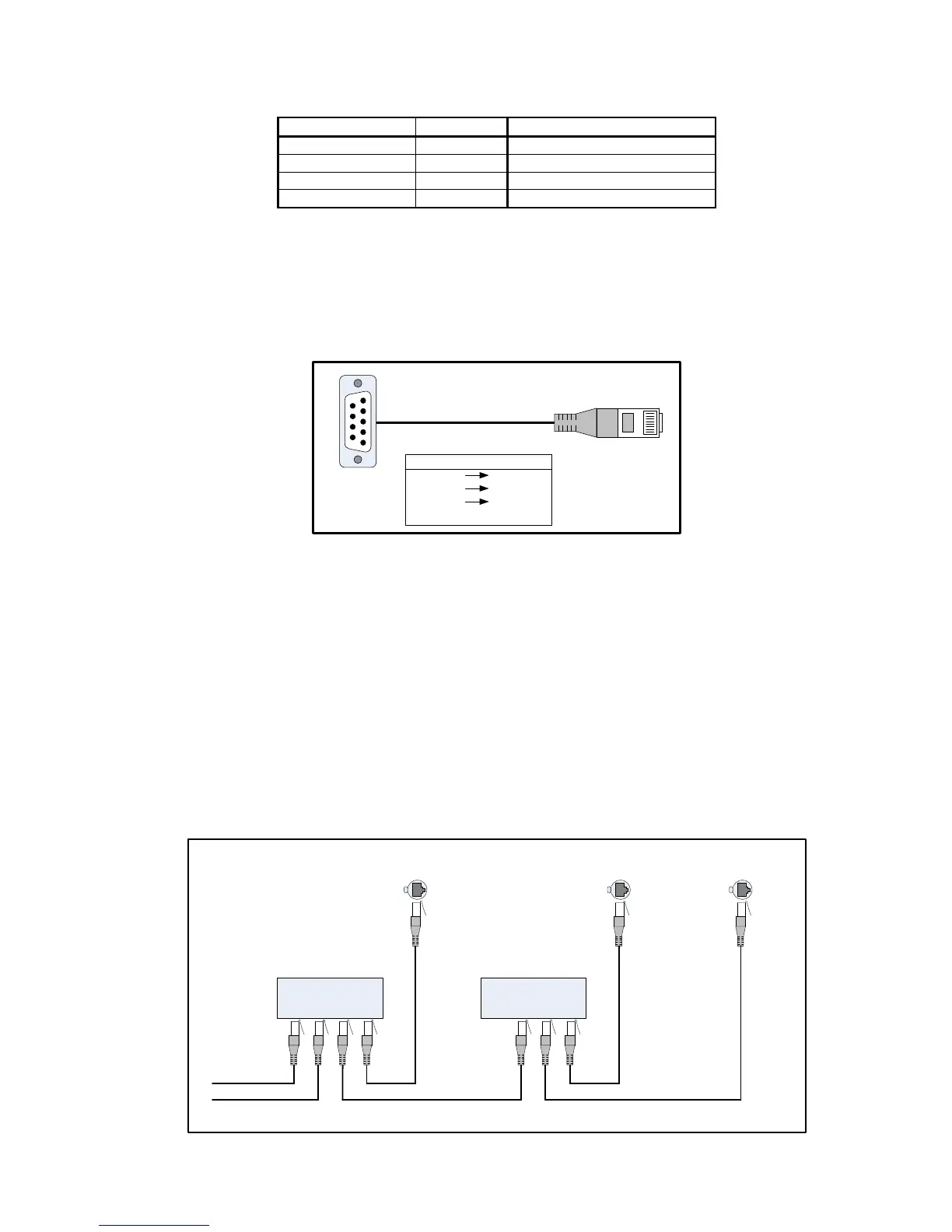
If the control equipment has RS-232 on D-sub connectors, an RS
RSRS
RS-
--
-232 to CAT
232 to CAT232 to CAT
232 to CAT-
--
-5
55
5 cable is required. Only pins 3, 4
and 5 should be connected. Pins 4 and 5 should be crossed over, i.e. TX connects to RX and vice versa. An adapter
can be self-made (see picture below) or ordered from Klein + Hummel (RS232
RS232RS232
RS232-
--
-to
toto
to-
--
-CAT5
CAT5CAT5
CAT5) – see Accessories and
Options section.
5
1
9
6
1
8
D
DD
D-
--
-Sub Pin
Sub PinSub Pin
Sub Pin CAT
CATCAT
CAT-
--
-5
5 5
5 Pin
PinPin
Pin
2 (RX) 4 (TX)
3 (TX) 5 (RX)
5 (GND) 3 (GND)
Do not connect shield
RS
RSRS
RS-
--
-232 D
232 D232 D
232 D-
--
-Sub to CAT
Sub to CATSub to CAT
Sub to CAT-
--
-5 Adapter
5 Adapter5 Adapter
5 Adapter
If the control equipment has a USB connector, a USB to RS
USB to RSUSB to RS
USB to RS-
--
-232 Adapter
232 Adapter232 Adapter
232 Adapter is required – see Accessories and Options
section. It is not recommended to use commercially available adapter as, depending on the internal wiring,
damage is possible. Once the USB is converted to RS-232, an RS
RSRS
RS-
--
-232 to CAT
232 to CAT232 to CAT
232 to CAT-
--
-5 Adapter
5 Adapter5 Adapter
5 Adapter is required to connect to
the subwoofer – see Accessories and Options section.
For multiple subwoofer systems, an EtherCon Adapter
EtherCon AdapterEtherCon Adapter
EtherCon Adapter (SEA 1) is required – see Accessories and Options section.
Four EtherCon sockets allow for simultaneous connection of a hardware remote control and an RS-232 source –
although simultaneous adjustment of the hardware remote should be avoided when sending data from the RS-
232 source. The last subwoofer in the daisy-chain is connected directed to the to previous subwoofer’s SEA 1 Sub
Out socket. The connectors are for:
1. Hardware remote input (SRC 1 or SRC 2)
2. RS-232 input / Subwoofer daisy chain input
3. Subwoofer slave output (subwoofer 2, 3, …)
4. Subwoofer output
K+H SEA 1
EtherCon Adapter
Remote Control
and RS-232 Input
Remote Control
and RS-232 Input
From SRC 1 or SCR 2
SUBWOOFER 1 SUBWOOFER 2, 3, ...
From RS-232 Device
SRC n RS-232 Slave Sub
/ Sub in Out Out
K+H SEA 1
EtherCon Adapter
SRC n RS-232 Slave Sub
/ Sub in Out Out
Remote Control
and RS -232 Input
SUBWOOFER n



 To Next Page