16
ENGLISH
OPERATING INSTRUCTIONS
TEMPERATURE
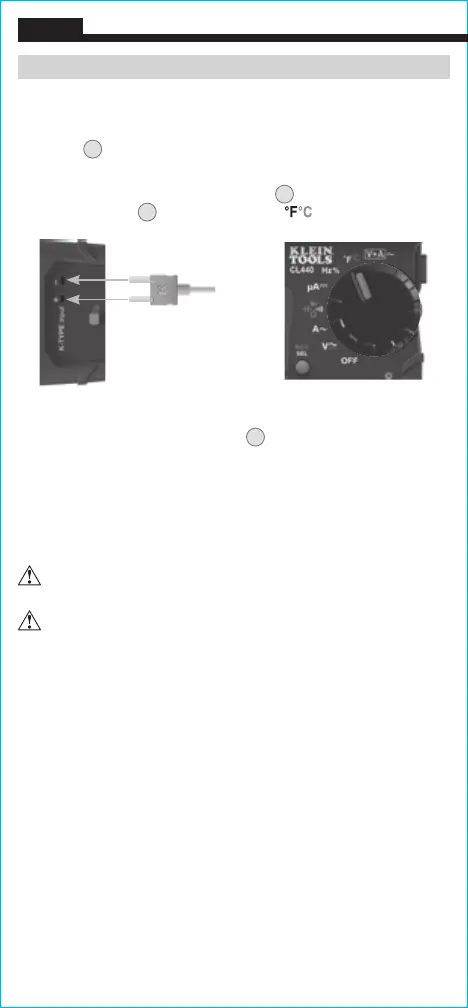
1. Remove leads from meter and slide the temperature probe input
switch
18
to close jacks and expose the K-Type thermocouple
ports.
2. Insert K-type thermocouple into port
15
( and rotate function
selector switch
2
to the Temperature setting.
NOTE: The meter defaults to Fahrenheit scale in this mode. To enter
Celsius scale, press the SEL button
9
. Ensure that the appropriate
icon (either
°F
or
°C
) appears on the display.
3. To measure temperature, make contact between the
thermocouple tip and the object being measured. When
thermocouple tip and object are in thermal equilibrium, the
measurement on the display will stabilize. The meter will auto-
range to display the measurement in the most appropriate range.
Remove thermocouple before switching meter to other
measurement functions.
T
he thermocouple included with the original purchase
is suitable for temperatures below 356°F / 180°C only.
To measure higher temperatures, a K-type thermocouple
with the appropriate measurement range should be used.
K-Type Thermocouple







 To Next Page