4
ENGLISH
WARNINGS
To ensure safe operations and service of the instruments, follow these
instructions. Failure to observe these warnings can result in re,
electric shock, severe injury or death.
•
The Toner-Pro and Probe-Pro (sold seperately) are designed for use on extra-low
voltage cabling systems (less than 60 volts) for testing when NOT energized.
•
The maximum voltage across ABN Test Clips of the Toner-Pro is 60 volts in
Test mode, and 20 volts in Continuity mode. Connecting the Probe-Pro to live
mains AC power may damage it and pose a safety hazard for the user.
•
DO NOT use instruments if they are wet, as it could pose a shock hazard.
•
DO NOT use instruments if they are damaged in any way.
•
Turn off instruments and disconnect all ABN Test Clips before attempting to
replace batteries.
•
The battery door must be in place and secure before you operate the instrument.
•
DO NOT open the case, other than the battery compartment.
OPERATING INSTRUCTIONS
READ ALL INSTRUCTIONS BEFORE OPERATING AND RETAIN
INSTRUCTIONS FOR FUTURE REFERENCE
CONTINUITY TEST
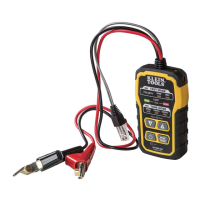
The Toner-Pro transmits frequencies on non-energized wires only. When the
Toner-Pro is turned on, a continuity test will be performed to determine if the 2
wires to be traced are in close proximity to each other, without a conductive path
between them. The "CONT" Indicator
T4
wIll illuminate green to indicate pass.
Attach the red and black ABN Test Clips
T14
to the wires to be tested. If the
resistance of the circuit is less than 10kΩ, the "CONT" Indicator
T4
will illuminate
red and no toning can occur. If the "CONT" Indicator is illuminated green, a tone
can be generated and you may proceed.
SELECTING TONE FREQUENCY
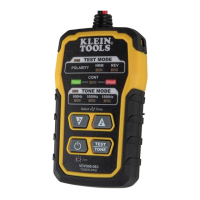
The Toner-Pro defaults to the 800Hz frequency setting when powered on. Use
the Tone Mode Up
T8
and Tone Mode Down
T7
selector buttons to change the
frequency. The Tone Frequency Indicators
T6
will display the frequency being
transmitted. If an alternating tone is selected, the two respective Tone Frequency
Indicators
T6
will blink. Tones will cycle through the available frequencies in a
continuous loop when a selector button is pressed repeatedly.
TRACING PAIRED WIRES (FIG. 1)
1. Connect the Toner-Pro’s red ABN Test Clip
T14
to one of the wires of the
pair to be traced. Connect the black ABN Test Clip
T14
to the other wire to
be traced.
2. Turn Toner-Pro on by pressing the Power On/Off button
T9
.
3. Check the “CONT” Indicator
T4
. If illuminated green, you may proceed.
4. Select the preferred tone setting using the Tone Mode Up
T8
and/or Tone
Mode Down
T7
selector buttons.
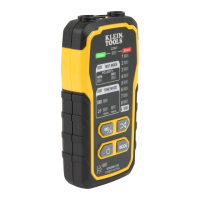
5. Turn on the Probe-Pro (sold seperately).
6. At the far end of the cable, spread the wires apart at least 2" (51 mm), if possible.
7. Use the Probe-Pro (sold seperately) to scan the cable’s wire pairs. Move the
Probe-Pro's tip slowly across the wires. The Probe-Pro’s volume will increase
as it approaches the toned pair. When the Probe-Pro’s volume is high over
the first wire, low in the middle (between) the two wires, and high over the
second wire, you have located the pair of wires you are tracing. Use the
Volume Increase
and
Volume Decrease
buttons to adjust the volume.


 To Next Page