6
ENGLISH
OPERATING INSTRUCTIONS
RJ11 / RJ12 / RJ45 TESTING
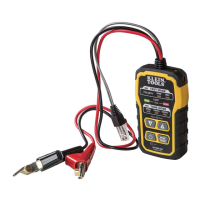
The Toner-Pro has an
RJ11 Test Plug
T13
that can be used in place of the
ABN clips to transmit the tone. The RJ11 plug works with RJ11, RJ12, or
RJ45 jacks. The red and black ABN contacts are replaced by the 2 center
conductors of the inserted plug, i.e. pins 2 and 3 for RJ11, pins 3 and 4 for
RJ12, and pins 4 and 5 for RJ45.
Use the Probe-Pro
(sold seperately)
to locate the toned wires at the far end of
the cable, as described in the TRACING PAIRED WIRES section.
POLARITY AND VOLTAGE PRESENCE TESTING
The Toner-Pro may be used to test the polarity and type of voltage present.
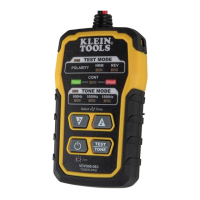
1. Press the
Power On/Off button
T9
on the Toner-Pro.
2. Press the
TEST/TONE Select button
button
T10
. The "TEST MODE" indicator
T1
will illuminate.
3. Connect the
ABN Test Clips
T14
, or insert the
RJ11 Test Plug
T13
.
4. Check the “CONT” Indicator
T4
. If illuminated green, you may proceed.
5. The
"NRM" (Normal) Polarity Indicator
T2
will illuminate if the red
ABN
Test Clip
T14
is connected to the POTS (Plain Ol' Telephone Service) in the
proper orientation. The
"REV" (Reverse) Polarity Indicator
T3
will illuminate
if the wires are reversed.
• The
"NRM" (Normal) Polarity Indicator
T2
will illuminate
when the black
ABN Test Clip detects higher voltage than the red ABN Test Clip.
• The
"REV" (Reverse) Polarity Indicator
T3
w
ill illuminate
when the red
ABN Test Clip detects higher voltage than the black ABN Test Clip.
• The
"NRM" (Normal) Polarity Indicator and "REV" (Reverse) Polarity
Indicator will both illuminate when
AC voltage is present.
• When the
RJ11 Test Plug
is used, the
"NRM" (Normal) Polarity Indicator
will illuminate on
a correctly wired and powered POTS (Plain Ol'
Telephone Service) phone jack.
NOTE: The POTS (Plain Ol' Telephone Service) color code convention
(black/positive, red/negative) is the opposite of the multimeter color
code convention (red/positive, black/negative).


 To Next Page