III. USING THE MICROPHONE
Once the microphone is set up correctly, you may use it on any recording software, voice
chat or speech-to-text utilities. Make sure that the correct microphone is selected within
each software's settings.
Voice recordings
Each operating system has some default programs that you can use to make recordings:
Windows: Voice Recorder
MacOS: QuickTime Player (File > New Audio Recording)
Speech recognition
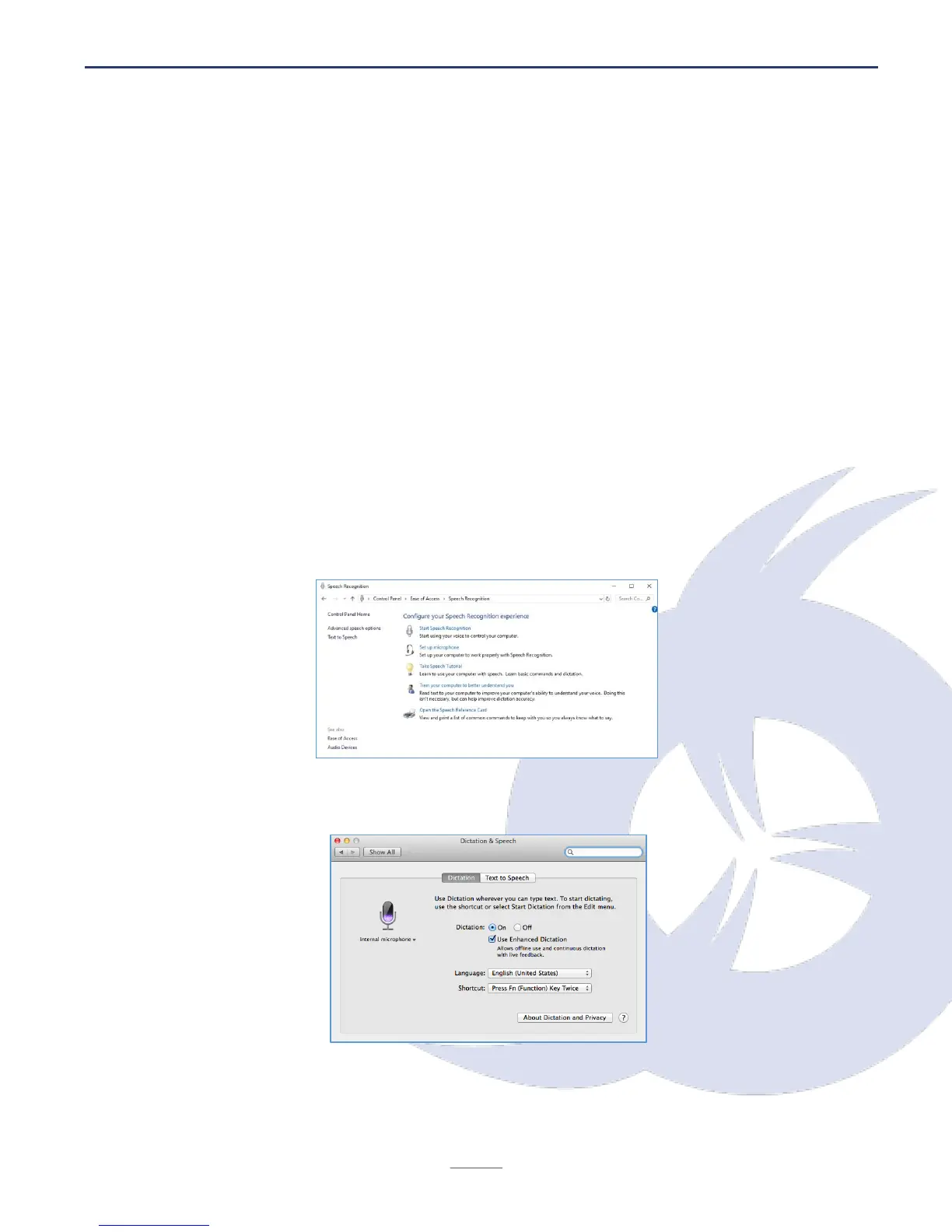
You can also use the microphone to give commands using your voice, or dictate text to your
computer. Here is how you can set up Speech Recognition on each Windows and MacOS:
Windows: Control Panel > Ease of Access > Speech Recognition
MacOS: System Preferences > Dictation and Speech
As with any speech recognition software, it is strongly recommended that you speak clearly
and loudly, avoiding any external noise if possible. There can also be a "learning" period for
the software, so accuracy and recognition tends to improve with use.


 To Next Page