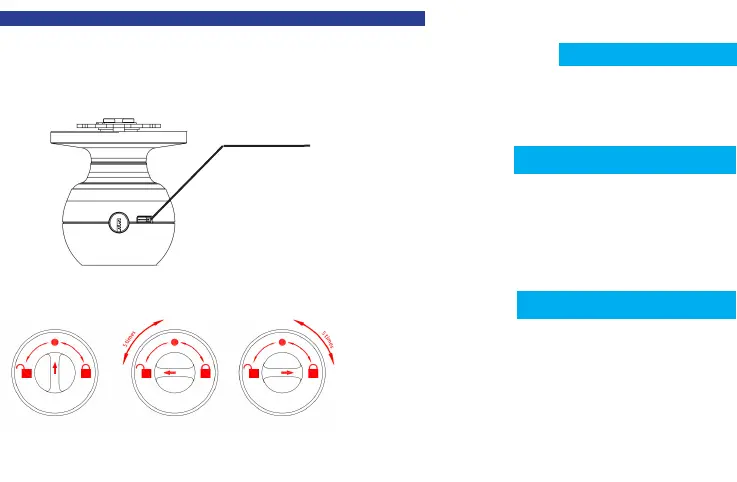
Insert the key into the keyhole at the
edge of the Exterior Knob and turn key
120°to unlock, then turn the Exterior
Knob to open the door.
Key To Unlock
Unlock the smart lock with either app or fingerprint,
rotate the thumb turn from the circular mark to the
unlock sign on the left and then return the thumb turn
to the circular mark, after repeating this operation 5
times, conduct the same operation towards the right for
5 times. After that, you will hear the long beep and the
ngerprint identication area ashes green.
Any ngerprints can unlock the lock.
OPERATION GUIDE
Restore the Factory Setting
Low Power Indication
7
After being unlocked by fingerprint or APP successfully, it is time to
recharge the lock when the buzzer beeps once and the fingerprint
identication area ashes green and then ashes red.
Connect a power bank to the type-C interface on the knob for charging.
Type-C Interface
Privacy Mode


 To Next Page