10
CS.A80.IST-1 / Rev 1.0 ENGLISH
DESCRIPTION OF COMPONENTS
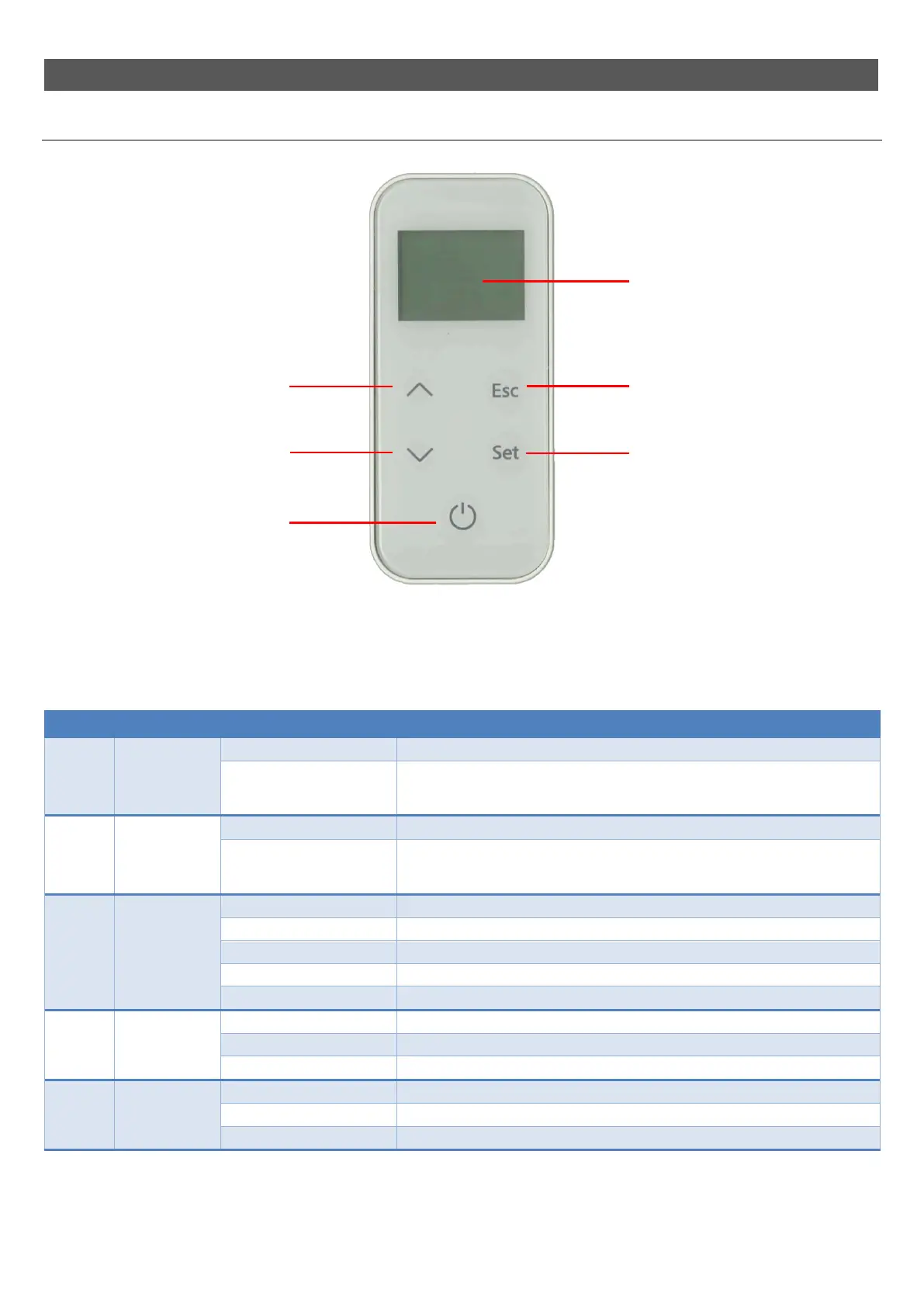
Remote control
The remote control must be fitted with 3 AAA 1.5 V batteries (mod. LR03 / MN2400); The battery life depends on how often the remote control is used.
The table explains how the keys on the remote control work.
Key Description Mode Action
1 INCREASE
On the first press... Allows you to modify the room temperature “SET ROOM”.
Programming mode..
Changes/increases the value of the selected menu item.
Increases the room temperature setting/operating power.
In “SET DUCTING” mode, it modifies the value of du
2.
2 DECREASE
On the first press... Allows you to modify the operating power “SET POWER”.
Programming mode..
Changes/decreases the value of the selected menu item.
Decreases the room temperature setting/operating power.
In “SET DUCTING” mode, it modifies the value of du
1.
3 ON/OFF
On the first press... Activates the display.
Working.. Switches the appliance off when pressed for 2 seconds.
Off.. Switches the appliance on when pressed for 2 seconds.
In alarm block.. Releases the alarm.
Menu/programming mode.. Moves you to the previous menu level, not saving the changes made.
4 SET
On the first press... Enters the user menu.
Menu mode.. Moves you to the next menu item, storing the changes made.
Programming mode.. Moves you to the next submenu item, storing the changes made.
5 ESC
On the first press... Allows you to modify the speed of the ducted fans “SET DUCTING”.
Menu mode.. Moves you to the previous menu item, storing the changes made.
Programming mode.. Moves you to the previous submenu item, storing the changes made.
Key 1 – INCREASE
Key 5 – ESC
Key 3 – ON/OFF
Key 2 – DECREASE Key 4 – SET
Display



 To Next Page