11
CS.A80.IST-1 / Rev 1.0 ENGLISH
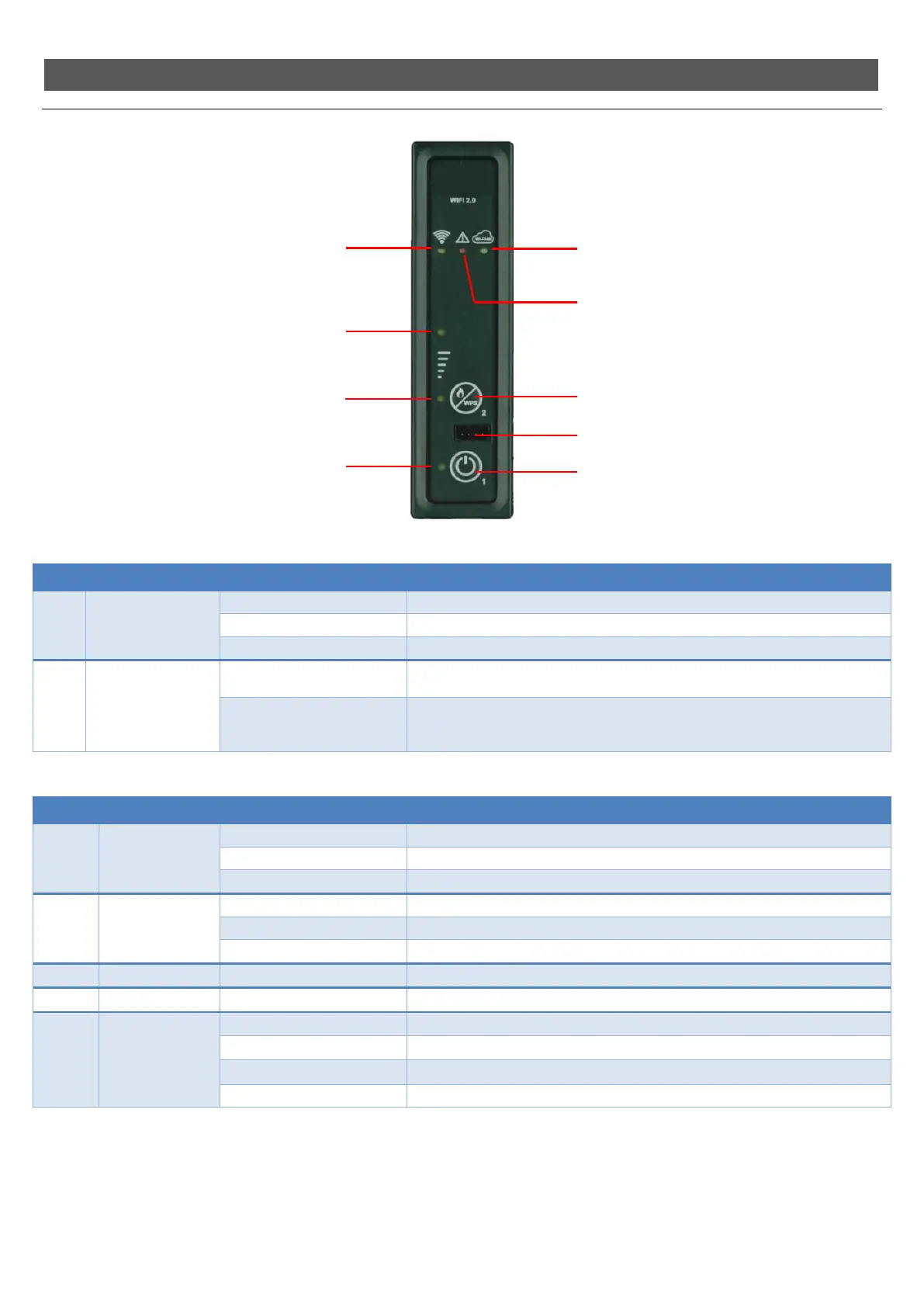
Support panel
The table explains how the keys on the support panel work.
Key Description Mode Action
1 ON/OFF
Working.. Switches the appliance off when pressed for 2 seconds.
Off.. Switches the appliance on when pressed for 2 seconds.
In alarm block.. Releases the alarm.
2 POWER
Each press...
Modifies the operating power “SET POWER”, choosing from the 3 available power
sett
1, 3 or
.
With long press 6 seconds ...
It allows the WiFi module to enter WPS mode to facilitate connection to the WiFi
network of the home modem (it is also necessary to hold down the WPS button of
the modem, according to its characteristics).
The table explains how the LEDs on the support panel work.
LED Description Status Action
1 ON/OFF
Off The appliance is off.
Flashing The appliance is shutting down.
On The appliance is on.
2 and 3 POWER STATUS
Led 2 On, Led 3 Off Power set to setting 1.
Led 2 On, Led 3 On Power set to setting 3.
Led 2 Off, Led 3 On Power set to setting 5.
4 RECEPTION On On when the card receives a signal from the remote control.
5 ALARM On The appliance is in alarm.
6 WIFI
Off The appliance is not connected to a Wifi network.
Slow flashing The WiFi module is in Access Point mode (waiting for connection to the network).
Fast flashing The WiFi module is in WPS (signal search) mode.
On The appliance is connected to a Wifi network.
The support panel allows you to control basic functions governing the operation of the appliance in the absence of the remote control.
The following operations can be carried out:
- SWITCH ON/OFF: holding key 1 (On/Off) down for 2 seconds
- MODIFY OPERATING POWER: each press of key 2 (Power) varies the operating power by selecting one of the three available power settings
(1, 3 or 5). With the help of LEDs 2 and 3 (Power status) you can check the set power setting
(see LED table).
Key 1 – ON/OFF
Key 2 – POWER / WPS
Led 6 – WIFI
Led 4 – RECEPTION
Led 5 – ALARM
Led 3 – POWER STATUS
Led 2 – POWER STATUS
Led 1 – ON/OFF
Serial Connection for Remote Control



 To Next Page