Need help?
Do you have a question about the klover SOFT 100 and is the answer not in the manual?
Read these instructions before installing and using the product.
Lists the technical specifications and performance data for the SOFT 80 model.
Lists the technical specifications and performance data for the SOFT 100 model.
Guidance on selecting the optimal location for the appliance.
Details minimum safety distances from furniture and walls.
Explains the necessity and requirements for an external air vent.
Provides information on chimney shape, size, and connection requirements.
Details how to connect a room thermostat to the appliance.
Explains the functions and buttons of the remote control.
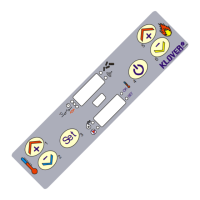
Describes the buttons and LEDs on the appliance's support panel.
Procedure for interfacing the remote control with the support panel.
Steps to connect the appliance to a domestic Wi-Fi network.
Steps to perform the initial start-up of the appliance.
Describes common issues and their potential causes and solutions.
Lists and explains various alarm messages that may appear on the display.


 To Next Page

 General