8 Description of the Osmometer K-7400
Description of the Osmometer K-7400
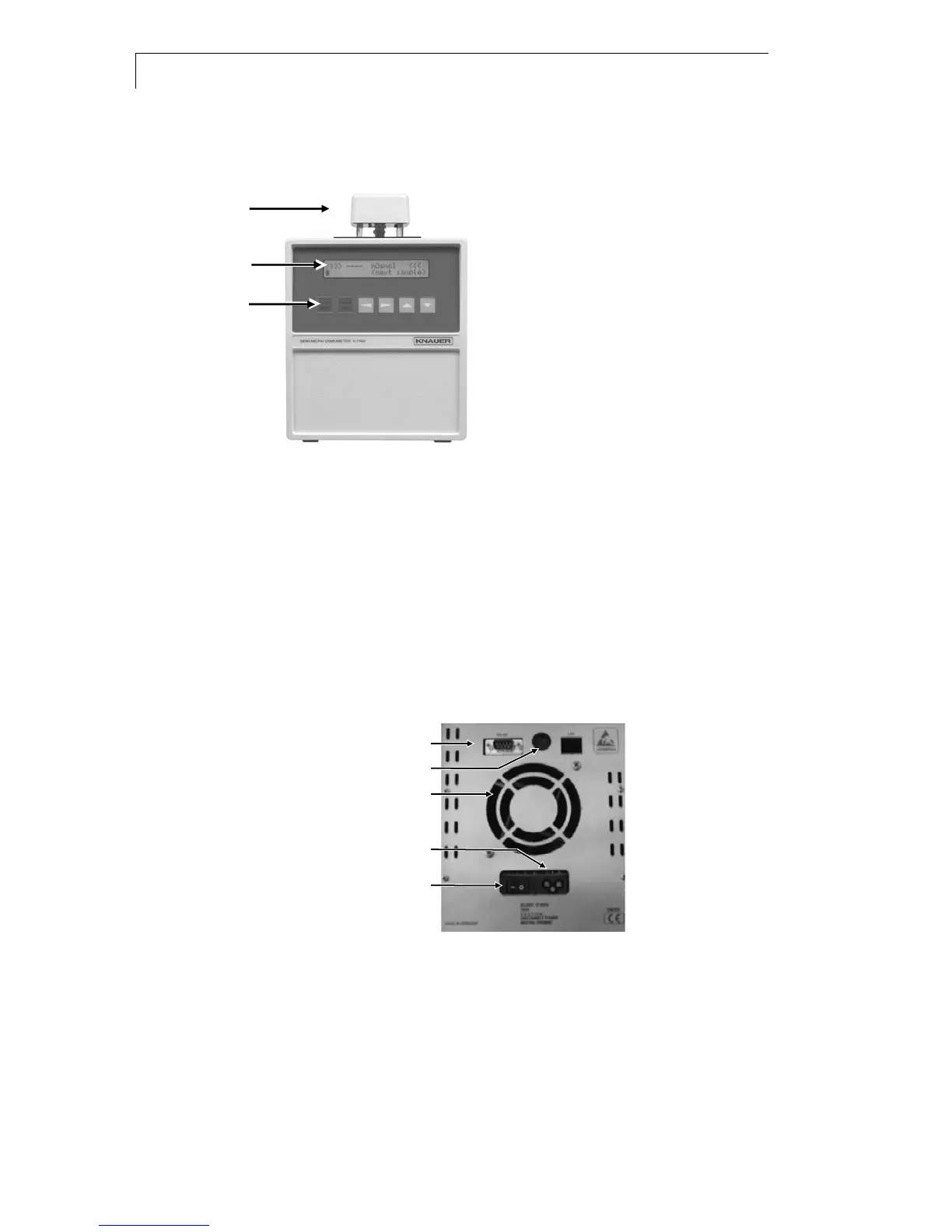
Front View
Measuring Head
LCD Display
Key pad
Fig. 1 Front view of the Osmometer K-7400
Buttons Function
START/STOP 1. Starts a measurement or calibration run.
2. It interrupts any running measurement!
3. If no run can be started or stopped it causes a
jump into the main menu.
VIBRATOR Activates the stirrer for one second. During a
measurement or calibration run the button is not
in function.
ARROW KEYS Cursor navigation buttons for parameter or value
selection
Rear View
RS232 connector (printer)
Measuring head connector
Ventilator
Power connector
Main power switch
Fig. 2 Rear view of the Osmometer K-7400
Connection of the Measuring Head
Parts of the measuring head are an inbuilt motor with a stirring wire
(vibrator), the thermistor and a cone adapting the measurement vial. The
measuring head cable is to be plugged into the connector.
The measuring vial, filled with exact 0.15 ml solution (calibration or
measuring) is to fix to the adapter. Two versions of measuring heads are
available, for the use of glass vials and plastic vials respectively. The


 To Next Page