Semi-Micro Osmometer K-7400S instructions, V3700
Using the EuroOsmo 7400 Software 35
10.8 Report & Graph
Command Explanation
Report Settings Report design area.
Logo Bitmap Clicking on the <...> button, an explorer win dow
appears to select the logo.
Change Caption Clicking on the <...> button, an explorer win-
dow appears to edit the caption. Clicking on the
<Font...> button to format the caption.
Change SubTitle Clicking on the <...> button, an explorer win dow
appears to edit the subtitles. Additionally, you
can format the subtitles here.
Graph Settings Area for settings of the graph design. A click
on one of the four buttons will open the colour
selection window where the colours of the cur-
ve, axes, grid lines, and the back ground can be
defined separately.
GridOn This option field is to show or to hide the grid
lines of the graphs.
A click on the <print> button opens a printer setup window prior to print-
ing the report. A preview of the actual report will be displayed when click-
ing on the <preview> button.
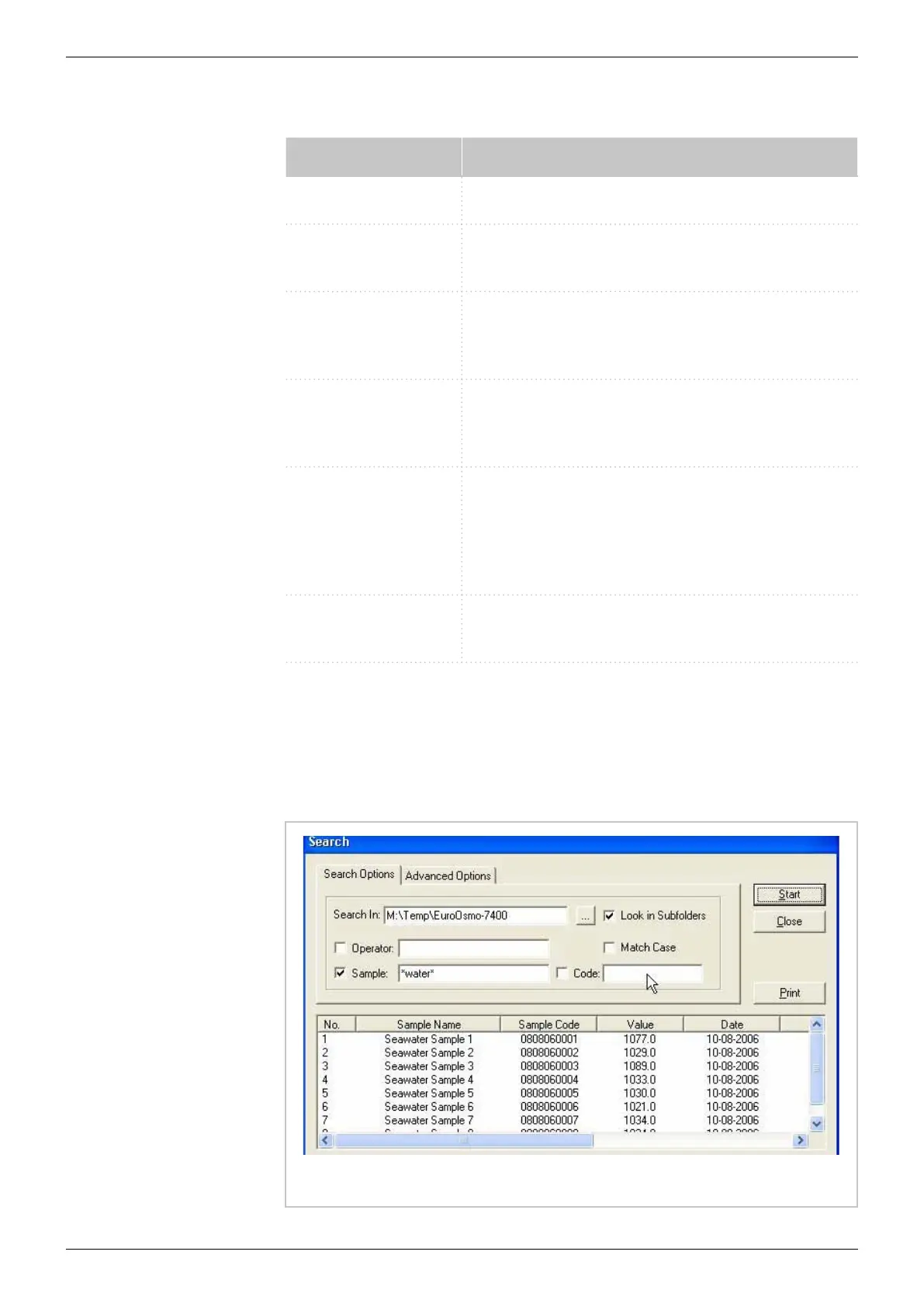
10.9 Search function
Fig. 17: Search function


 To Next Page