8
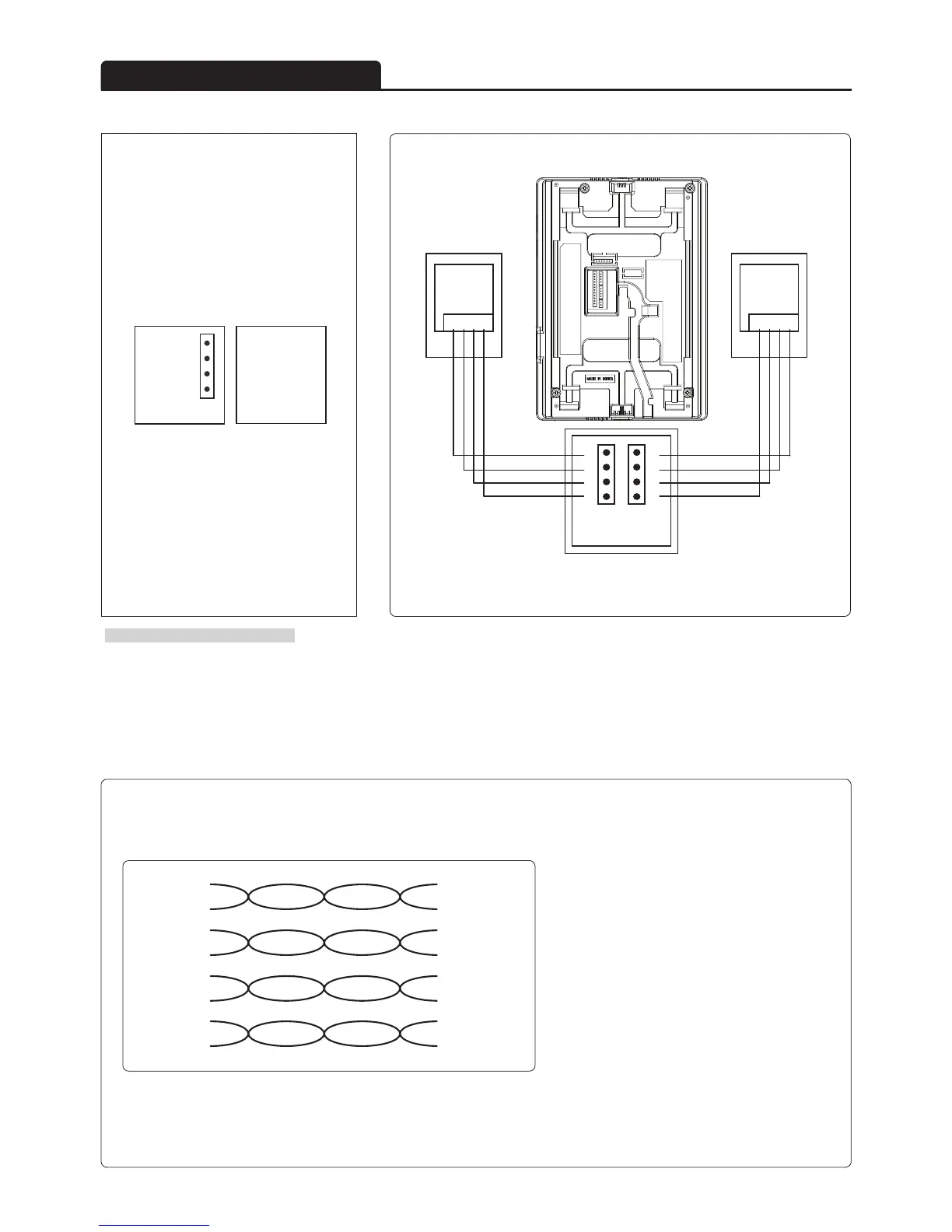
■ Name of each connection port ■ Camera connection wiring
■ Cable requirement - Based on distance from a camera to the monitor
1
2
3
4
TO CAMERA
1. VCC
2. GND
3. AUDIO
4. VIDEO
·Upto 100M : CAT5 cable
①
②
③
④
①
②
③
④
1
12
1
4
1
4
1
2
1 6
①②③④ ①②③④
CAM 2
CAM 1
※ Caution for Camera Installation
Because of condition or atmosphere, Monitor can't detect automatically NTSC or PAL.
In that case, turn the monitor power off and on again.
※According to outside environment, you may view the images somewhat unclear.
However, they do not result from any defect or trouble of the product.
Orange
W/Orange
Green
W/Orange
Blue
W/Orange
Brown
W/Orange
① VCC
double up
② GND
double up
③ Audio
double up
④ Video
double up
In case of more than 50m of CAT5 cable length,
the screen and voice quality can get lower.
But the sympthom is not a kind of fault.
So less than 50m is recommended.
·Upto 50M : TIV 0.65㎟cable
·Upto 100M : Over TIV 0.8㎟cable
·Upto 150M : TIV 0.8㎟cable + RG-59 / U
RG-59 / U (Coaxial cable) for Video signal
(Connect core to Video & shield to GND)
CAT5 wire configuration
※
※
Product connection diagram



 To Next Page