EasyManua.ls Logo

KOCOM KCV-T701SM - User Manual

KOCOM KCV-T701SM
28 pages
Print Icon
To Next Page IconTo Next Page
Loading...
KCV-T701SM MANUAL
www.kocom.com
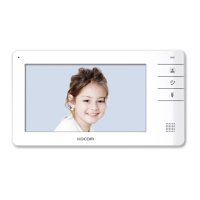
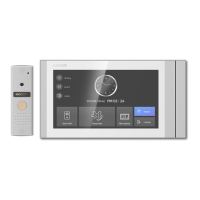
GUI Full Touch Videophone
AHD CCTV Compatible
7" Digital LCD Screen (NTSC/PAL)
Simple and Convenient UI & Full Capacitvive screen
Compatible with 1080p (FHD) AHD CCTV
(TVI, AHD, CVI)
Auto still image capture (Max 32 cuts) Door Camera
Connection up to 2 Door Cameras and
4 Monitors with Sub-interphone (KIP-32G)
Overall or individual calling available
Multifamily, Apartment application
(KLP-C420 SYSTEM)
[7" Digital Color LCD Videophone]
Question and Answer IconNeed help?

Do you have a question about the KOCOM KCV-T701SM and is the answer not in the manual?

Summary

Safety Precautions

Setup, Repair, and Usage Safety

Provides crucial safety guidelines for setup, repair, and general product usage.

Usage and Operational Cautions

Installation Procedures

Product Overview and Specifications

Technical Specifications

Details the technical specifications for the monitor and various door camera models.

Wiring Diagrams Overview

Wiring Diagrams Details

Wiring Connection Guides

CCTV and 420 System Wiring

Provides wiring diagrams for CCTV and 420System connections to ex-indoor monitors.

420 System and CCTV Ex-Monitor Wiring

Illustrates wiring for 420System and CCTV connections to external monitors.

Wiring Best Practices

Correct Wiring Configurations

Shows proper wiring methods for multiple devices to ensure optimal performance.

Incorrect Wiring Examples

Highlights common wiring mistakes and their negative impact on video quality and wiring distance.

Wiring Specifics

CCTV Camera and Interphone Connections

Details how to connect CCTV cameras using coaxial cable and interphones using UTP cable.

Operating the Device

Essential Device Settings

Guides on setting device IDs, camera modes (CCTV, 420System), and video detection.

Home Screen Interface

Outdoor Camera Call Operations

Call Screen Controls

Details how to use call screen icons for receiving calls, opening doors, and capturing images.

Camera Monitoring and Control

Monitoring Outdoor Cameras

Explains how to view images from different outdoor cameras and switch between them.
Extension Calling Features

Intercom and Guard Calling

System Settings Menu

Summary

Safety Precautions

Setup, Repair, and Usage Safety

Provides crucial safety guidelines for setup, repair, and general product usage.

Usage and Operational Cautions

Installation Procedures

Product Overview and Specifications

Technical Specifications

Details the technical specifications for the monitor and various door camera models.

Wiring Diagrams Overview

Wiring Diagrams Details

Wiring Connection Guides

CCTV and 420 System Wiring

Provides wiring diagrams for CCTV and 420System connections to ex-indoor monitors.

420 System and CCTV Ex-Monitor Wiring

Illustrates wiring for 420System and CCTV connections to external monitors.

Wiring Best Practices

Correct Wiring Configurations

Shows proper wiring methods for multiple devices to ensure optimal performance.

Incorrect Wiring Examples

Highlights common wiring mistakes and their negative impact on video quality and wiring distance.

Wiring Specifics

CCTV Camera and Interphone Connections

Details how to connect CCTV cameras using coaxial cable and interphones using UTP cable.

Operating the Device

Essential Device Settings

Guides on setting device IDs, camera modes (CCTV, 420System), and video detection.

Home Screen Interface

Outdoor Camera Call Operations

Call Screen Controls

Details how to use call screen icons for receiving calls, opening doors, and capturing images.

Camera Monitoring and Control

Monitoring Outdoor Cameras

Explains how to view images from different outdoor cameras and switch between them.

Extension Calling Features

Intercom and Guard Calling

System Settings Menu

KOCOM KCV-T701SM Specifications

General IconGeneral
BrandKOCOM
ModelKCV-T701SM
CategoryTelephone
LanguageEnglish

Related product manuals