6 Deletion of all RF cards.
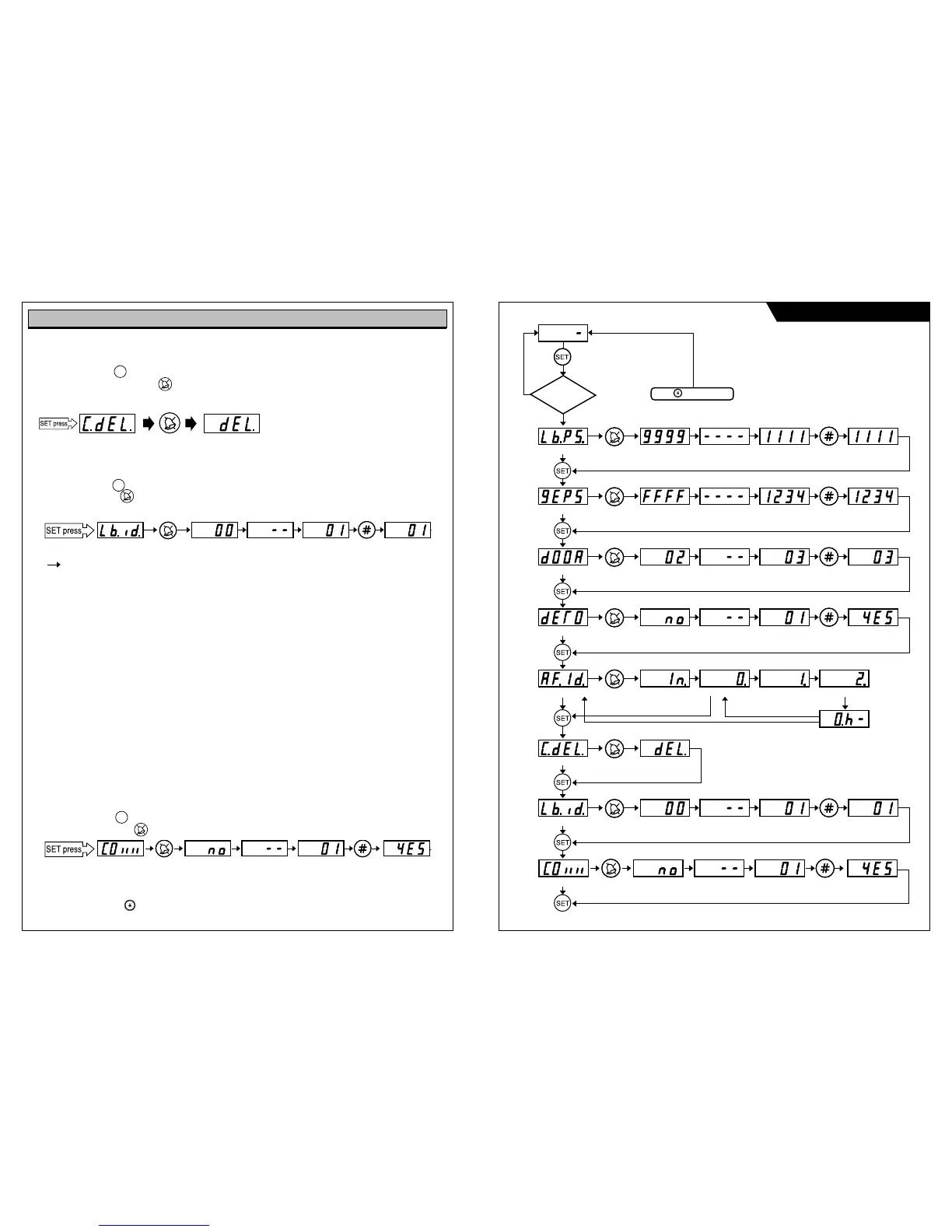
Press “SET” button until “C.dEL.” sign emerges on display.
To delete, press “Cancel” button.
Tone sound of the deletion of all RF card IDs is heard for 60 seconds. When deletion is completed,
tone sound stops.
7 Lobby Phone ID Setting
Press “SET” button until “Lbid” sign emerges on display.
Press “Cancel” button
Input new ID and press “#” button to finish ID registration.
Registration tone sound is heard.
- In case of installing lobbyphone more than 1pc, each ID of lobbyphone should be resistered differently.
- In order to use monitoring function of lobbyphone which has lobby mornitoring function,
the lobbyphone’s ID should be set as “1”.(This function is available only for KLP-100 series.)
- Lobbyphone ID is available to set from 0 upto 9 number.
8 Protocol Setting
This function is to allow setting the house number DIP setting on monitor according to the building heights
or location.
Please be noted that the default value is Old protocol and there should be no mixed protocol in a system.
Mixed protocol in a system can make the malfunction of system.
“0” = no : Old protocol
House number DIP setting on monitor is possible from 1 to 63 number (901 to 963 or 3901 to 3963)
Over 64 to 100 number is not available to set
“1” = yes : New protocol
House number DIP setting on monitor is possible from 1 to 100 number
Upto 1599 number is available to set. Over 1599 number is not available.
a. Press “ SET” button again until “COIIII” sign emerges on display.
b. Press “CANCEL” button , then “no” (inital setting value) sign emerges on display.
9 Lobby Phone version checking
Press “RESET” button and version “5.02” is displayed.
Operational Descriptions
11
12
Lobbyphone ID setting mode button Existing ID Hold New ID Input button New ID
Protocol setting mode button Initial setting value Hold New value Input button New value
Lobby phone setting Flow Chart
System Password
No
Yes
Lobby phone Password
setting mode
Existing Password
Reset
Stand by
Hold
Hold
Hold
New Password Input
New Password Input
Common Password
Registaration mode
Lobby phone Door open
time setting mode
Bypass call to Guard house
phone setting mode
RF-ID Card Registration mode
Deletion of all RF Card mode
Lobby phone ID setting mode
Initial setting ID
Initial setting Value
Protocol setting mode
New ID Input New ID
Deleting card number
(60 sec.)
Initial Value
Initial setting value New Value Input New Value
New Password
New Password
button
button
button button
Hold
Initial setting value New Value Input New Value
button
Hold
Hold
Hold
Hold New Value Input New Value
button
button
Over time
Input state One contact of RF card
Tone Sound (T.T.T.T)
Two contact of RF card
Three contact of RF card
button
button
button
button
button
button
button
SET
SET
RF card delete mode button
Deleting card number (60 sec.)
SET



 To Next Page