EasyManua.ls Logo

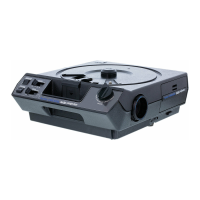
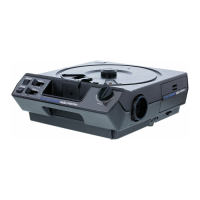
Kodak 5600 - BC5601 Carousel Projector - User Manual

Kodak 5600 - BC5601 Carousel Projector
34 pages
Print Icon
To Next Page IconTo Next Page
Loading...
Operating Manual
CONSUMER IMAGING
KODAK
CAROUSEL
®
Slide Projector

Questions and Answers

  • D
    David AndersonAug 13, 2025
    How to fix a slide that fails to drop into projection position in my Kodak 5600 - BC5601 Carousel?
    • K
      Kara WalkerAug 13, 2025
      If a slide isn't dropping into the projection position in your Kodak Projector, it could be due to several reasons: 1. The tray base plate might not be properly indexed. 2. The tray might not be correctly positioned on the projector. 3. The slide mount could be warped or frayed at the corners. 4. The projector might not be level or is tilted too high. To fix this, align the index hole and index notch, reposition the tray, straighten the mount or remount the slide, and ensure the projector is level with the center of the screen.
  • C
    Cindy MclaughlinAug 16, 2025
    Why is my Kodak 5600 - BC5601 Carousel not cycling to the next slide?
    • Z
      zdeanAug 16, 2025
      If your Kodak Projector isn't advancing to the next slide, the tray might not be positioned correctly, or a slide or foreign object could be stuck in the gate. Try repositioning the tray.
  • M
    Mr. Charles CoffeyAug 20, 2025
    What to do if my Kodak Projector does not operate?
    • K
      Kylie MillerAug 20, 2025
      If your Kodak Projector isn't working, ensure the power cord is properly plugged into a working electrical outlet and that the power switch is set to the 'Lamp' position.
  • N
    Nancy WatkinsAug 25, 2025
    Why is there no illumination on the screen with a slide in my Kodak Projector?
    • M
      mhendricksAug 25, 2025
      If there's no light on the screen when a slide is in the Kodak Projector, the power switch might be set to 'Off' or 'Fan', the lamp may be burned out, or the lamp might not be correctly seated in its socket. Try setting the switch to 'Lamp', installing a new lamp or lamp module, and checking the lamp's seating.
  • B
    bpalmerAug 27, 2025
    What to do if autofocus has difficulty slide to slide on my Kodak Projector?
    • K
      Karen BirdAug 27, 2025
      If your Kodak Projector's autofocus struggles when switching between slides, it might be due to mixing open and glass slide mounts. Avoid using a combination of open and glass mounts.
  • M
    Mark BrownAug 31, 2025
    Why is the illumination uneven on the screen of my Kodak 5600 - BC5601 Carousel?
    • B
      Barbara JonesSep 1, 2025
      Uneven illumination on your Kodak Projector's screen could be due to a projection lamp not fully seated, a condenser lens that's either not installed or improperly positioned, or a slide mount not properly seated in the projector gate. Check the lamp, condenser lens, and slide position and slide-mount condition.
  • G
    gabrielmcmillanSep 4, 2025
    Why is the slide not in proper focus on the screen of my Kodak 5600 - BC5601 Carousel Projector?
    • A
      Amanda CarterSep 4, 2025
      If the slide isn't in focus on your Kodak Projector's screen, it could be due to the slide itself not being sharp, the first slide in the tray not being properly focused, a slide in a different type of mount, or the projection lens being installed improperly. Examine the slide for sharpness, manually focus the center of the first slide, focus manually, and follow the lens installation instructions.
  • U
    ubrooksSep 7, 2025
    Why is there uneven edge-to-edge focus on my Kodak Projector?
    • D
      Deborah SmithSep 8, 2025
      Uneven edge-to-edge focus on your Kodak Projector may occur if the slide itself is not sharp, a curved field lens is used with glass, plastic, or non-embossed mounts, a curved field lens is used for rear projection, or due to lamp performance. Examine the slide. Try a flat field lens. Install a new lamp and try again.

Summary

Important Safety Instructions

Operation

Projector Startup and Connection

Details the initial steps for powering on and connecting the projector.

Loading Slide Trays

Instructions for correctly inserting slide trays into the projector.

Adding Slides to Tray

Guide on how to place slides into the loaded tray.

Removing Slide Trays

Steps for safely detaching a slide tray from the projector.

Preparing for Slide Projection

How to prepare and start projecting slides, including lens and lamp setup.

Screen Image Adjustment

How to center and adjust the projected image height and level.

Slide Projection Techniques

Projecting Individual Slides

How to project individual slides without using a tray.

Editing Your Presentation

Clearing a Gate Jam

Shutdown Procedure

Maintenance

Replacing the Projection Lamp

Step-by-step guide for safely replacing the projector lamp.

Cleaning Optical Components

Instructions for cleaning the condenser, glass, and mirror.

Reassembling the Lamp Module

Steps for correctly putting the lamp module back together after cleaning.

Cleaning the Mirror

How to clean the projector's internal mirror.

Troubleshooting

Warranty Information

How to Obtain Service

Kodak 5600 - BC5601 Carousel Projector Specifications

General IconGeneral
Model5600 - BC5601
BrandKodak
Slide Capacity80 slides
Remote ControlYes
FocusManual
Compatibility2x2 inch slides
TypeCarousel Projector
Power Supply120 V AC

Related product manuals