3-8 KODAK DIGITAL SCIENCE DC210 Plus Zoom Camera User’s Guide
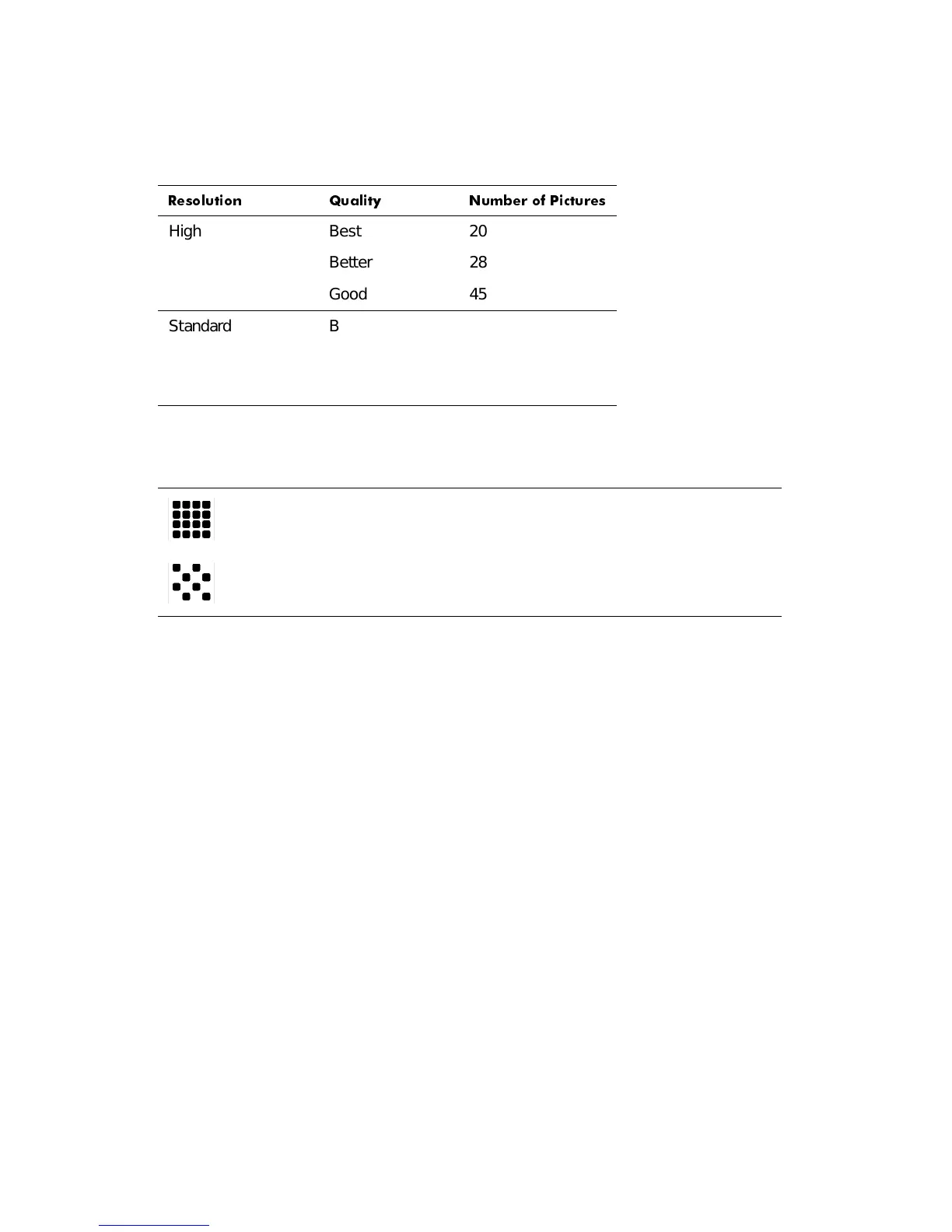
You can switch freely between the two settings when taking pictures. The number of pic-
tures the camera is able to store varies accordingly.
The Resolution setting is indicated on the status display using the following icons:
The Resolution setting is changed using the Preferences mode. Refer to “Resolution” in
Chapter 5 for more information.
4XDOLW\
You may set your camera to capture pictures in a Good, Better, or Best quality setting. The
Quality setting indicates how much the picture is compressed to save space on the mem-
ory card. Your pictures include more detail with the Best or Better setting, but they will use
more memory on the card than with the Good setting.
You may switch freely between the three settings when taking pictures. The number of
pictures the camera can store varies accordingly (refer to the picture count table in the pre-
vious subsection).
5HVROXWLRQ 4XDOLW\ 1XPEHU RI 3LFWXUHV
High Best 20
Better 28
Good 45
Standard Best 41
Better 57
Good 87
High — Picture size is 1152 x 864 pixels. This is the default setting. Use
this setting when your pictures are to be printed.
Standard — Picture size is 640 x 480 pixels. Use this setting when the pic-
tures are for e-mail or online use.


 To Next Page