Adjusting Camera Settings 5-9
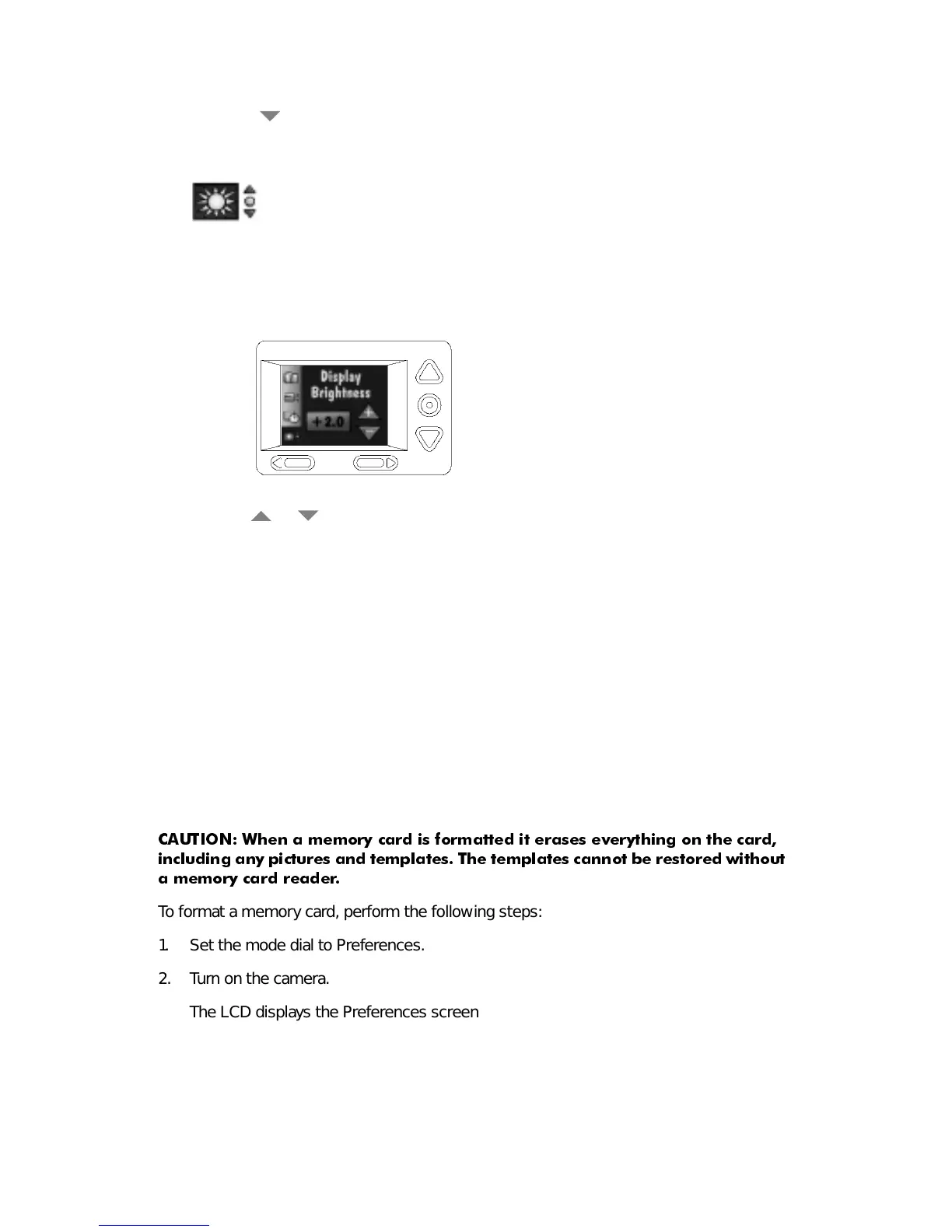
3. Press the button until the LCD Brightness icon (shown below) is highlighted on the
Preferences screen.
4. Press the Do-It button.
The LCD displays the main LCD Brightness screen.
5. Press a or
button to adjust the brightness of the LCD screen to the appropri-
ate level.
The brightness of the LCD screen changes as the setting is adjusted.
6. Press the Do-It button.
The main Preferences screen reappears.
The LCD Brightness setting is maintained until another setting is selected. This setting
does
not
change when the camera is turned off.
)RUPDW0HPRU\&DUG
The Format Memory Card screen formats the memory card while it is in the camera and
sets up new directories and pointers on the card.
&$87,21 :KHQ D PHPRU\ FDUG LV IRUPDWWHG LW HUDVHV HYHU\WKLQJ RQ WKH FDUG
LQFOXGLQJ DQ\ SLFWXUHV DQG WHPSODWHV 7KH WHPSODWHV FDQQRW EH UHVWRUHG ZLWKRXW
D PHPRU\ FDUG UHDGHU
To format a memory card, perform the following steps:
1. Set the mode dial to Preferences.
2. Turn on the camera.
The LCD displays the Preferences screen.


 To Next Page