Need help?
Do you have a question about the Kodak FLIK X7 and is the answer not in the manual?
Essential safety guidelines for operating the KODAK FLIK X7 HOME PROJECTOR to prevent damage or injury.
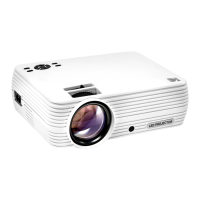
Identifies and labels the physical parts and input/output ports of the KODAK FLIK X7 HOME PROJECTOR.
Lists and labels the buttons and features of the remote control for the projector.
Details the functions of each button on the KODAK FLIK X7 HOME PROJECTOR remote control.
Step-by-step guide on using the focus wheel to achieve a sharp and clear image on the screen.
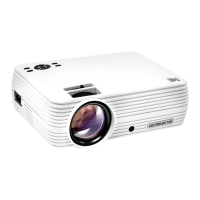
The KODAK FLIK X7 Home Projector is a versatile device designed for home entertainment, offering a range of features for projecting various media types. This user manual provides comprehensive guidelines for safe operation, ensuring users can maximize their experience with the projector while adhering to safety precautions.
The KODAK FLIK X7 is primarily a home projector, capable of displaying video files, photo files, and playing music. It supports multiple input sources, making it compatible with a wide array of external devices. Users can connect USB drives and SD cards to access stored media directly, or utilize HDMI® and VGA inputs for devices like laptops, personal computers, smartphones, tablets, and video game consoles. The projector features built-in speakers for audio playback, but also includes a 3.5 mm Audio Out Jack for connecting headphones or external portable speakers, offering flexibility in audio output.
The projector's main page serves as the central hub for all operations, loading automatically upon power-on. From this page, users can navigate to dedicated sections for Movies, Photos, Music, and Settings. The Movies page allows playback of video files, while the Photos page is for viewing image files. The Music page enables playback of audio files. The Settings page provides access to various adjustments for the projector's display and sound.
Operating the KODAK FLIK X7 is made intuitive through both on-device controls and a remote control. The top of the projector features buttons for power, navigation (back, left, up, right, down, OK), settings, and input source selection. The remote control mirrors many of these functions, adding dedicated buttons for mute, rewind, play/pause, fast forward, and volume control.
One of the key usage features is the ability to adjust the focus of the projected image. A focus wheel located on the projector allows users to sharpen the image if it appears fuzzy or unfocused. Additionally, a dial behind the focus wheel enables adjustment of the viewing angle. For optimal performance, the projector should be positioned at a minimum distance of 3.5 feet (1 meter) from the screen.
The projector supports various media sources, including VGA, USB, HDMI®, SD™ Card, and AV inputs. Switching between these sources is straightforward: users can tap the Sources button on the projector or use the remote to highlight and select the desired input.
Navigating through media files is facilitated by the user interface. On the Movies, Photos, and Music pages, files are displayed, and users can use the navigation buttons to select and open their desired media. During playback, a Control Bar appears at the bottom of the screen, offering options for managing the media.
The Settings page is a crucial feature for customizing the projector experience. Here, users can adjust the date/time, display size, picture mode (including contrast, brightness, color, and sharpness), and sound settings (treble/bass, sound presets). The "Rotate" option within the Settings menu allows users to cycle through various screen orientations to match their projector setup.
Connecting external devices is a core functionality. For USB drives and SD cards, users simply insert the storage device into the corresponding port, and the projector will read the files directly. For HDMI® and VGA compatible devices, users connect the appropriate cable to the side port. The manual provides a helpful table illustrating the necessary cables and adapters for different iOS and USB-C devices, ensuring users can easily connect their smartphones, tablets, and other gadgets.
The KODAK FLIK X7 is designed with user safety and longevity in mind, and the manual outlines several maintenance-related precautions and features.
The projector should not be disassembled, as this could damage the device and void the warranty. Proper storage is emphasized to prevent damage from high temperatures, humidity, or direct sunlight. Users are advised against handling the projector with damp or wet hands to avoid electric shock. Keeping the projector out of reach of children and never pointing the projector light directly at someone's face are also important safety measures.
Cleaning the projector requires care; users should avoid using alcohol, gasoline, diluent, or any other organic solvent. The device should not be used in environments with heavy dust or humidity/moisture, and dropping or shaking the projector should be avoided to prevent internal damage.
In terms of software maintenance, the Settings page includes an "Options Menu" where users can adjust the software language and install firmware updates via USB. This ensures the projector's software remains current and functional.
A significant maintenance feature is the ability to reset the projector to factory defaults. This option, found in the Options Menu, can be useful for troubleshooting or preparing the device for a new user. The projector prompts for confirmation before proceeding with the reset, preventing accidental data loss or setting changes.
The product is covered by a limited one-year warranty, which covers defects in material and workmanship under normal use. Users experiencing problems are encouraged to contact customer service before returning the product. The manual provides contact information for both U.S. and International support, ensuring users can receive assistance with problem determination and service procedures. Proof of purchase is required for warranty service. While shipping expenses to the company's return facility are not covered by the warranty, the company offers repair, exchange, or refund options for valid claims within the warranty period. This comprehensive support system helps maintain the projector's functionality and user satisfaction over time.
 General
| Contrast Ratio | 1000:1 |
|---|---|
| Throw Ratio | 1.4:1 |
| Lamp Life | 30, 000 hours |
| Aspect Ratio | 16:9 |
| Keystone Correction | Manual |
| Connectivity | HDMI, USB |
| Built-in Speakers | Yes |
| Throw Distance | 3.9 ft to 12.5 ft |

 To Next Page