EasyManua.ls Logo

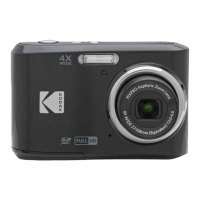
Kodak PIXPRO FZ54 - User Manual

Kodak PIXPRO FZ54
91 pages
Print Icon
To Next Page IconTo Next Page
Loading...
User Manual

Table of Contents

Questions and Answers

  • C
    Curtis BellAug 15, 2025
    Why my Kodak Digital Camera does not turn on?
    • A
      Anthony Bullock DDSAug 15, 2025
      If your Kodak Digital Camera does not turn on, the battery may be depleted. Recharge the battery. Alternatively, the battery may not be correctly installed. Correctly reinstall the battery.
  • A
    Anthony GillAug 18, 2025
    What to do if I cannot write to the memory card on Kodak Digital Camera?
    • B
      barbara29Aug 18, 2025
      If you cannot write to the memory card of your Kodak Digital Camera, the memory card may be locked. Release the write lock of the memory card or replace it with another card.
  • J
    John EvansAug 22, 2025
    Why does my Kodak PIXPRO FZ54 turn off suddenly?
    • I
      idoughertyAug 22, 2025
      If your Kodak Digital Camera turns off suddenly during operation, it is likely because the batteries have been depleted. To resolve this, recharge the battery.
  • C
    Clayton SanchezAug 26, 2025
    How to fix blurred picture on Kodak Digital Camera?
    • M
      Mark SandersAug 26, 2025
      If the picture from your Kodak Digital Camera is blurred, it might be because the camera shakes while taking the picture. Turn on the OIS feature to stabilize the image.
  • S
    scott28Aug 28, 2025
    What to do if images and video files cannot be saved on Kodak PIXPRO FZ54?
    • H
      Heather TerryAug 28, 2025
      If your Kodak Digital Camera images and video files cannot be saved, it might be due to a full memory card. Try using another memory card or deleting unnecessary files. Alternatively, the memory card might be locked; in that case, unlock the memory card.
  • C
    christine05Aug 31, 2025
    What to do if images will not print from Kodak PIXPRO FZ54 Digital Camera?
    • K
      Kristen ColeSep 1, 2025
      If images will not print from the connected printer, check the connection between the Kodak Digital Camera and the printer. Ensure you are using a PictBridge compatible printer. Also, make sure the printer has paper and ink, and that the paper is not jammed.
  • K
    Kayla SmithSep 4, 2025
    Why is saving data to memory card slow on Kodak Digital Camera?
    • C
      christopher86Sep 4, 2025
      If saving data to the memory card of your Kodak Digital Camera is slow, it may be because you are using a memory card below Class 4. Use a memory card with write Class 4 or higher to improve performance.
  • B
    Brian MillerSep 7, 2025
    What to do if Kodak Digital Camera has too many movies to process?
    • R
      rebecca41Sep 7, 2025
      If your Kodak Digital Camera has too many movies to process, it means that the number of pictures or folders in the memory card exceed the specifications, so the playback cannot be displayed. Delete unwanted files to resolve this.
  • C
    Cameron PughSep 12, 2025
    Why does the flash flash on the LCD screen of my Kodak PIXPRO FZ54?
    • V
      Vanessa MunozSep 12, 2025
      If the flash flashes on the LCD screen of your Kodak Digital Camera, it indicates that the current shooting environment requires flash. Turn on the flash to improve image quality.

Summary

Safety Notes

Camera Safety Notes

Essential guidelines to prevent damage and ensure safe operation of the digital camera.

Battery Safety Notes

Critical safety precautions for handling, charging, and disposing of the camera's battery.

Memory Card Safety Notes

Important guidelines for handling, formatting, and storing memory cards to prevent data loss.

Getting Ready

Installing Battery and Memory Card

Procedure for inserting the battery and memory card into the camera.

Capturing Images

Guide on holding the camera, framing shots, focusing, and capturing images.

Mode Overview

Manual Exposure Mode (M)

How to manually control exposure settings like EV, shutter speed, and ISO.

Automatic Shooting Mode

How to use the camera's automatic settings for optimal photo and video results.

Basic Operation

Using Optical and Digital Zoom

How to use optical and digital zoom to frame subjects while taking pictures.

Playback

Connections

Appendices

Troubleshooting Common Issues

Common problems, their possible causes, and solutions for the camera.

Kodak PIXPRO FZ54 Specifications

General IconGeneral
BrandKodak
ModelPIXPRO FZ54
CategoryDigital Camera
LanguageEnglish

Related product manuals