EasyManua.ls Logo

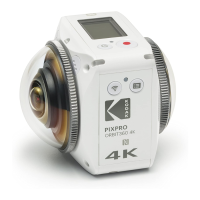
Kodak PIXPRO ORBIT360 4K - User Manual

Kodak PIXPRO ORBIT360 4K
76 pages
Print Icon
To Next Page IconTo Next Page
Loading...
User Manual
KODAK
VR CAMERA
PIXPRO
ORBIT360 4K/4KVR360

Questions and Answers

  • A
    Anthony CalderonJul 27, 2025
    Why my Kodak Digital Camera does not turn on?
    • E
      Emily GonzalesJul 27, 2025
      If your Kodak Digital Camera does not turn on, it could be due to a depleted battery. In this case, charge the battery. Also, ensure that the battery is correctly installed by following the charging instructions in the manual.
  • M
    Michael CooperJul 31, 2025
    What to do if my Kodak PIXPRO ORBIT360 4K failed to connect to Wi-Fi?
    • J
      Jacob ReidJul 31, 2025
      If your Kodak Digital Camera fails to connect to Wi-Fi, it may be due to an incorrect password. Re-enter the password. If the password has been forgotten after changing it from the default, use the reset function to restore the initial factory default password: 12345678.
  • M
    Michael McgrathAug 4, 2025
    What to do if Kodak Digital Camera does not turn on?
    • M
      Melissa RossAug 4, 2025
      If your Kodak Digital Camera doesn't turn on, it could be due to a depleted battery. Charge the battery. Another possibility is that the battery is installed incorrectly. Follow the charging instructions in the manual to properly install the battery.
  • R
    Rachel MorrowAug 8, 2025
    What to do if Micro USB connection failure with Kodak PIXPRO ORBIT360 4K Digital Camera?
    • A
      Andrew JohnsonAug 9, 2025
      If you are experiencing a Micro USB connection failure with your Kodak Digital Camera, the wrong USB connection mode may have been selected. Confirm the USB connection mode in the camera menu. If there is a need to read, save videos or photos, please select "Mass Storage". If there is a need to serve as a video chat (SKYPE) camera, please select "Webcam".
  • L
    lreyesAug 13, 2025
    How to fix blurred images on Kodak PIXPRO ORBIT360 4K Digital Camera?
    • O
      openaAug 13, 2025
      If you are getting blurred images with your Kodak Digital Camera, the lenses or lens covers might have smudges or dirt. Clean them carefully with a clean, lint-free, dry cloth.
  • C
    Christine AndersonAug 17, 2025
    What to do if I have Micro USB connection failure with Kodak PIXPRO ORBIT360 4K Digital Camera?
    • C
      Cynthia DuncanAug 17, 2025
      A Micro USB connection failure on your Kodak Digital Camera could be caused by selecting the wrong USB connection mode. Confirm the USB connection mode in the camera menu. Select "Mass Storage" to read or save videos/photos, or select "Webcam" to use it as a video chat camera (e.g., with SKYPE).
  • M
    millergeorgeAug 21, 2025
    Why is my Kodak Digital Camera Wi-Fi connection so slow?
    • A
      Amanda LewisAug 21, 2025
      If you are experiencing a slow Wi-Fi connection with your Kodak Digital Camera, it might be due to too many programs running simultaneously on your smart device. Try closing other unnecessary programs and APPs that are connecting or running on your smart device.

Summary

Getting Started

Before You Start

Introduction and setup overview, including conformity and manual details.

Safety Notes

Essential safety guidelines for product usage, battery, and memory card.

Camera Setup and Basics

Parts and Initial Setup

Identifying accessories, installing battery/memory, and cover.

Camera Interface and Controls

Understanding buttons, displays, and basic operations.

Shooting Modes and Settings

Display Modes and Image Settings

Customizing display, movie size, and photo parameters.

General Settings and Maintenance

Configuring audio, power, USB, date/time, formatting.

Connectivity and Remote Operation

BLUETOOTH Remote Control

Setup, pairing, and app usage for remote control.

USB and HDMI Interfaces

Connecting for data transfer and external display.

Wi-Fi and NFC Connectivity

Connecting camera to devices wirelessly via Wi-Fi and NFC.

Technical Information and Support

Specifications

Detailed technical data of the camera and its features.

Troubleshooting and Warnings

Resolving issues and understanding messages.

Special Accessories

Accessory Installation Guides

Instructions for mounting various camera accessories.

Kodak PIXPRO ORBIT360 4K Specifications

General IconGeneral
Video Frame Rate30 fps
ConnectivityWi-Fi, Micro HDMI, Micro USB
Image SensorCMOS
Video Resolution4K UHD (3840 x 2160)
Field of View360 degrees
Battery TypeLithium-ion
StorageMicroSD
WaterproofNo
Sensor TypeCMOS

Related product manuals