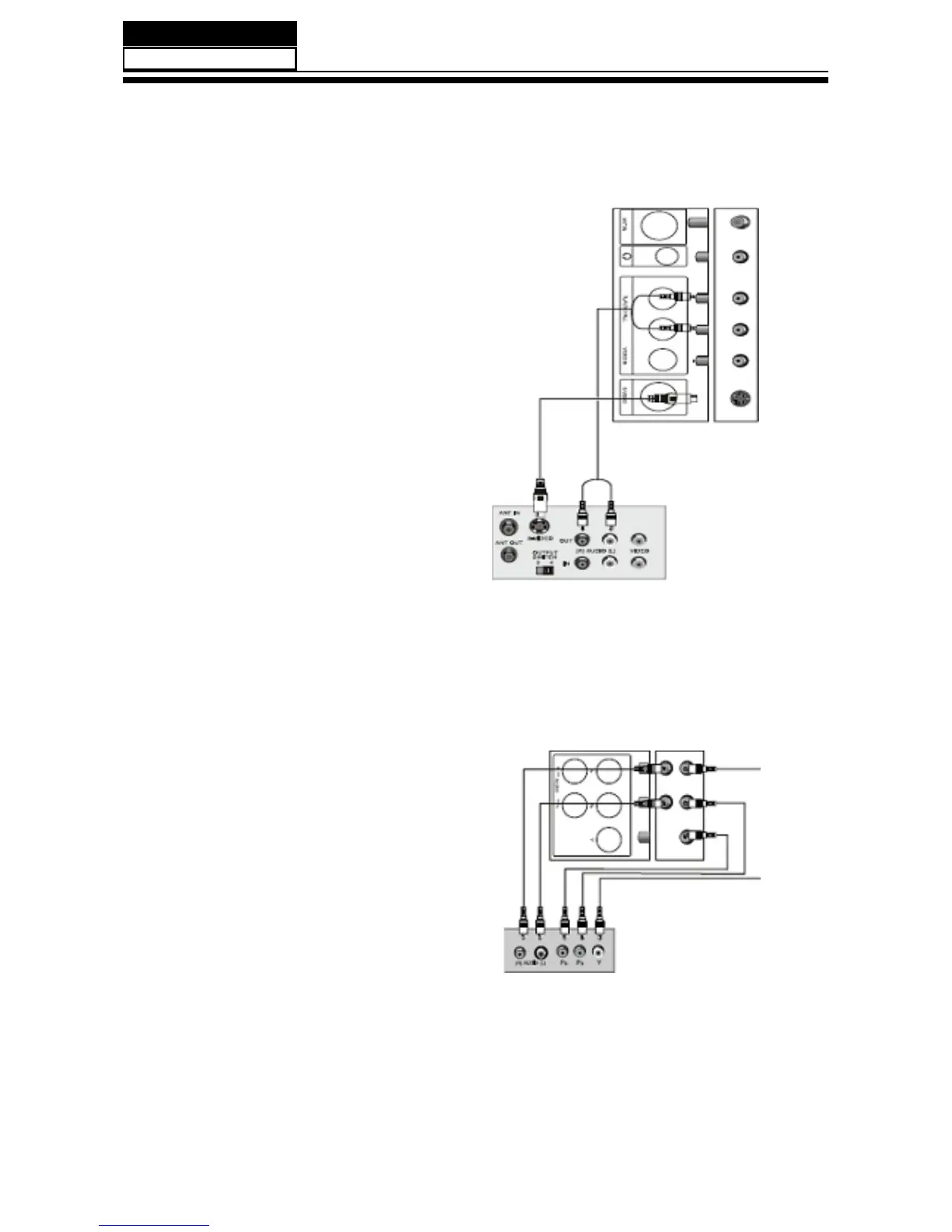
Connecting a VCR with an S-Video cable
An S-Video connection provides better video
than a standard AV connection.
To connect a VCR with an S-Video cable:
1. Make sure that your TV/DVD combo and
the VCR are turned off;
2. Connect an S-Video cable(not included)
to the S-VIDEO jack on the back of your TV/
DVD combo,then connect the other end of the
S-VIDEO OUT jack on the VCR;
3. Connect a standard audio cable(not
included)to the R and L AUDIO jacks to the
left of the VIDEO jack on the back of your TV/
DVD combo,them connect the other end of the
cable to the AUDIO OUT jacks on the VCR;
4. Turn on your TV/DVD combo and the VCR;
5. Press INPUT,press CN+ or CN- to select
S-VIDEO,then press ENTER.
External Equipment Connections: Connecting a component
video device
A component video device provides better
video than an S-Video connection.
To connect a component video device.
1. Make sure that your TV/DVD combo and
the component video device are turned off;
2. Connect a component video cable not
included to the Pr,Pb,and V jades on the back
of your TV/DVD combo,then connect the
other end of the cable to the corresponding
COMPONENT OUT jacks on the component
video device;
3. Conn ect a sta ndard audi o cabl e(n ot
included) to the R and L AUDIO jacks below the
Pr,Pb,and Y jacks on the back of your TV/DVD
combo,then connect the other end of the cable
to the COMPONENT AUDIO OUT jacks on the
VCR;
4. Turn on your TV/DVD combo and the
component video device;
5. Press INPUT,press CH+ or CH- to seclect
COMPONENT,then press ENTER.


 To Next Page