TT-1715 2/17 3
2. Install the remote digital gauge.
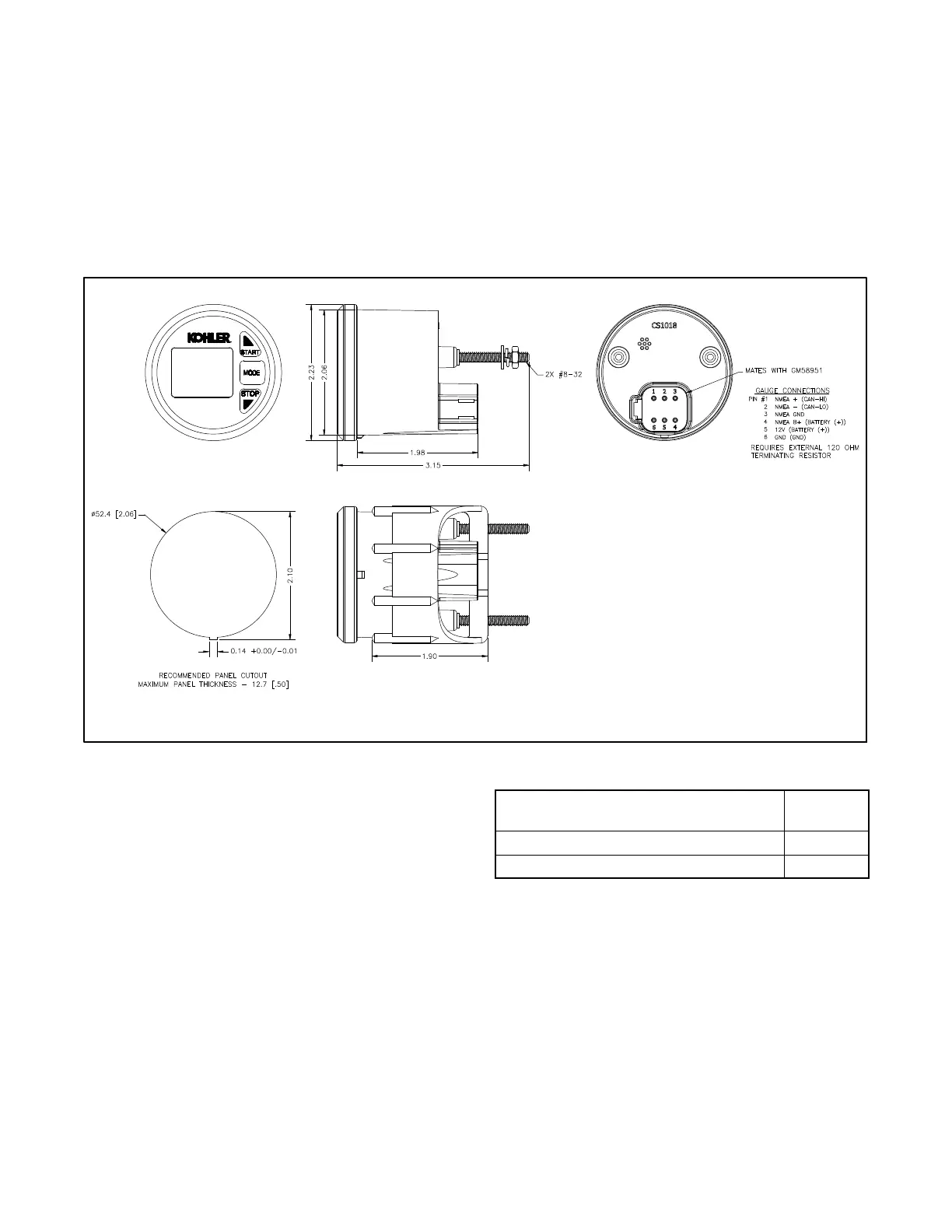
2.1 Consider the following when mounting the remote
digital gauge:
D A dry location in the wheelhouse or bridge.
D The wiring harness length.
D The mounting depth and overall size.
2.2 See Figure 4 for the gauge mounting dimensions.
Note: Dimensions are in mm [in.] and not to scale.
GM95503-B
Figure 4 Two-Inch Digital Gauge Mounting Dimensions
2.3 Connect the wiring harness (GM96782) 6-pin
connector end to the 6-pin connector on the
gauge. See Figure 6.
2.4 Connect the wiring harness (GM96782) 12-pin
connector end to the generator set’s
customer-interface 12-pin connector. See
Figure 6 and Figure 7. Use a r emote extension
harness if additional length is required.
Note: Order a remote extension harness kit, if
required. DO NOT use more than
3 remote harness kits and DO NOT
exceed 40 m (131 ft.) in harness length.
See Figure 5 for kit selection.
Remote Extension Harness Kit Numbers
Length
m (ft.)
GM32333-KP1 4.6 (15)
GM32333-KP2 7.6 (25)
Figure 5 Remote Extension Harness Kits
(For Gauge to Generator Set)


 To Next Page
 Loading...