4
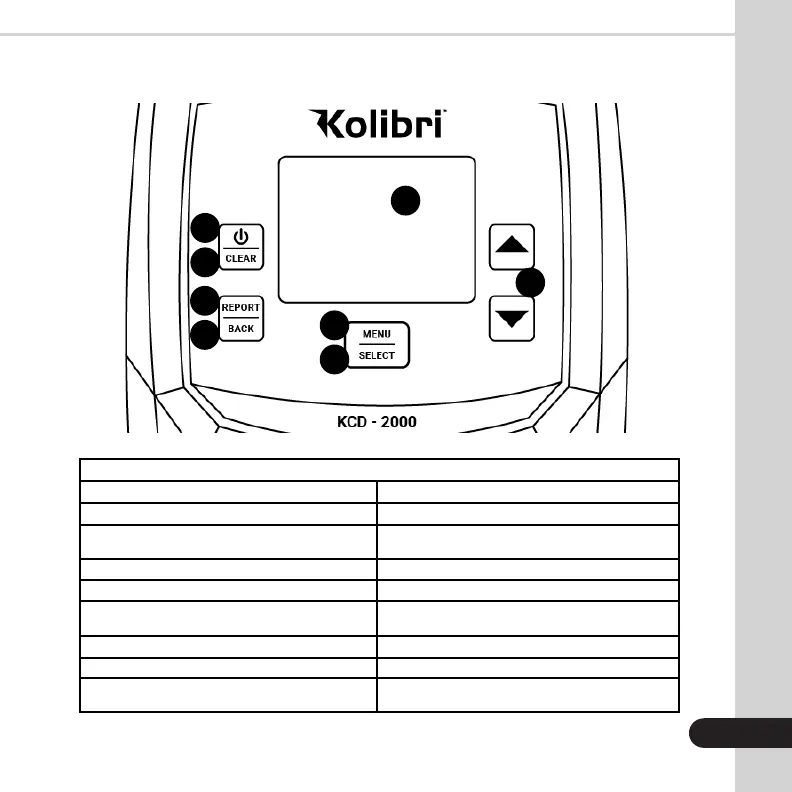
CONTROL PANEL
Key Function
1. Display Shows detection outcome
Shows the detailed report of bills counted
Shows settings
Selects settings in the menu
Changes the direction that bills are ejected
(front or back). Moves cursor in the menu
Goes back to home screen from menu or
report screen
2. POWER Button
3. CLEAR Button
4. REPORT Button
5. BACK Button
6. MENU Button
7. SELECT Button
8. ARROW Buttons
Turns unit ON/OFF by pressing and holding down
for three seconds
Resets the count
1
2
3
4
6
8
5
7


 To Next Page