20
Assemble it in reverse order of disassembly.
※For Brushless Motor Type, there is no 4th filter.
⑤ Replace the filter.
④ Open the filter lid at the bottom.
③ Carefully lay the body on the
flat place.
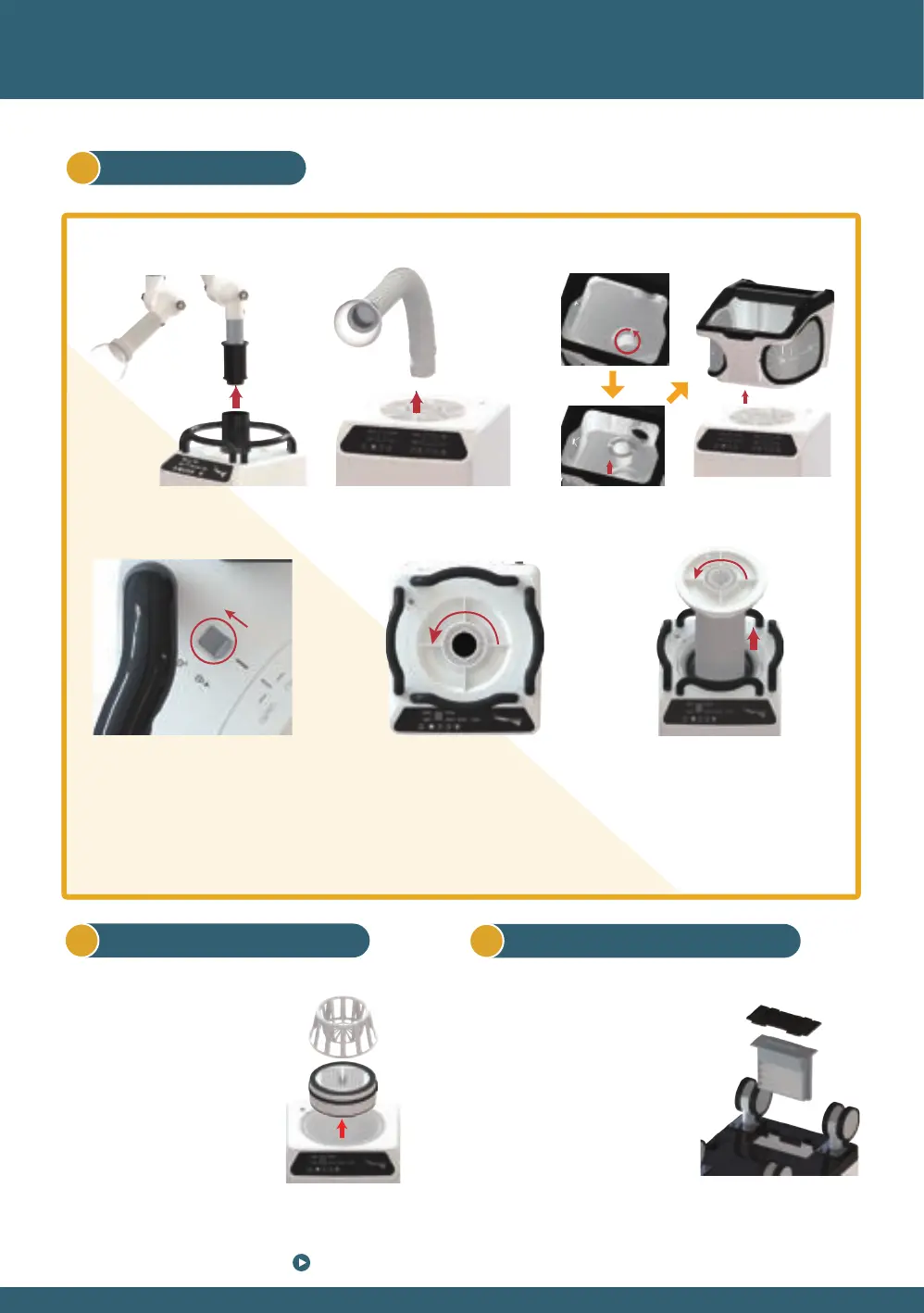
② Remove the spare parts (arm,
hose, etc.) connected to the main
body.
① Disconnect the power cord
connected to the main body.
3
How to replace the 4th Filter
Filter bracket
① Take out the 1st filter
and the filter bracket
below the 1st filter in order.
② Remove the 2nd filter /
3rd filter and replace it
with a new one.
2
Replace 2nd and 3rd Filter
④-1 Lift the lid.
④-2 Align the opening of the pocket
filter with the groove on the
bottom of the lid, and turn it
clockwise to insert.
(Before connecting the pocket filter, fold
the side of the filter well to shape it.)
1
2
③ With both hands, turn the upper
lid in the open direction
② Move the switch on the upper
side of the main body towards
the unlock shape.
① Remove the attachment attached to the top
Grinding Box TypeSuction Hose Type3 Joint Arm Type
1
Replace 1st Filter
10 Replacing the filters



 To Next Page