9
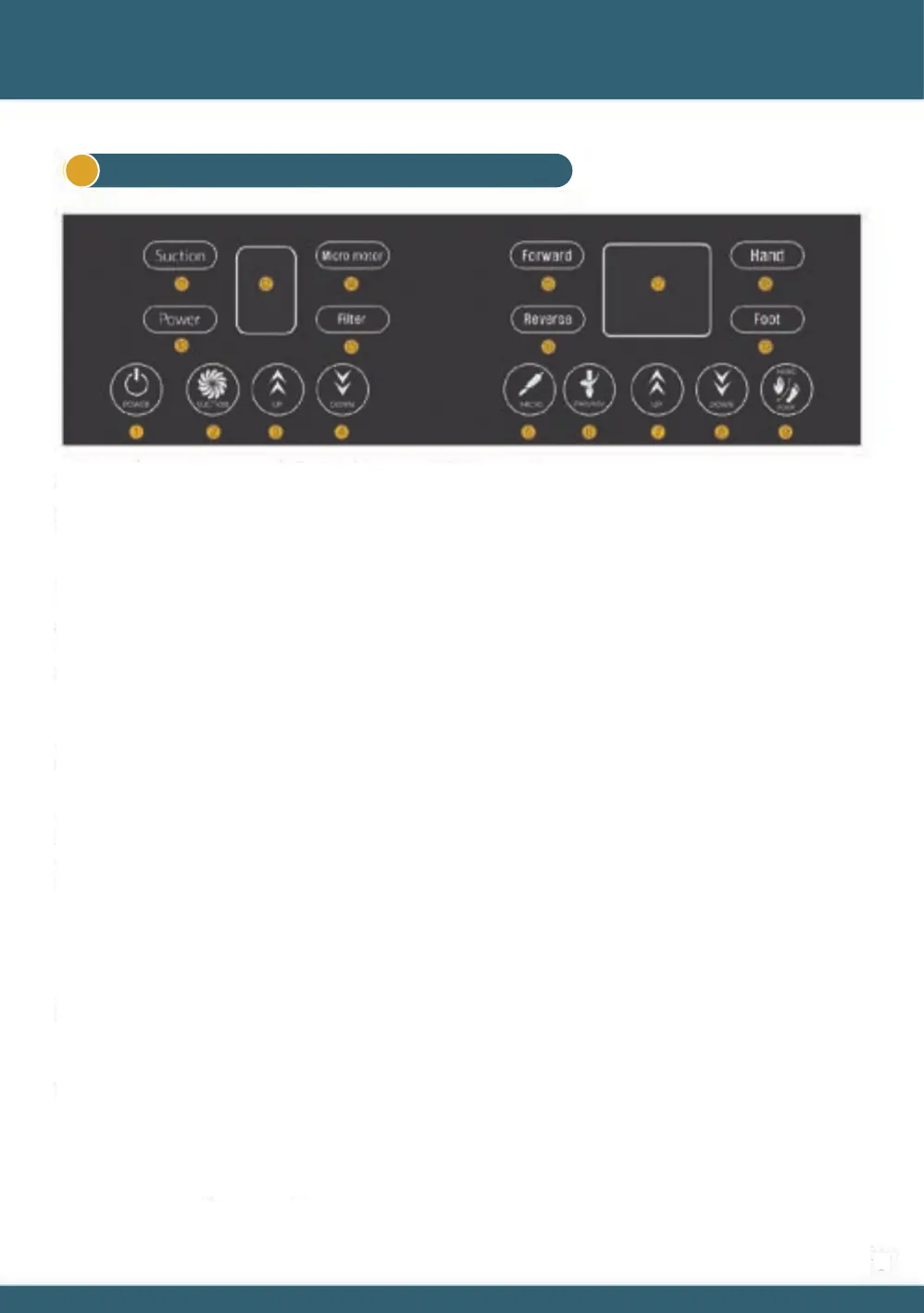
⑬ Filter : When the blue LED turns on automatically, it is a signal notifying when to clean or replace the 1st filter.
It can be used while the Filter LED is on, but the suction power decreases, and if it is used continuously,
'F'is displayed on the ⑫ display window and the suction stops.
In this case, the filter must be cleaned or replaced for normal use.
To release the Filter LED, turn off the power with the ① POWER button and then turn it on again.
When you touch the ⑦ or ⑧ button, between 1 to 35 are displayed on the ⑰ display window.
⑫, ⑰ Number display : When you touch the ③ or ④ button, between 1 to 9 or 1 to 5 are displayed on the ⑫ display window.
⑨ HAND / FOOT : Button for Micromotor driving method selection. Refer to ⑤ MICRO description above.
When the ⑱ Hand lamp is turned on, adjust the hand piece speed with the ⑦ UP / ⑧ DOWN button.
When the ⑲ Foot lamp is turned on, use the foot pedal to adjust the speed of the hand piece.
Strong push on the foot pedal will speed up the hand piece, and soft push will slow to down.
* For reference, both HAND and FOOT modes operate the hand piece.
* After setting the Foot mode, you need to press the ⑤ MICRO button to control the hand piece
with the foot pedal.
⑦ UP & ⑧ DOWN : RPM control button of the hand piece. A number between 1 and 35 is displayed in ⑰.
⑥ FWD/REV : Button for setting hand piece rotation direction. The ⑮Forward or ⑯Reverse LED turns on. (⑮
Foward-clockwise / ⑯ Reverse-counterclockwise)
⑤ MICRO : When the micromotor’s on/off button is turned on, ⑭ Micro motor LED turns on and the hand piece
operates. ⑱ In Hand mode, the speed of the hand piece operates at the speed of the ⑰display window.
Or ⑲ In Foot mode, the hand piece is operated by the foot pedal.
③ UP & ④ DOWN : Suction level control button, level is displayed in ⑫.
② SUCTION ON/OFF : Suction on / off button: When suction is on, ⑪ LED is turned on and suction is activated.
① POWER ON/OFF : Power on / off button: When the power is turned on, the ⑩LED changes from red to white,
and the numeric display and other buttons become operational.
※ When the power is connected, the ⑩ LED turns red. (Waiting state)
Touchpad - Extraction systems of Micromotor type1
05 Product usage


 To Next Page
 Loading...