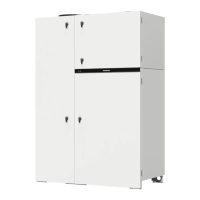
The KOMBI unit is a hybrid heating and ventilation system designed for domestic hot water production, temperature control with underfloor heating/cooling systems, and quality ventilation. It integrates an air handling unit, a heat pump, and a hot water system, which can operate independently or in combination based on user settings.
Function Description:
The heat pump efficiently utilizes thermal energy from the air to heat technical water for the underfloor heating system or to produce domestic hot water. It maintains the desired indoor temperature by adjusting the temperature and flow rate of water in underfloor circuits. The ventilation unit can also provide additional heating or cooling using technical water heated by the heat pump. Domestic hot water is stored in a special tank to minimize cooling and save energy.
The air handling unit removes indoor air containing carbon dioxide, allergens, and dust, replacing it with filtered fresh outdoor air. A heat exchanger within the ventilation unit extracts thermal energy from indoor air and transfers it to the supply air. If the heat exchanger alone cannot achieve the desired temperature, hot or cold water from the heat pump is used.
Important Technical Specifications:
The KOMBI unit offers various operation modes, each automatically adjusting ventilation, underfloor heating, and hot water production parameters. There are 8 pre-programmed operation modes:
- Home: Medium ventilation, comfortable indoor and hot water temperature.
- Away: Lower ventilation, lower indoor and hot water temperature for energy saving.
- Quiet: Reduced noise by limiting compressor load and ventilation intensity. Operates for a set duration (1-300 min) then returns to the previous mode. May take longer to heat water and might not reach desired room temperature in cold weather.
- Freshness: Increased ventilation for quick air changes or when more people are present. Operates for a set duration (1-300 min) then returns to the previous mode.
- Holidays: Periodic ventilation (30 min cycles, several times a day) at minimum intensity, lower indoor and domestic hot water temperatures. Operation time can be set from 1 to 90 days or to a specific date.
- Override: Activates ventilation at selected intensity, maintaining selected indoor and domestic hot water temperature regardless of other modes. Highest priority. Operates for a set duration (1-300 min) then returns to the previous mode. Can be activated by external devices (switch, kitchen hood, motion sensor).
- Kitchen: Increases air flow to premises and reduces extracted air volume to enhance kitchen hood efficiency. Operates for a set duration (1-300 min) then returns to the previous mode. Can be activated by external devices.
- Fireplace: Creates a small air imbalance to improve combustion and reduce heating costs. Operates for a set duration (1-300 min) then returns to the previous mode. Can be activated by external devices.
All operating mode parameters are pre-programmed but can be customized. Individual units (ventilation, domestic hot water, underfloor heating) can be switched off in different modes.
Usage Features:
The unit is controlled via a color touchscreen control panel.
- Turning On/Off: Press and hold the button on the indicator bar for 5 seconds. The unit will operate with the last selected settings. Alternatively, use the ON/OFF button on the control panel's home screen or within the "Menu" -> "OFF" option.
- Indicator LED: Solid red (off), solid white (in operation), blinking red (error), flashing yellow (dirty filters or service mode).
- Parameter Overview: Swipe the main window to view air/water temperatures, efficiency, and energy consumption. Parameters can be customized by pressing and holding for 5 seconds.
- Operation Mode Selection: Press the current mode icon on the home screen, then select a desired mode. "Home" and "Away" activate immediately and run continuously. Other modes require setting a duration.
- Weekly Schedule: Activate via the "AUTO" button. Two schedules are available: one for heating and one for cooling season, switching automatically. Users can add new events with specific start times, ventilation intensity, and temperatures. Schedules can be copied to other days.
- Settings Menu: Access via the "Menu" button.
- Operation Modes: Adjust parameters for each mode. "Advanced settings" (available at advanced user level) offer more detailed control, such as supply water temperature correction and extracted air volume correction.
- Heating/Cooling: Control heat pump operation and water/room temperatures.
- Season: Auto (switches based on outdoor temperature), Winter (heating only), Summer (cooling only, except for DHW).
- Temperature Feedback: None (no indoor temperature measurement), Room (measured at ventilation extraction), Panel (measured by control panel sensor).
- Heating: Set supply water temperature for underfloor heating/ventilation. Modes include Outdoor Temperature Compensation (adjusts water temp based on outdoor conditions) and Constant (maintains fixed water temp).
- Cooling: Use ventilation, underfloor system, or fan coils. Specify minimum water temperature to prevent condensation. Features integrated floor condensation prevention.
- Temperature Limits: Set min/max supply air temperature for the AHU. Ventilation intensity reduces if limits are not met.
- Domestic Hot Water:
- Disinfection: Schedule thermal disinfection to prevent Legionella bacteria. Set temperature (factory 65°C), duration, time, and intervals. Caution: Very hot water circulates during disinfection.
- Temperature Hysteresis: Set the temperature drop before the heat pump reheats domestic hot water. Lower hysteresis keeps water hotter, higher saves energy.
- Hot Water Circulation: Control a circulating pump for large DHW systems. Can be on continuously, on a weekly schedule, or during heating.
- Ventilation: AHU settings.
- Temperature Control: Adjust supply air temperature offset.
- Air Quality Control: Enable/disable ventilation intensity control by air or humidity sensors (Impurity, Humidity, Sensor 1/2, VOC). Set check interval for air quality.
- Ventilation Limits: Set maximum air volume for all functions and modes.
- ECO Mode: Energy-saving mode. Blocks electrical heaters, blocks heat pump cooling of ventilation air, maximizes outdoor air use for cooling/heating. Customizable.
- General Settings:
- User Interface: Language, flow units, screen saver (brightness, order, on/off), panel lock (partial/full with PIN), user level (Basic/Advanced), touch sound, alarms sound, time/date.
- Panel Sensor Calibration: Adjust accuracy of temperature/humidity sensors (±5°C for temperature, ±10% for humidity).
- Connectivity: Configure network settings (IP address, subnet mask, Gateway, BACnet ID, Modbus ID, RS-485) for remote access via web browser or "Komfovent Control" app. Reset user password.
- About Device: View unit type, software version, serial number. Generate QR code for app connection.
Maintenance Features:
Regular inspection, filter replacement, and cleaning are essential. Some tasks can be performed by the user, others by qualified specialists.
- Safety Precautions: Always stop and unplug the unit before working inside. Wait for fans, compressor, and heating devices to cool. Use caution near hot surfaces. Remove foreign objects and tools. Use safety equipment (gloves, goggles). Ensure components are dry before restarting.
- Heat Pump Maintenance: User can perform visual inspections. Mechanical/electrical work must be done by a qualified refrigeration specialist or "Komfovent" representative. Do not unscrew threaded connections or caps of the heat pump unit due to risk of frostbite from refrigerant.
- Filter Replacement:
- Check filters for damage, tears, or dampness. Replacement intervals depend on environmental conditions (e.g., shorter in spring/summer due to pollen). Replace if visibly dirty, even if not at scheduled time.
- Filter clogging is displayed (0-100%). A message appears at 100%. Reset filter timer after replacement.
- Important: Ensure filters are facing the correct air flow direction (indicated by a sticker on the filter frame).
- Maintenance Schedule (User tasks):
- Check filters and change if required: 3 months
- Change filters: 6 months
- Clean dust inside the unit: 6 months
- Clean piping and siphon of condensate drainage, check flow: 12 months
- Check for water leaks: 6 months
- Clean internal and external surfaces with vacuum cleaner/damp cloth (avoid electrical components, ensure dryness).
- Maintenance Schedule (Service Representative tasks):
- Check the rotor drum brushes for tightness and wear: 12 months
- Check AHU rotor drums for contamination: 6 months
- Clean the rotor drum: If required
- Check fan operation and clean impellers: 12 months
- Check tightness of heat pump and hot water preparation systems piping: 12 months
- Check floor and domestic water system components (manifolds, expansion vessels) according to manufacturer's instructions: 12 months
- Replace the rotor belt: If required
Troubleshooting:
The device continuously monitors operation and provides messages (critical alarms or notifications) on the control panel or mobile app.
- Actions: Read message and note number. Stop the unit, unplug it. Find tips in the "Message Table." Eliminate cause if possible. Contact authorized service if unresolved. Ensure no foreign objects remain before closing the unit. Reconnect power and delete messages.
- Common Messages (Examples):
- Low return water temperature (Code 1): Check ventilation air temperature, rotary heat exchanger, water temperature sensor, risk of freezing.
- Low supply air temperature (Code 2): Check heaters, rotary heat exchanger, air temperature sensor.
- High supply air temperature (Code 3): Check integrated heaters, air temperature sensor.
- Air/Water temperature sensor failure (Code 4-15, 12-13): Check sensor connection/function.
- Internal/External fire alarm (Code 16-17): Locate heat source, restart unit after alarm removal.
- Heat exchanger failure (Code 18-24): Check rotary heat exchanger, control board, temperature sensor.
- Air flow sensor failure (Code 25-26): Check sensor connection/function.
- Freezing protection (Code 27, 100, 121): Temperature too low, closed heating circuits, faulty circulation pump/water flow sensor.
- Low air flow (Code 28-29): Check filters, air duct system, fan.
- Controller failure (Code 30-33, 145): Check electrical input, external devices, main electronics board, communication.
- Water flow sensor fault (Code 41-42, 96, 122): Check water supply, circulation pump, water flow sensor.
- Pressure/Refrigerant temperature sensor failure (Code 43-48, 49-54, 79-80, 88-90, 93, 105): Check sensors, refrigerant levels, heat pump function.
- Temperature sensor failure (Code 55-78, 91-92, 131, 153): Check sensors, critical limits.
- Electric heater overheat/fail (Code 81, 108): Check water supply, electric water heater, circuit breakers.
- Evaporator fan/pressure sensor failure (Code 82-83): Check fan, sensor.
- Compressor control/frequency converter error (Code 86-87, 102-103): Check circuit breakers, compressor/converter function.
- Boiler heating/Disinfection timeout (Code 97-98): Check water usage, temperature sensor, electric water heater, circuit breakers.
- Limited heating (Code 99): Check electric heater blocking, operation mode, desired temperature.
- Defrost low water flow/fail (Code 106-107): Check water supply, heating circuits, circulation pump, water flow sensor.
- Overheat (Code 120): Hot water temperature exceeds 80°C.
- Humidity/Impurity sensor failure (Code 132-134): Check sensor wiring, connection, settings.
- Change air filters (Code 146): Replace filters.
- Service mode (Code 147): Contact specialist.
- Low heat exchanger efficiency (Code 151): Check supply air volume, unit door, air flow, air temperature sensor.
- Integrated control panel communication error (Code 152): Check indicator bar function/communication.
- Update failure (Code 154-158): Contact authorized service.

 Need help?

 To Next Page
 General