43
Issue 1.0 16/12/99
7 PROGRAMMING AND CONFIGURATION
For further details of normal operation please refer to the appropriate user manual -
WP10or WP30.
Page 9
3 Configuration
3.1 Scaling
Before using the Wheelpilot, it is necessary to pro-
gram in the steering sensitivity, which is related to
the number of turns that the wheel makes between
end stops. This will determine the amount of
steering correction the Wheelpilot applies.
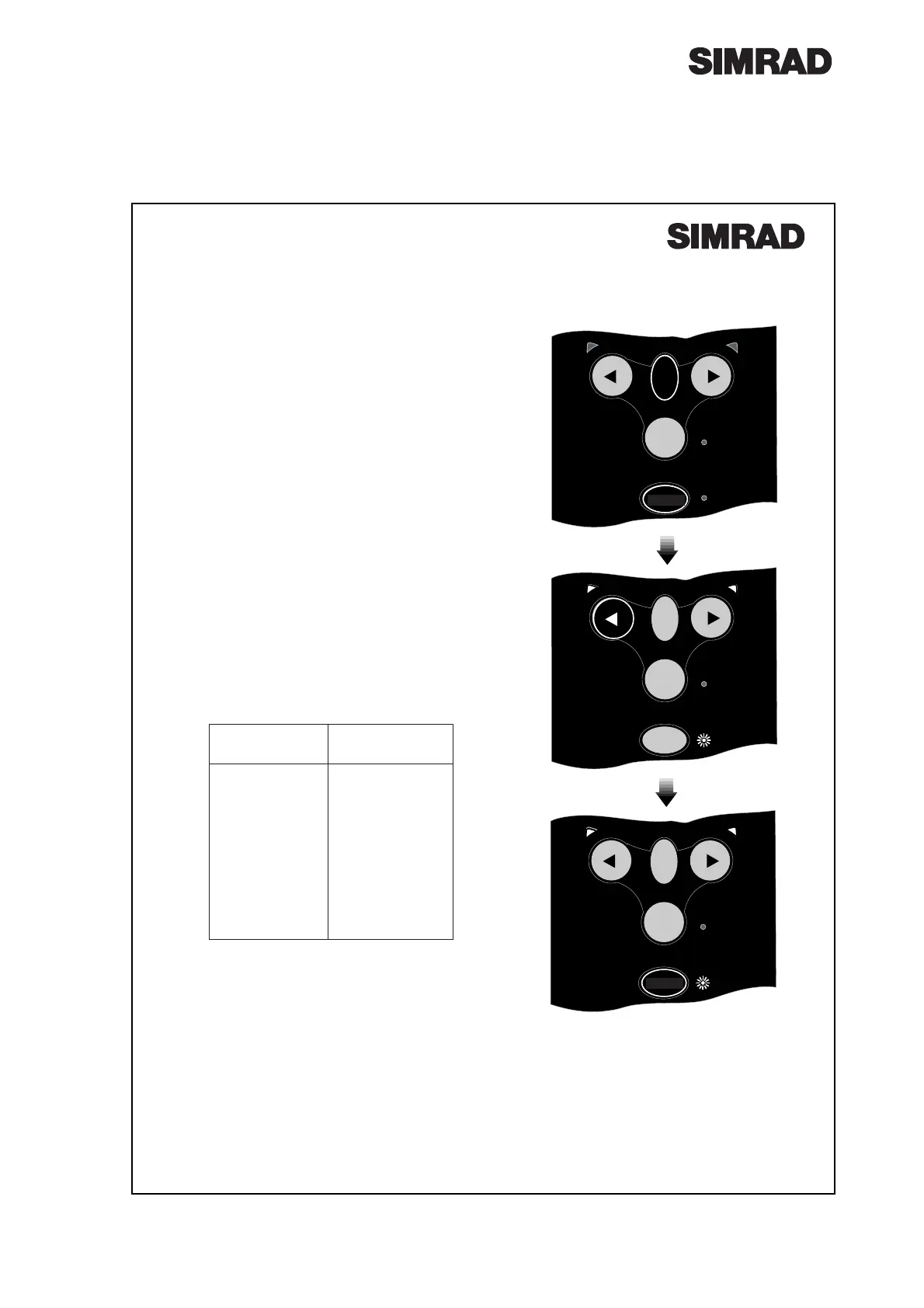
With the power OFF, press and hold the TACK
and CALkeys and switch on the power. Both
Port and Starboard LEDs will illuminate, the Cal
LED will flash, and a repeated sequence of beeps
will be heard. The number of flashes and beeps in
the sequence indicates the current scaling factor.
The scaling factor is the total number of half turns
from lock to lock. For example, if the wheel has
three complete turns from lock to lock, the scaling
factor will be 6. If there are 1
1
⁄2turns from lock to
lock, then the factor will be 3.
Press the Starboardkey to increase the scaling fac-
tor by one, to a maximum value of 10 (= 5 turns
lock to lock). Press the Portkey to decrease the
scaling factor by one, to a minimum value of 2 (= 1
turn lock to lock).
To confirm scaling setting and return to Standby
Mode, press the CALkey.
STBY
NAV
TACK
STBY
AUTO
TACK
NAV
STBY
CAL
TACK
STBY
AUTO
STBY
NAV
TACK
STBY
AUTO
NAV
Fig 3.1 - Reducing scaling factor by one
POWER
ON
Setting
(No.beeps/flashes)
2
3
4
5
6
7
8
9
10
Turns Lock To
Lock
1
1
1
⁄2
2
2
1
⁄2
3
3
1
⁄2
4
4
1
⁄2
5
CAL
CAL



 To Next Page