5. Press the
ENTER
key.
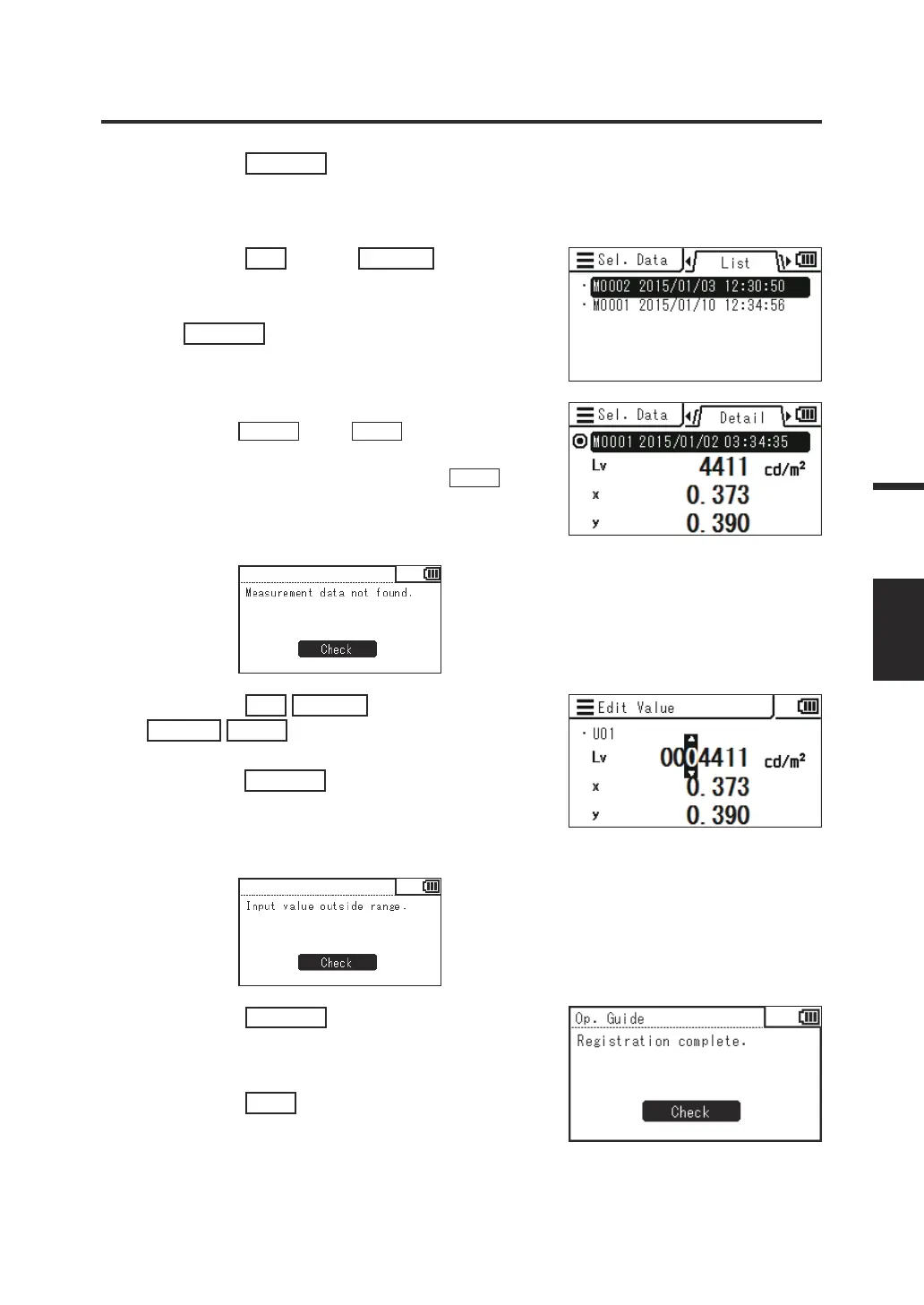
The screen for selecting from a list of measured
values is displayed.
6. Press the
UP
key or
DOWN
key to
select the measured value used as a
calibration standard, and then press
the
ENTER
key.
You can check the details of the stored data by
pressing the
RIGHT
key or
LEFT
key.
You can check the measurement condition, target,
user calibration value, etc. by pressing the
INFO
key.
When no measured value has been stored, the
following alert screen is displayed. You need to save a
measured value rst.
7. Press the
UP
/
DOWN
key and the
RIGHT
/
LEFT
key to set values as the
user calibration standard, and then
press the
ENTER
key.
(If the entered value is out of the available
setting range, the screen returns to the value
entry screen. Enter another value.)
8. Press the
ENTER
key on the
conrmation screen to return to the
menu screen.
9. Press the
ESC
key.
The measurement screen is displayed on the
LCD screen.
The specied values are stored even when the
power switch is set to OFF ().
69
Measurement
Preparation
USER CAL














 To Next Page