3
No. Key/Indicator Mark Function
15 RIGHT
Move right / Play forward
16 SEL/PTZ SEL/PTZ
Enter system pop-up (short cut) menu bar/ edit button / enter PTZ
mode
17 MENU/ESC MENU/ESC Enter/exit system menu
18 HDD indicator HDD HDD indicator
19
Power
indicator
PWR Power supply indicator
20 IR Receiver To receive signal from remote control
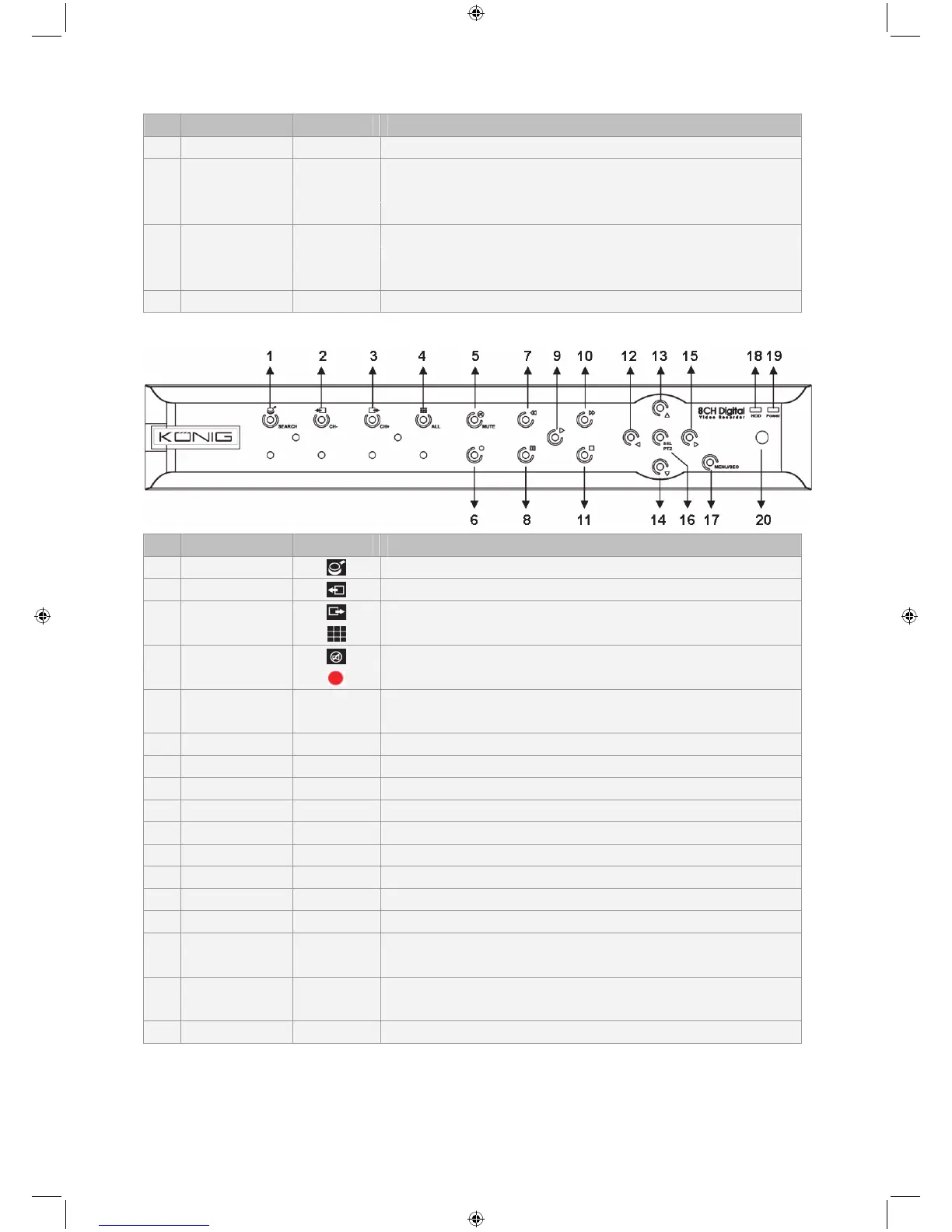
Description of SEC-DVR408 front panel:
No. Key/Indicator Mark Function
1 SEARCH
Enter system pop-up (short cut) menu bar
2 CH-
Switch to previous channel
3 CH+
Switch to next channel
4 ALL CH
Switch to 4/8 pictures display
5 MUTE
Audio mute key
6 REC
Start manual recording
7 REW
Move left / Rewind
(it also can be used for switching to the OSD control panel)
8 PAUSE
Pause / play frame by frame
9 PLAY
Enter into playback mode / Play button
10 FWD
Move right / Play forward
11 STOP
Stop Playback / stop manual recording
12 LEFT
Move left / Rewind
13 UP
Enter main menu or exit menu
14 Down
Move down
15 RIGHT
Move right / Play forward
16 SEL/PTZ SEL/PTZ Enter system pop-up menu bar / edit button / enter PTZ mode
17 MENU/ESC MENU/ESC Enter/exit system menu
18 HDD indicator HDD Continuous flickering indicates HDD is being accessed
19
Power
indicator
PWR Green light indicates power supply status
20 IR Receiver To receive signal from remote control



 To Next Page