EasyManua.ls Logo

Korg 01/W pro - Page 29

Korg 01/W pro
41 pages
Print Icon
To Next Page IconTo Next Page
To Previous Page IconTo Previous Page
Loading...
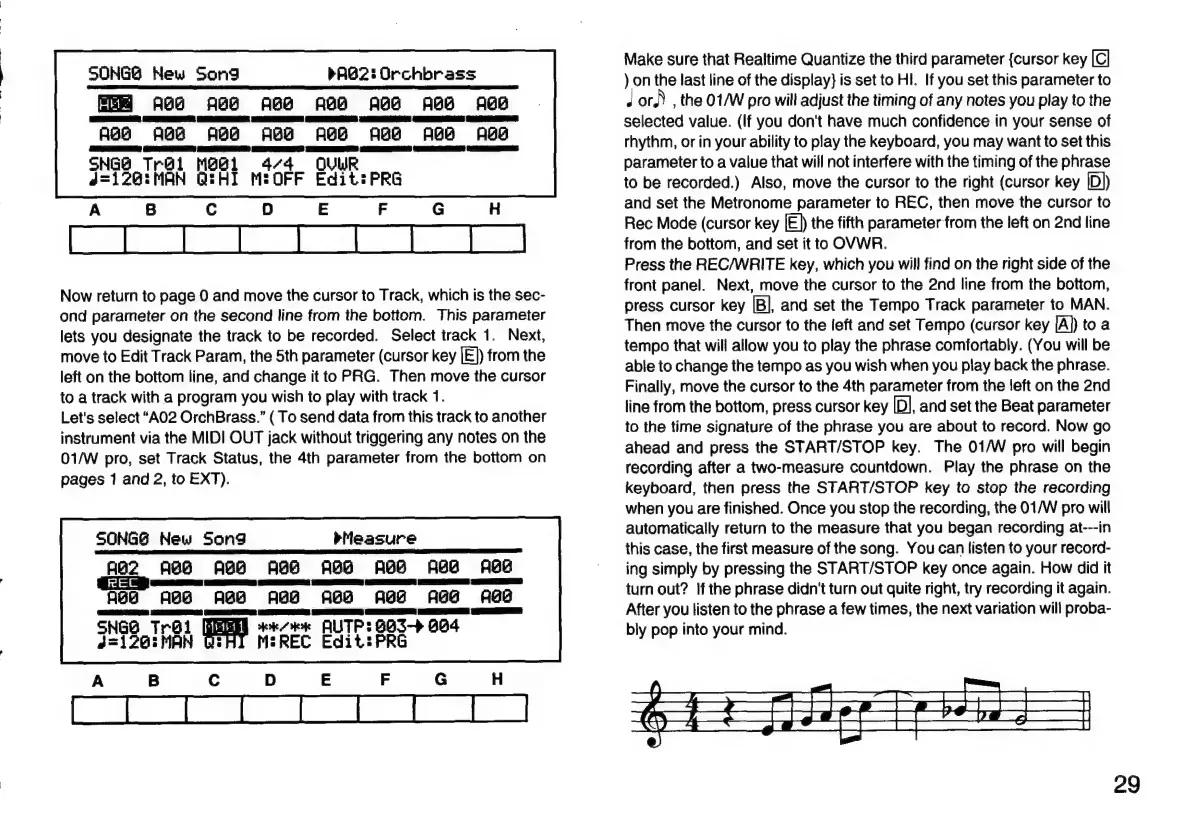
SONGO
New
Song
PROZ:
Orchbrass
AGA ABB ABa ABB
ABO
ABB aBa
AGA
ABS
Aga
ABS
AGG
ABE
ABB
ABD
SNGO
Trgl
MGI
4/4
QUUR
d=1202:MAN
Q:HI
MIOFF
Edit:
PRG
Now
return
to
page
0
and
move
the
cursor
to
Track,
which
is
the
sec-
ond
parameter
on
the
second
line
from
the
bottom.
This
parameter
lets
you
designate
the
track
to
be
recorded.
Select
track
1.
Next,
move
to
Edit
Track
Param,
the
5th
parameter
(cursor
key
[E])
from
the
left
on
the
bottom
line,
and
change
it
to
PRG.
Then
move
the
cursor
to
a
track
with
a
program
you
wish
to
play
with
track
1.
Let's
select
“A02
OrchBrass.”
{
To
send
data
from
this
track
to
another
instrument
via
the
MIDI
OUT
jack
without
triggering
any
notes
on
the
01/W
pro,
set
Track
Status,
the
4th
parameter
from
the
bottom
on
pages
1
and
2,
to
EXT).
SONGG
New
Song
Measure
AB2
AGO ABB
ABS
ABB
ABB
ABE ABE
ares)
Te
=
E
ES
DEE
SaaS
RR
Ea
(eee
Age
ABG
AGG
ABB
ABH ABE AGG
ABE
TERE
EEE)
E
ee
GEER
det
AUTP:
6G3->
G04
SHI
MEREC
Edit:
PRG
SNGO
Troi
2=126:
MAN
Make
sure
that
Realtime
Quantize
the
third
parameter
{cursor
key
)
on
the
last
line
of
the
display}
is
set
to
HI.
If
you
set
this
parameter
to
J
or.)
,
the
01/W
pro
will
adjust
the
timing
of
any
notes
you
play
to
the
selected
value.
(If
you
don't
have
much
confidence
in
your
sense
of
rhythm,
or
in
your
ability
to
play
the
keyboard,
you
may
want
to
set
this
parameter
to
a
value
that
will
not
interfere
with
the
timing
of
the
phrase
to
be
recorded.)
Also,
move
the
cursor
to
the
right
(cursor
key
|D))
and
set
the
Metronome
parameter
to
REC,
then
move
the
cursor
to
Rec
Mode
(cursor
key
[E))
the
fifth
parameter
from
the
left
on
2nd
line
from
the
bottom,
and
set
it
to
OVWR.
Press
the
REC/WRITE
key,
which
you
will
find
on
the
right
side
of
the
front
panel.
Next,
move
the
cursor
to
the
2nd
line
from
the
bottom,
press
cursor
key
[B],
and
set
the
Tempo
Track
parameter
to
MAN.
Then
move
the
cursor
to
the
left
and
set
Tempo
(cursor
key
[A))
to
a
tempo
that
will
allow
you
to
play
the
phrase
comfortably.
(You
will
be
able
to
change
the
tempo
as
you
wish
when
you
play
back
the
phrase.
Finally,
move
the
cursor
to
the
4th
parameter
from
the
left
on
the
2nd
line
from
the
bottom,
press
cursor
key
[D],
and
set
the
Beat
parameter
to
the
time
signature
of
the
phrase
you
are
about
to
record.
Now
go
ahead
and
press
the
START/STOP
key.
The
01/W
pro
will
begin
recording
after
a
two-measure
countdown.
Play
the
phrase
on
the
keyboard,
then
press
the
START/STOP
key
to
stop
the
recording
when
you
are
finished.
Once
you
stop
the
recording,
the
01/W
pro
will
automatically
return
to
the
measure
that
you
began
recording
at---in
this
case,
the
first
measure
of
the
song.
You
can
listen
to
your
record-
ing
simply
by
pressing
the
START/STOP
key
once
again.
How
did
it
turn
out?
If
the
phrase
didn't
turn
out
quite
right,
try
recording
it
again.
After
you
listen
to
the
phrase
a
few
times,
the
next
variation
will
proba-
bly
pop
into
your
mind.
29

Related product manuals