microKORG XL+
18
4. Playing arpeggios
Using the arpeggiator
The arpeggiator is a function that automatically plays a broken chord
(arpeggio) when you hold down a chord on the keyboard.
The microKORG XL+’s arpeggiator provides six arpeggio types, and
allows you to change various aspects of the arpeggio, such as the duration
(gate time) of the notes. It also provides a “step arpeggiator” that lets you
specify the on/off status for up to eight steps, giving you a wide range of
performance possibilities.
1. Select a program.
You can use the arpeggiator with both synth programs and vocoder pro-
grams, but in this example we’ll select a synth program such as “A24:
PRAY ARP” in order to try out this function.
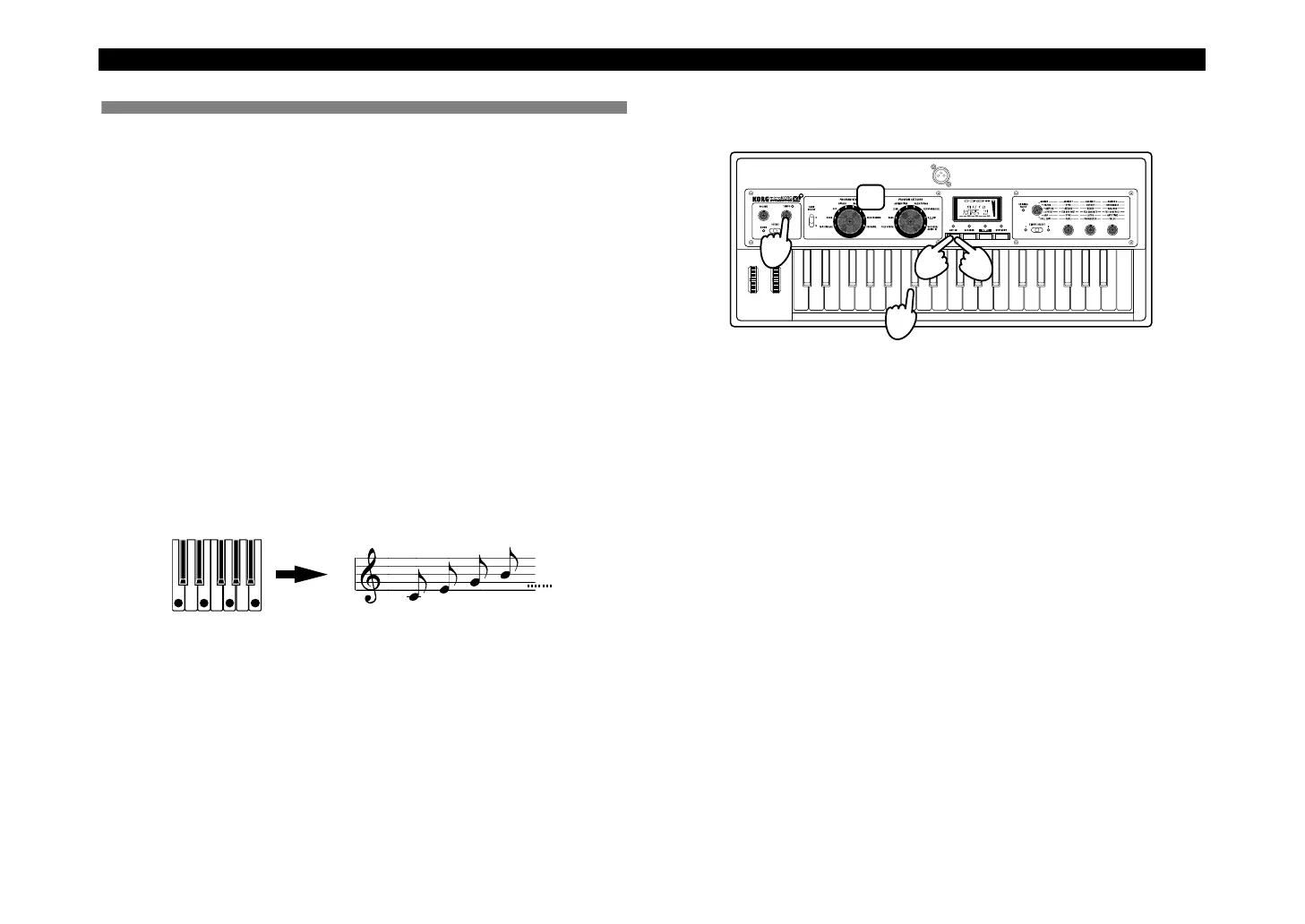
2. Press the [ARP ON] button to make the LED light, turning
the arpeggiator on.
3. Hold down a c
hord on the keyboard; an arpeggio will start
playing.
When you hold down a chord, it will be sounded as shown at the right.
(TYPE: UP)
4. Use the [TEMPO] knob to adjust the tempo.
5. T
o stop the arpeggio, press the [ARP ON] button (the LED
goes dark).
3
4
1
2 5


 To Next Page