4-3
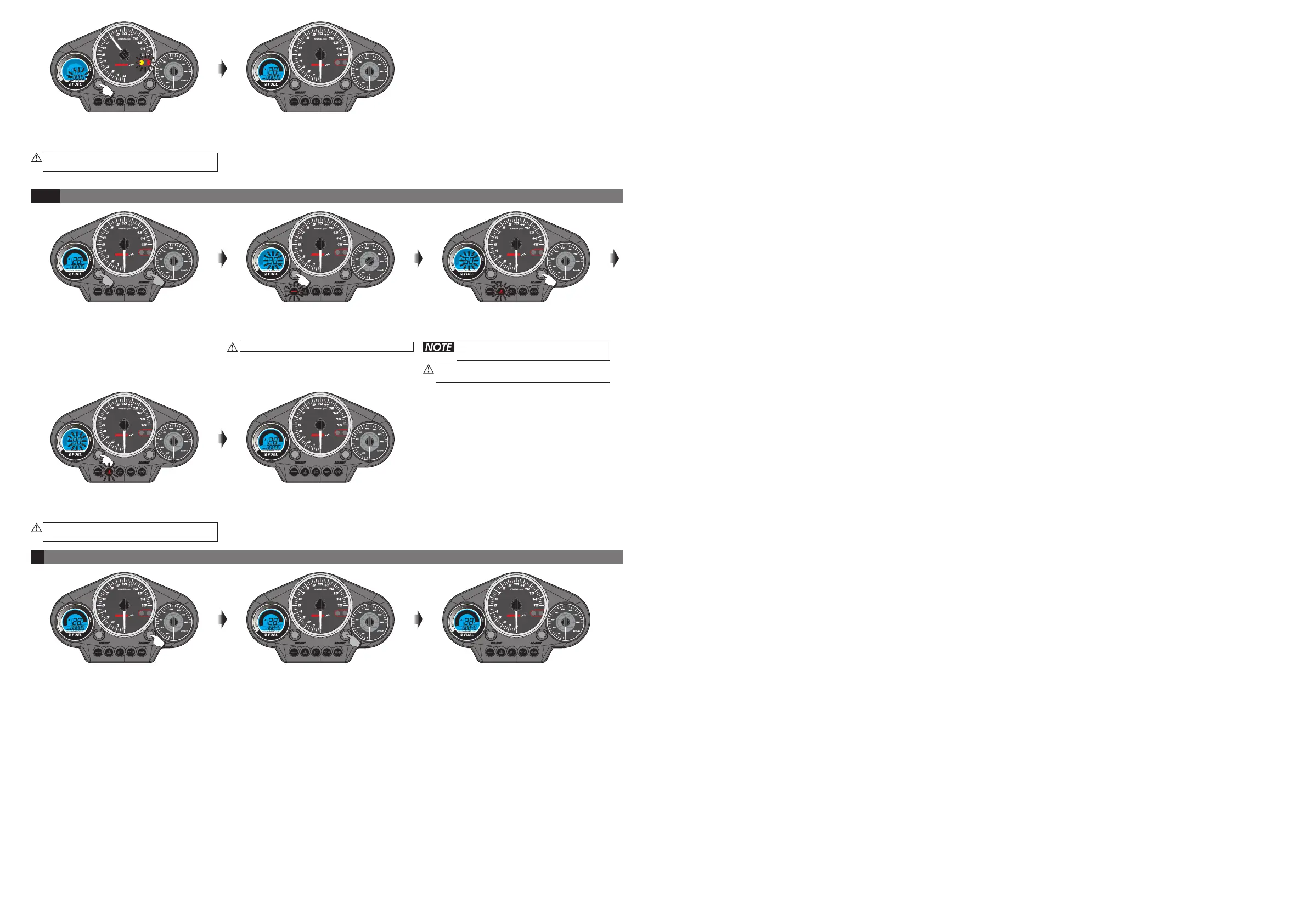
Temperature warning light setting instruction.
Now 30 & speed is flashing.
Now 60 (The number you want to set) &
warning light is flashing.temperature
Now 8000 (The number you want to set)
& tachometer warning light is flashing.
o
Setting range: 0~150 C.
o
Adjusting unit: 1 C
6
.
Press the button 2 times to
main screen.
EX. The setting is changed from 5000 RPM
to 8000 RPM.
SELECT back
the
5
Trip reset instruction
In main screen, press the button to
switch the odometer to trip meter.
ADJUST
Press down the button for 3 seconds,
and then the trip meter will be reset.
ADJUST
Now the trip meter is reset.
Now 90 (The number you want to set) &
warning light is flashing.temperature
press the button to back the main
screen.
oo
EX. The setting is changed from 60 C to 90 C.
SELECT
Now in setting screen. press the
button 2 times to enter the
warning light setting screen.
SELECT
temperature
Press the button to select the number
you want to set.
ADJUST
In main screen, press down the &
button for 3 seconds to enter the
speeding warning light setting screen.
SELECT
ADJUST
ODO<ADJUST>TRIP
X1000 rpm
ODO<ADJUST>TRIP
X1000 rpm
ODO<ADJUST>TRIP
X1000 rpm
ODO<ADJUST>TRIP
X1000 rpm
ODO<ADJUST>TRIP
X1000 rpm
ODO<ADJUST>TRIP
X1000 rpm
ODO<ADJUST>TRIP
X1000 rpm
ODO<ADJUST>TRIP ODO<ADJUST>TRIP
X1000 rpm X1000 rpm
ODO<ADJUST>TRIP
X1000 rpm
Main screen.
Main screen.
wh802ba001


 To Previous Page