Assign Digital Input
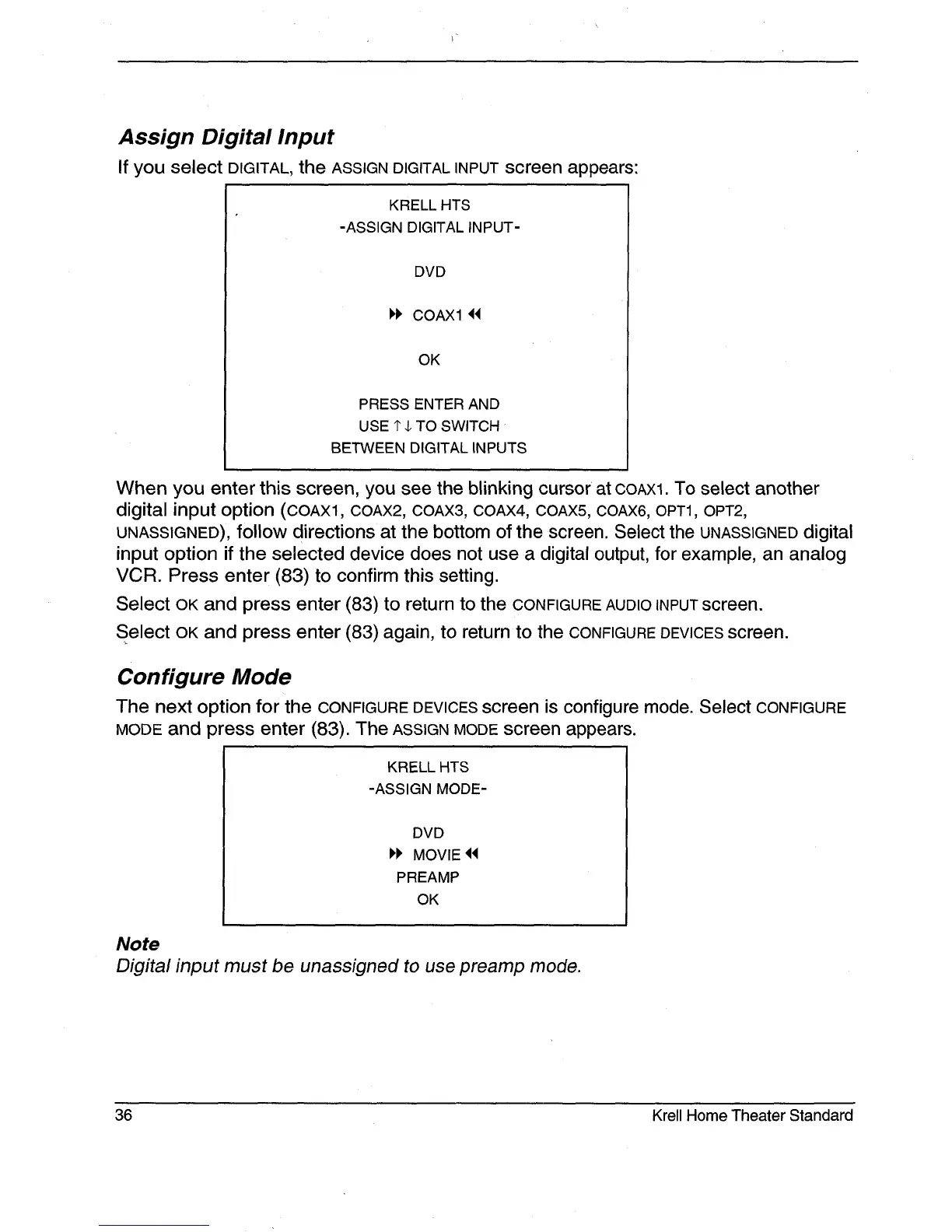
If you select DIGITAL, the ASSIGN DIGITAL INPUT screen appears:
KRELL HTS
-ASSIGN DIGITAL INPUT-
DVD
I,I, COAX1 ~
OK
PRESS ENTER AND
USE 1" $ TO SWITCH
BETWEEN DIGITAL INPUTS
When you enter this screen, you see the blinking cursor at COAX1. To select another
digital input option (COAX1, COAX2, COAX3, COAX4, COAX5, COAX6, OPT1, OPT2,
UNASSIGNED), follow directions at the bottom of the screen. Select the UNASSIGNED digital
input option if the selected device does not use a digital output, for example, an analog
VCR. Press enter (83) to confirm this setting.
Select OK and press enter (83) to return to the CONFIGURE AUDIO INPUT screen.
Select OK and press enter (83) again, to return to the CONFIGURE DEVICES screen.
Configure Mode
The next option for the CONFIGURE DEVICES screen is configure mode. Select CONFIGURE
MODE and press enter (83). The ASSIGN MODE screen appears.
KRELL HTS
-ASSIGN MODE-
DVD
MOVIE
PREAMP
OK
Note
Digital input must be unassigned to use preamp mode.
36 Krell Home Theater Standard







 To Next Page