4
Contact
Select your country from the region / language
selector to view your local KROHNE contact
details on:
www.krohne.com
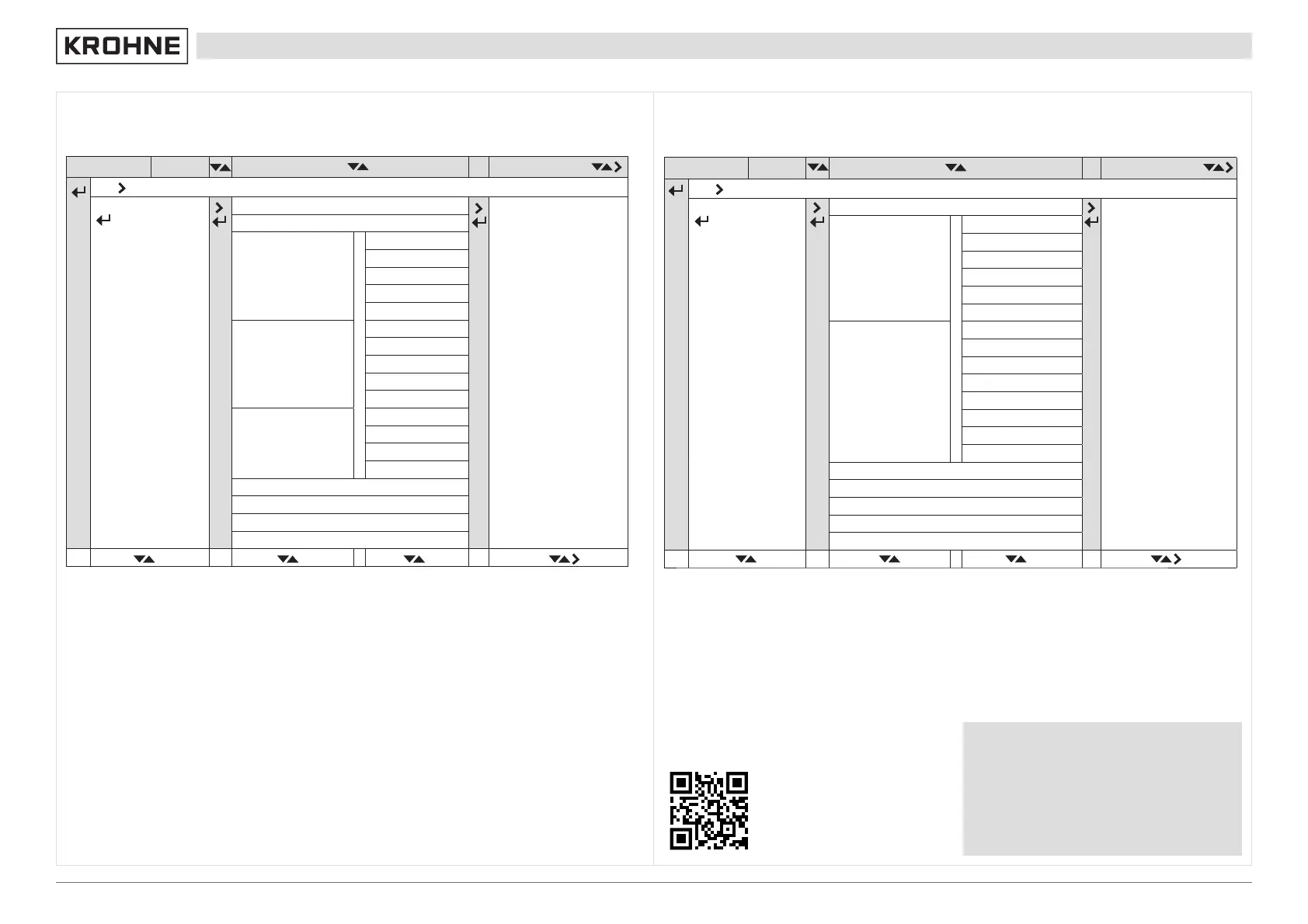
Quick setup menu
Measure mode Select Menu Select menu and/or submenu Select function & set data
Press for 2.5 s
A Quick Setup
A1 Language
A2 Tag
A3 Reset
A3.1 Reset Errors
A3.2 All Totalisers
A3.3 Totaliser 1
A3.4 Totaliser 2
A3.5 Totaliser 3
A4 Analogue Output
A4.1 Measurement
A4.2 Units
A4.3 Range
A4.4 Low Flow Cutoff
A4.5 Time Constant
A5 Digital Outputs
A5.1 Measurement
A5.2 Pulse Value Unit
A5.3 Value p. Pulse
A5.4 Low Flow Cutoff
A6 GDC IR Interface
A7 Flow Direction
A8 Zero Calibration
A9 Operation Mode
ER 1.0.x
Measure mode Select Menu Select menu and/or submenu Select function & set data
Press for 2.5 s
A Quick Setup
A1.0.0 Language
A2 Reset
A2.1.0 Reset Errors
A 2.2.0 Stop all Simulations
A 2.3.0 All Totalisers
A 2.4.0 Totaliser 1
A 2.5.0 Totaliser 2
A 2.6.0 Totaliser 3
A3 Confi guration
A 3.1.0 Tag
A 3.2.0 Measurement
A 3.3.0 Range
A 3.4.0 Alarm Code
A 3.5.0 Low Flow Cutoff
A 3.6.0 Damping
A 3.7.0 Terminals C Type
A 3.8.0 Flow Direction
A 4.0.0 Safety Mode
A 5.0.0 SIL Verifi cation
A 6.0.0 Unlock Device
A 7.0.0 Calibrate Zero
A 8.0.0 Operation Mode
ER 2.x.x
Download documents and software
Scan the code on the nameplate or scan the following
code and enter the serial number.
03/2022 - 4008115503 - QS-OPTIMASS 7400-R03-en




 To Previous Page