
 Need help?
Do you have a question about the Kronoterm KT-2A and is the answer not in the manual?
Explains symbols used to emphasize important information on mitigating risks.
Discusses potential harm from improper handling and need for safe practices.
Provides crucial safety instructions for appliance operation and maintenance.
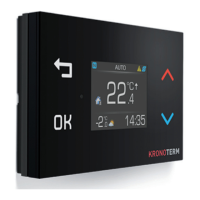
Describes the three operational modes of the KT-2A Controller: Thermostat, Controller, and combined mode.
Explains how to lock controller buttons to prevent unauthorized changes.
Details how to access and use the Quick View feature for system and weather information.
Explains the status line indicators in thermostat mode.
Guides on how to set the desired ambient temperature using the controller.
Explains settings for the heating loop's operational mode (ON, AUTO, OFF).
Describes how to activate or deactivate quick heating for Domestic Hot Water (DHW).
Details how to set the desired DHW temperature.
Explains how to adjust the display brightness.
Describes how the screen dims or stays illuminated in dark conditions.
Explains the icons and meanings for heat pump status indicators.
Details various heat pump operational modes like Heating, DHW, Cooling.
Describes states like ON, Passive cooling, Anti-freezing.
Indicates the status of additional heaters (external/internal).
Indicates if heating is active using biomass or solar cells.
Explains how to interpret error and warning codes.
Indicates an active signal from a PV power station.
Describes different combinations of heating, cooling, and DHW modes.
Indicates if the additional internal electric heater is on or backup heating is active.
Lists operational modes for heating loops like ECO, COMFORT, Screed-drying, Vacation.
Explains the Normal Regulator mode for maintaining set temperature.
Describes ECO mode's temperature adjustment relative to Normal mode.
Details COMFORT mode's temperature adjustment relative to Normal mode.
How to activate Holiday mode for vacation days.
Setting operational modes for heating, cooling, or DHW.
Activating or deactivating quick DHW heating.
Activating the anti-legionella heating function.
Controlling the pool heating loop operation.
Activating an additional heat source.
Turning the heat pump on or off.
Procedure for filling the heating system with water.
Displays supply and return pipe temperatures and system pressure.
Shows actual and calculated temperatures for the buffer tank.
Displays actual and calculated temperatures for Domestic Hot Water (DHW).
Shows temperature values for heating loop 1.
Shows temperature values for heating loop 2.
Shows temperature values for heating loop 3.
Shows temperature values for heating loop 4.
Displays actual temperature for the pool.
Shows actual temperature of an alternative heat source.
Indicates the status of WEB and Link connections.
Describes errors that shut down the whole system.
Explains warnings indicating light operational disturbances.
Details informational events during appliance operation.
Indicates when a warning or error has been fixed.
Setting the operational mode for the buffer tank.
Adjusting buffer tank temperature for ECO mode.
Adjusting buffer tank temperature for COMFORT mode.
Setting a weekly operational schedule for the buffer tank.
Setting weather mode at -15°C for heating curve calculation.
Setting weather mode at +15°C for heating curve calculation.
Setting operational modes for heating loops.
Setting the desired ambient temperature for heating loops.
Adjusting ambient temperature for ECO mode in heating loops.
Adjusting ambient temperature for COMFORT mode in heating loops.
Setting a weekly operational schedule for heating loops.
Setting weather mode at -15°C for heating curve calculation.
Setting weather mode at +15°C for heating curve calculation.
Setting operational modes for heating loops without thermostats.
Adjusting loop temperature for ECO mode.
Adjusting loop temperature for COMFORT mode.
Setting a weekly operational schedule for heating loops.
Setting weather mode at -15°C for heating curve calculation.
Setting weather mode at +15°C for heating curve calculation.
Setting the operational mode for the pool heating loop.
Setting the desired water temperature for the pool.
Adjusting pool temperature for ECO mode.
Adjusting pool temperature for COMFORT mode.
Setting a weekly operational schedule for the pool.
Setting the operational mode for DHW heating.
Setting the desired water temperature for DHW.
Adjusting DHW temperature for ECO mode.
Adjusting DHW temperature for COMFORT mode.
Setting a weekly operational schedule for DHW.
Setting a weekly schedule for circulating DHW.
Setting parameters for anti-legionella heating.
Adjusting the temperature offset for the system.
Setting general operating modes for heating loops.
Configuring automatic switching between heating and cooling modes.
Information about the screed-drying program.
Setting or monitoring the heating system pressure.
Configuring adaptive regulation for loop 1.
Configuring adaptive regulation for loop 2.
Configuring adaptive regulation for loop 3.
Configuring adaptive regulation for loop 4.
Setting the current hour on the regulator.
Setting the current date on the regulator.
Adjusting the regulator's display brightness.
Configuring the regulator's display for night-time.
Generating a registration code for Cloud.Kronoterm.
Configuring network parameters for the regulator.
Accessing regulator information and status.
Accessing the service menu, restricted to authorized persons.
Enabling or disabling DHCP for automatic IP address assignment.
Manually setting the IP address for the device.
Setting the network subnet mask.
Configuring the default gateway address.
Setting the primary DNS server address.
Setting the secondary DNS server address.
Displays information about the KT-2A regulator.
Displays information about the KSM module.
Displays information about the WEB module.
Shows operating hours and counters for the system.
Setting the heating water temperature based on -15°C ambient temperature.
Setting the heating water temperature based on +15°C ambient temperature.
Explains operational modes for heating, cooling, DHW, and pool.
Guide to setting daily temperature transitions and operational modes.
Describes the built-in electric heater for backup or fault conditions.
Describes external heaters used for additional heat generation.
Explains how faults, warnings, and notifications are displayed as codes.
Details the diagnostic menu for recording and displaying events.
Lists specific notification codes and their meanings.
Provides a list of warning codes and their descriptions.
 General
| Brand | Kronoterm |
|---|---|
| Model | KT-2A |
| Category | Controller |
| Language | English |

 To Next Page