The KRUUSE PS250 Platform Scale is a self-contained, portable weighing device designed for various applications. It features a robust platform and a remote display for convenient operation.
Function Description
The primary function of the PS250 is to accurately measure the weight of objects placed on its platform. It operates by detecting the force exerted by an object and converting it into a digital weight reading displayed on the remote indicator head. The scale is capable of performing several weighing-related tasks, including:
- Basic Weighing: Providing a direct weight measurement of an object.
- Tare Function: Allowing the user to zero out the weight of a container or an initial object, so that only the weight of subsequently added items is measured. This is particularly useful for measuring ingredients or components within a larger container.
- Unit Conversion: Switching between different weighing units such as kilograms (kg), pounds (lb), and ounces (oz), providing flexibility for various measurement standards.
- Hold Function: Retaining the average weight display, which can be useful for unstable loads or when the user needs to record a reading after removing the object.
- Automatic Power-off: An energy-saving feature that automatically turns off the scale after a period of inactivity, with configurable settings for its operation (ON/OFF).
- Backlight Control: Adjusting the display's backlight intensity across multiple levels (1-3), with level 1 indicating the backlight is off, level 2 meaning it's always on, and level 3 for automatic activation when an object is on the scale.
- Weighing Unit Shield: This function allows the user to enable or disable specific weighing units (kg, lb, oz, lboz) for use during weighing, ensuring that only desired units are available.
- Mailing Address (Multi-machine Communication): Enables the selection of an address for multi-machine communication, allowing the scale to interact with other devices.
- BaudRate Function: Configures the BaudRate for communication, offering different modes (9600/4800/2400) to ensure compatibility with various host systems or serial printers.
- Even-Odd Check Function: Selects the Even-Odd Check function for data verification during communication.
- Transportation Function: Used in conjunction with the "Hold" function for data transfer to a host computer or serial printer.
- Voltage Testing: The scale periodically tests its battery voltage, displaying a warning ("LbAt") when the battery power is insufficient and automatically powering off if the voltage drops too low.
- User Fast Calibration Mode: Provides a method for quick calibration of the scale using a known counterweight, ensuring accuracy.
Usage Features
The PS250 is designed for ease of use and versatility in various environments.
- Portable Design: Being a self-contained unit with a remote display, it offers flexibility in placement and operation. The platform is constructed of mild steel, and a stainless steel version is also available for specific needs.
- Adjustable Feet: The platform is equipped with four adjustable feet, allowing for proper leveling on uneven surfaces, which is crucial for accurate weighing.
- Non-slip Mat: A non-slip mat is provided for the platform, enhancing safety and stability when placing objects on the scale.
- Remote Display: The indicator head is separate from the platform and can be desk or wall-mounted using the supplied bracket and fixings, providing optimal viewing angles and operational convenience.
- Intuitive Key Functions: The display features clearly labeled buttons for essential operations:
- [TARE/ZERO]: Switches the scale on or off, returns the scale to zero if the object's weight is less than 4% of its capacity, or reduces the tare if the weight is more than 4%.
- [UNIT]: Selects different weighing units (kg, lb, oz, lboz).
- [PRINT/HOLD]: Retains the average weight display and is used for saving changes in user mode.
- [ON/OFF]: Switches the scale on or off.
- Battery Operation with Rechargeable Batteries: The indicator head contains six 1.2V metal hydride rechargeable batteries, providing approximately 18 hours of continuous use on a full charge. A low battery indicator ("Lo") alerts the user when recharging is needed.
- AC Adaptor: An AC re-charger adapter is included, with various conversion connectors (2 pin European, 3 pin UK, 2 pin USA, 2 pin Australia) to suit different power outlets.
- Self-Test Function: Upon power-on, the scale performs a self-test, displaying "dIC-1" and cycling through "99999" to "00000" before showing the working voltage and entering weighing mode.
- User Mode for Customization: By pressing [TARE/ZERO] and [ON/OFF] simultaneously, users can access a "User mode" to configure various settings like automatic power-off, backlight, weighing unit shield, mailing address, BaudRate, Even-Odd check, transportation, and hold functions.
- Overload Indication: The display shows "OL" if the scale is overloaded, prompting the user to remove objects and restart the scale.
Maintenance Features
The PS250 is designed with straightforward maintenance in mind to ensure longevity and proper function.
- Cleaning: The exterior of the scale can be wiped down with a clean cloth moistened with water containing a small amount of washing-up liquid or disinfectant. It is crucial to avoid harsh abrasives, solvents, scouring cleaners, alkaline cleaning solutions, and especially not to wipe the inside of the machine or display windows with such substances.
- Power Supply Safety:
- Always connect the AC adaptor to the indicator head before connecting to the mains power supply.
- Disconnect from the mains power supply before disconnecting the adaptor from the indicator head.
- Pluggable equipment must be installed near an easily accessible socket outlet.
- Permanently connected equipment requires a readily accessible disconnect device in the fixed wiring.
- For outdoor or damp conditions, equipment should be supplied from a correctly fused source and protected by an approved RCD.
- The mains lead must be connected to a supply outlet with a protective earth contact, and the electrical supply must provide appropriate overcurrent protection.
- In case of doubt, advice from a qualified electrician should be sought.
- Electrical Safety: To prevent electric shock or damage, always switch off the machine and isolate it from the power supply before performing any routine maintenance.
- Battery Recharging: The internal rechargeable batteries are easily recharged by inserting the AC re-charger adapter into the socket on the indicator head. Recharging takes approximately 4 hours.
- Calibration: The user fast calibration mode allows for recalibration using a counterweight. It is important to note that the deviation between the technical calibration value and the weighing calibration value should not exceed ±20%; otherwise, the calibration will fail, and the display will show "CALEr".
- Overload Prevention: Users are warned not to overload the machine and to take care not to exceed its weighing capacity, as this can damage the scale.

 Need help?
 General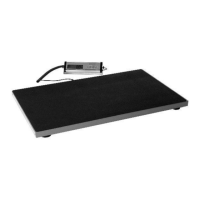

 To Next Page