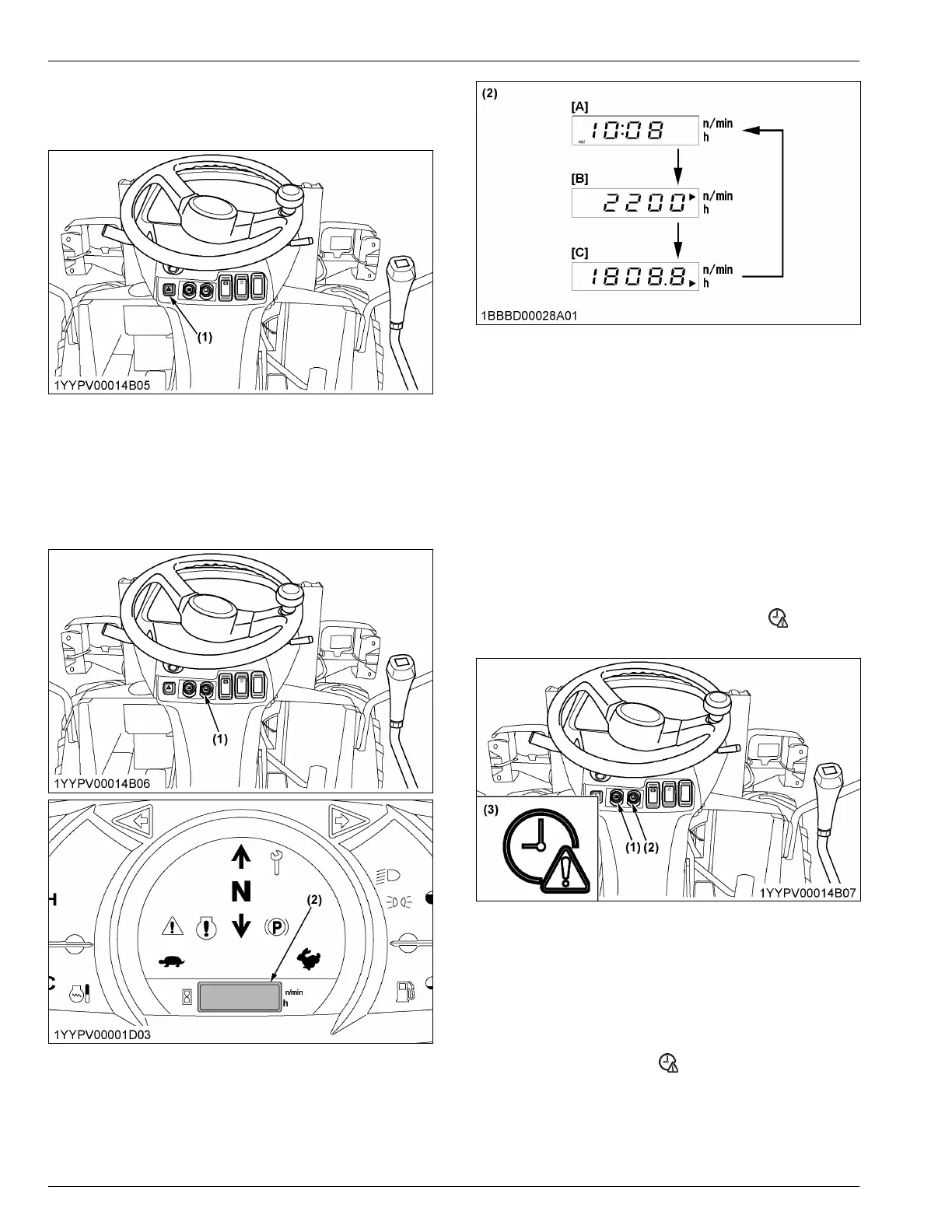
7. Hazard lamp switch
Press
the hazard-lamp-switch for the hazard lamps to
blink.
(1) Hazard lamp switch
8. Display selector switch
When pressing the display-selector-switch, the LCD of
the electronic meter will change from one indication
mode to the other.
Change the 3-mode display according to your jobs.
(1) Display selector switch
(2)
LCD
[A] Clock
[B] Tachometer
[C] Hour meter
NOTE :
• W
ith the starter key at the [STOP] position,
press the display-selector-switch of the
electronic meter, and the LCD shows the hour
meter for 15 seconds.
8.1 Setting the clock
1. Press the user-setting-switch.
2. Select
the clock-setting-mode by pressing the
display-selector-switch.
The clock-setting-request-indicator
on the
instrument panel lights up.
(1) User setting switch
(2)
Display selector switch
(3) Clock setting request indica-
tor
NOTE :
• Press
the display-selector-switch for a long
time and the year, month, day, hour, and
minute will be selected in this order.
• While setting the clock, the clock-setting-
request-indicator
on
the instrument panel
is blinking.
CHECKS BEFORE STARTING THE MACHINE
CHECKS FOR THE SWITCHES


 To Next Page